S
ETTING
U
P
Y
OUR
P
RINTER
2.9
2
Connecting a Printer Cable
To print from your computer, you need to connect your printer
to your computer with a Universal Serial Bus (USB) cable.
Using a USB Cable
Note: Connecting the printer to the USB port of the computer
requires a certified USB cable. You will need to buy a USB 1.1
compliant cable that is within 3m in length.
1
Make sure that both the printer and the computer are
turned off.
2
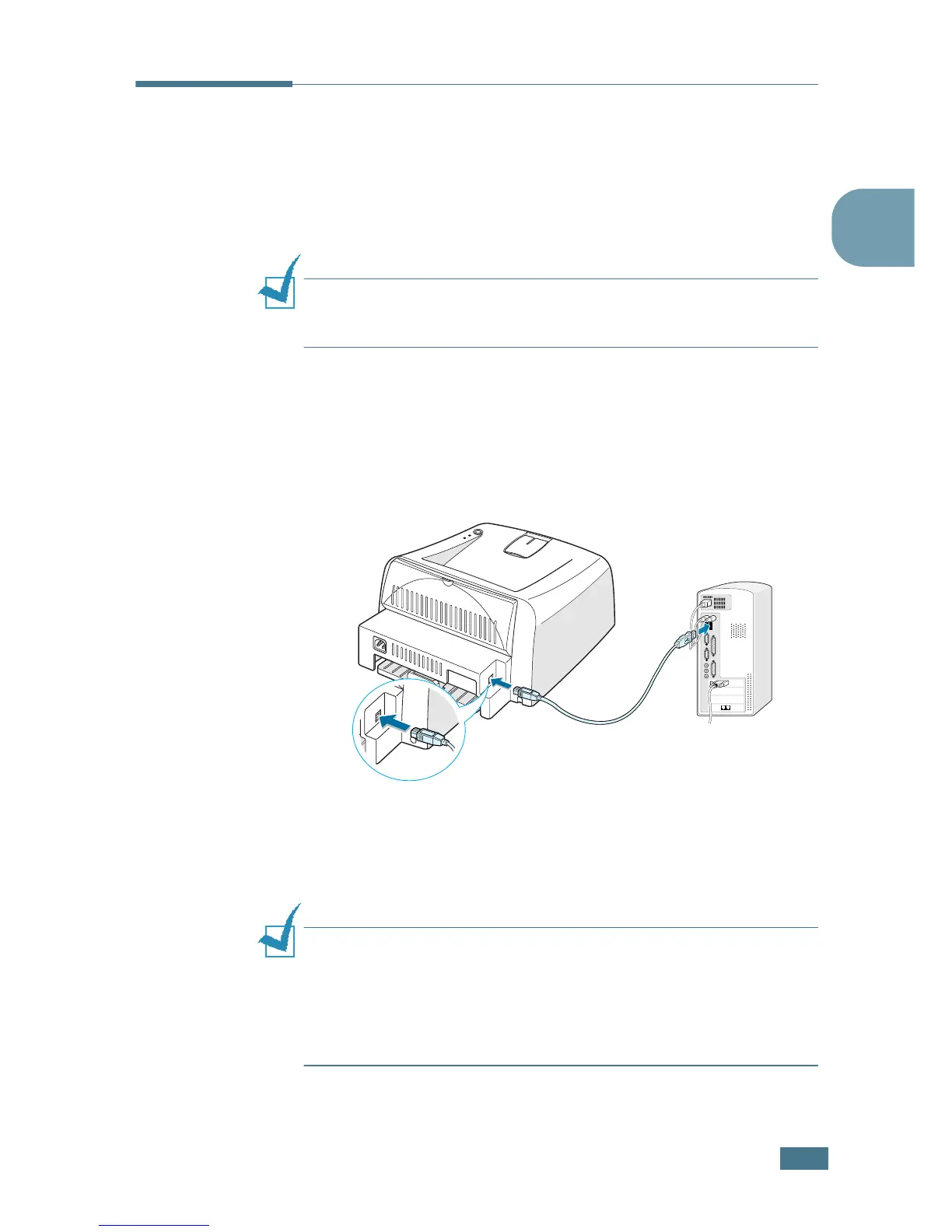
Plug the USB printer cable into the connector on the back of
the printer.
3
Connect the other end of the cable to the USB port on your
computer.
See your computer User’s Guide if you need help.
Notes:
• For using a USB cable, you must be running Windows 98/Me/
2000/XP, or Macintosh with OS 8.6 and the G3 processor or
higher.
• In Windows 98/Me, you must install the USB driver to add the
USB port. See page 2.15.
To the USB port on
your computer


 To Next Page