In order to play back video CD, make sure that your unit is connected
to your TV set.
This unit is designed for playback of video CD, version 1.1 and 2.0. Only
with version 2.0, it is possible to call up the on screen menu function. This
unit will not play back any other video CD other than 1.1 and 2.0 versions.
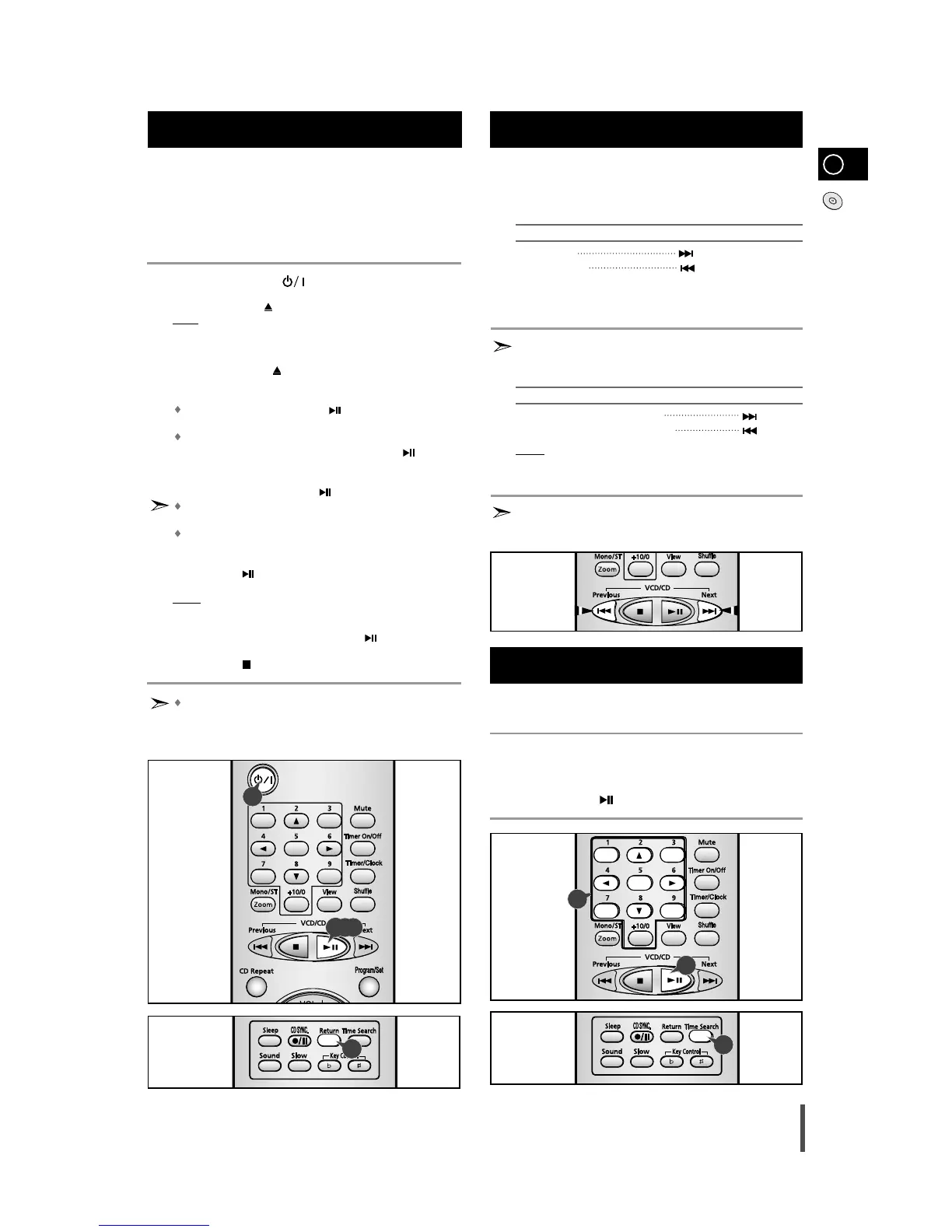
Turn on the Standby/On ( ) switch and set the VCD mode.
Press the Open/Close ( ) button on the unit to open the CD compartment.
Result: “OPEN” is displayed and the
CD compartment opens.
Load a video-CD with the label facing upwards in the
compartment
.
Press the Open/Close ( ) button again to close the CD
compartment
.
To playback:
In version 1.1, press the VCD/CD
()
button for direct access to
the film, as there is no menu-on-screen.
In version 2.0, load a video CD, “Video CD 2.0”, and “MENU ON”
are displayed on the TV screen. Press the VCD/CD
()
button
and the menu is displayed on the TV screen.
Select a number from the menu using Digit buttons on the remote
control and press the VCD/CD
()
button.
To return to the previous menu in the version 2.0, press the Return
button on the remote control.
When playing a video-CD version 2.0, reading time on the
display may take longer, depending on the disc’s contents.
Press VCD/CD
()
button on the remote control to receive a still
picture.
Result: Pause is displayed, a still picture appears and the sound is
muted.
To return to normal playback, press VCD/CD
()
button.
Press the Stop ( ) button to stop playback.
Please make sure that the Video-CD to be played is not flawed
optically, as this may cause a distorted sound or the unit to
malfunction.
GB
15
Video CD Player Playback
1
2
3
4
5
6
7
8
You can find a certain passage faster during playback.
This function is possible in CD or VCD Ver 1.1 or Ver 2.0 menu off
mode.
To... Press and hold down...
Scan forwards
Scan backwards
Release the Skip/Search buttons when the desired passage has
been found.
In the video CD version 1.1, where the disc’s contents are over 15
minutes long, you can scan up or down by intervals of five minutes.
To... Press...
Scan forwards by 5 minute intervals
Scan backwards by 5 minute intervals
Result:
The picture is still, and the disc’s contents are forwarded or
reversed by 5 minute intervals. Playback then resumes from
this new position.
In the Skip/Search or Scan mode, the sound can only be partially
heard and the picture scenes will change sporadically, until the
required passage has been found.
Search Functions
1
2
3
Please use this function for reproducing a desired track in a certain
time of playback.
Press the Time Search button.
Set a desired time by pressing the Digit buttons.
Press the VCD/CD ( ) button.
Time Search Function
(This function is available only during the playback of a CD/VCD)
1
2
3
3
1
1
5,6,7
2
5



 To Next Page