GB
18
You can store up to:
15 FM stations
15 AM(MW) stations
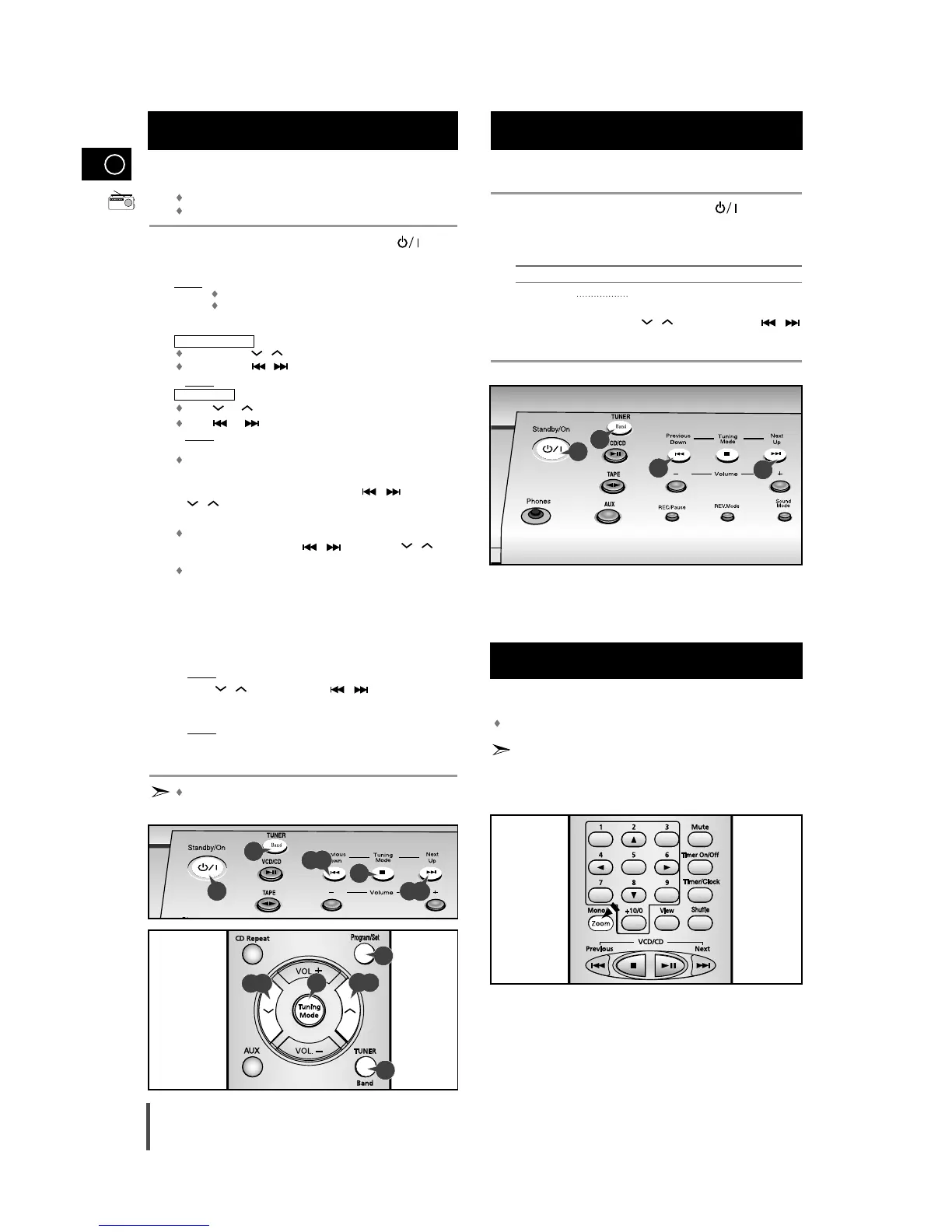
Switch the system on by pressing Standby/On ( ) .
Select the required frequency band by pressing TUNER (Band)
again on the front panel.
Result: The appropriate indication is displayed:
FM Frequency Modulation
AM(MW) Medium Wave
Press Tuning Mode one or more times until MANUAL is displayed.
Automatic tuning
Press and hold , on the remote control.
Press and hold , on the main unit.
Result:
Automatically scans and tunes to the next available station.
Manual tuning
Press or on the remote control.
Press or on the main unit.
Result
: Press the button repeatedly to tune in the desired station
manually.
PRESET function is explained in detail in the section “Selecting a
Stored Station” on.
Select the station to be stored by pressing ,
(main unit)
or , (remote control) buttons to increase or decrease the
frequency respectively.
To scroll through the frequencies faster when searching
manually, hold down the ,
(main unit)
or ,
(remote control) buttons.
The automatic search procedure may stop on a frequency
that does not correspond to a radio station.
If this happens, use the manual search mode.
If you do not want to store the radio station found, revert to Step 4
and search for another station.
Otherwise:
a Press Program/Set.
Result:
The PROGRAM is displayed for a few seconds.
b Press , (remote control) or ,
(main unit)
to assign
a program number between 1 and 15.
c Press Program/Set to store the radio station.
Result:
PROGRAM is no longer displayed and the station is
stored.
To store any other radio frequencies required, repeat Steps 3 to 5.
The PROGRAM function can be used to assign a new station
to an existing program number.
You can improve the quality of radio reception by:
Rotating the FM or AM(MW) aerial
If reception from a specific FM radio station is poor, press Mono/ST.
to switch from stereo mode to mono. The quality of the sound will be
improved.
You can listen to a stored radio station as follows:
Switch the system on by pressing Standby/On ( ) .
Select the required frequency band by pressing TUNER(Band) .
Select the radio station as follows.
To listen to ... Press ...
Stored station 1.
the Tuning Mode button until “PRESET”
is displayed.
2. ,
(remote control) or
,
(main unit)
to select the required
program.
Selecting a Stored Station
1
2
3
Improving Radio Reception
1
2
3
1
2
3
4
5
6
Searching for and Storing the Radio
Stations
5
4
3
5
4
2
1
5
4
5
4
2
3
5
3



 To Next Page