12 _Introduction
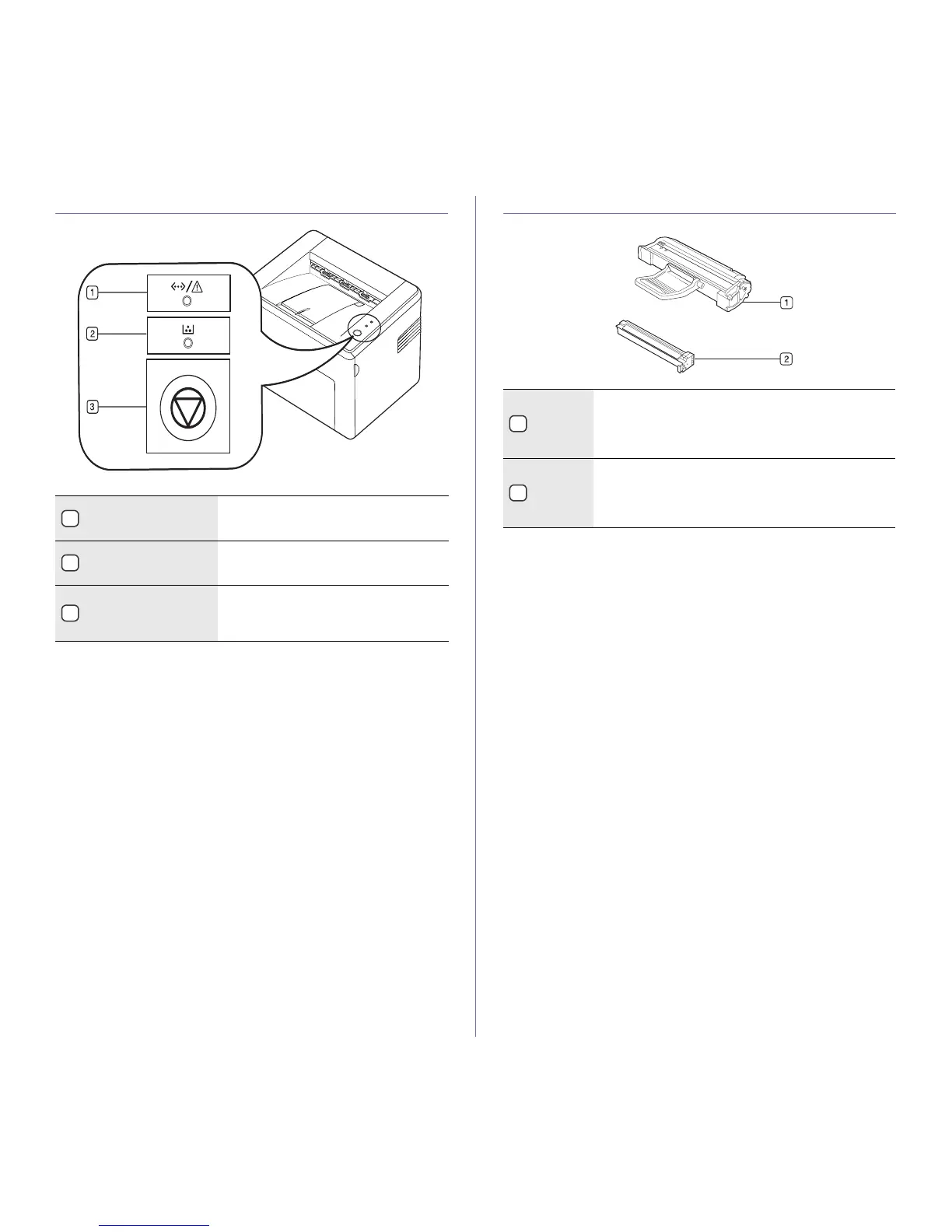
CONTROL PANEL OVERVIEW PRINTING CARTRIDGE OVERVIEW
1
On-Line/Error LED
Shows the status of your machine. (See
"Understanding the control panel" on
page 13 for more information.)
2
Toner LED Shows the status of the toner cartridge.
(See "Understanding the control panel" on
page 13 for more information.)
3
Cancel Stops an operation at any time and there
are more functions. (See "Understanding
the control panel" on page 13 for more
information.)
1
Imaging
unit
An unit containing a OPC drum which makes virtual
image for print.
When the imaging unit is worned out, replace the
imaging unit. “See "Replacing the imaging unit" on
page 30
2
Toner
cartridge
An unit containing toner powder.
When the toner cartridge has almost reached its
estimated cartridge life, you can separate the toner
cartridge from the printing cartridge to replace it. “See
"Replacing the toner cartridge" on page 28”







 To Next Page