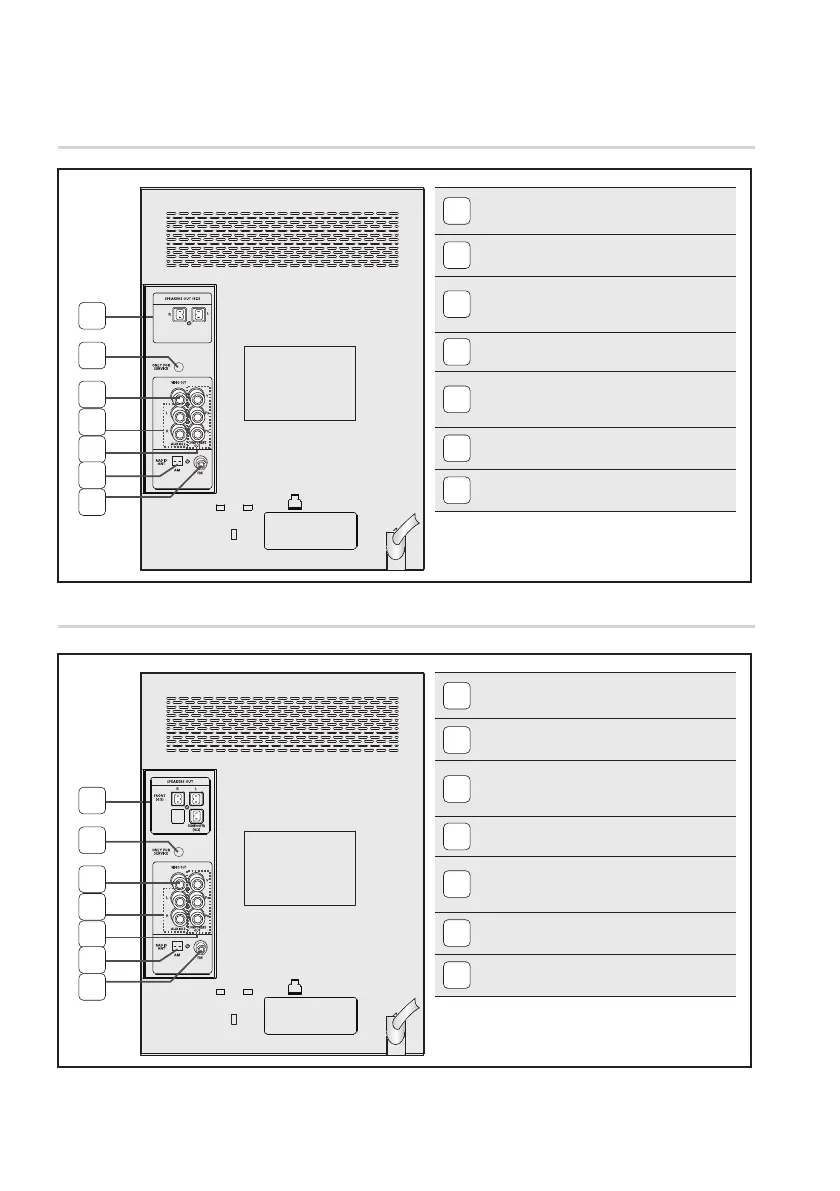
All those pictures of the Rear panel are based on MODEL: MX-D730D. ✎
Rear Panel (MX-D730D)
Rear Panel (MX-D750D)
1
1
2
2
3
3
4
4
5
5
6
6
7
7
1
2.0 CH SPEAKER CONNECTOR TERMINALS
Connect the front speakers
.
2
ONLY FOR SERVICE
This jack is just for testing, please don't use it.
3
VIDEO OUT JACK
Connect your TV's Video Input jack (VIDEO IN) to the
VIDEO OUT jack.
4
AUX IN JACK
Connecting an External Component.
5
COMPONENT VIDEO OUTPUT JACKS
Connect a TV with Component video inputs to these
jacks.
6
AM ANTENNA JACK (Optional)
Connect the AM antenna.
7
FM ANTENNA JACK
Connect the FM antenna.
1
2.1 CH SPEAKER CONNECTOR TERMINALS
Connect the front speakers
.
2
ONLY FOR SERVICE
This jack is just for testing, please don't use it.
3
VIDEO OUT JACK
Connect your TV's Video Input jack (VIDEO IN) to the
VIDEO OUT jack.
4
AUX IN JACK
Connecting an External Component.
5
COMPONENT VIDEO OUTPUT JACKS
Connect a TV with Component video inputs to these
jacks.
6
AM ANTENNA JACK (Optional)
Connect the AM antenna.
7
FM ANTENNA JACK
Connect the FM antenna.
This product may not support the AM function
✎
depending on your region.
This product may not support the AM function
✎
depending on your region.


 To Next Page