Connecting External Components
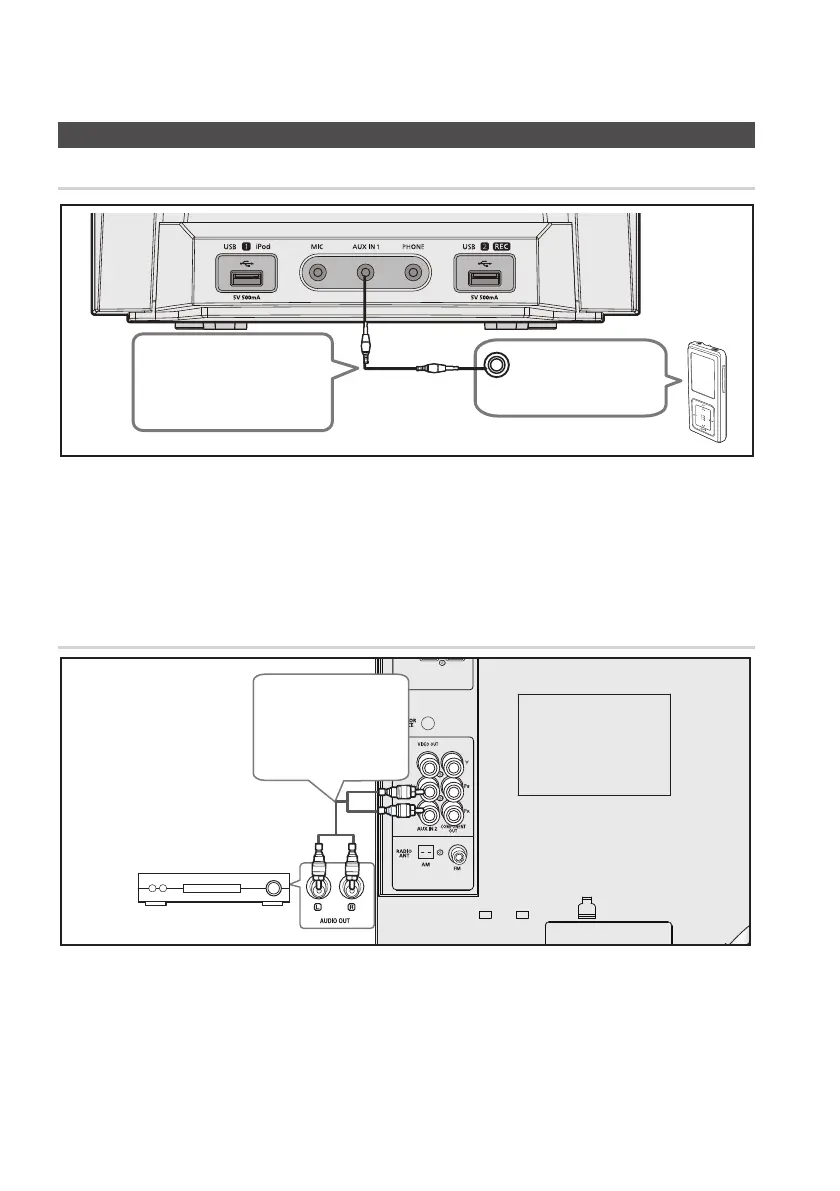
AUX IN 1: Connecting an External Component/MP3 player
Components such as an MP3 Player.
Connect 1. AUX IN 1 (Audio) on the front of the product to the Audio Out of the external component/ MP3
player.
Press the 2. AUX button to select AUX 1 input.
You can select AUX 1 by pressing the FUNCTION button on the remote control
Audio Cable
(not supplied)
AUDIO OUT
AUX IN 2: Connecting an External Analog Component
Analog signal components such as a VCR.
Connect AUX IN 2 (Audio) on the MINI COMPACT rear panel to the Audio Out of the external analog 1.
component.
Be sure to match connector colors.
`
Press the 2. AUX button to select AUX 2 input.
You can select AUX 2 by pressing the FUNCTION button on the remote control.
Audio Cable
(not supplied)
If the external analog
component has only
one Audio Out, connect
either left or right.


 To Next Page