Connecting Headphones
You can connect a set of headphones to your mini-
compact system so that you can listen to music or
radio programme without disturbing other people in
the room. The headphones must have a 3.5ø jack or
an appropriate adapter.
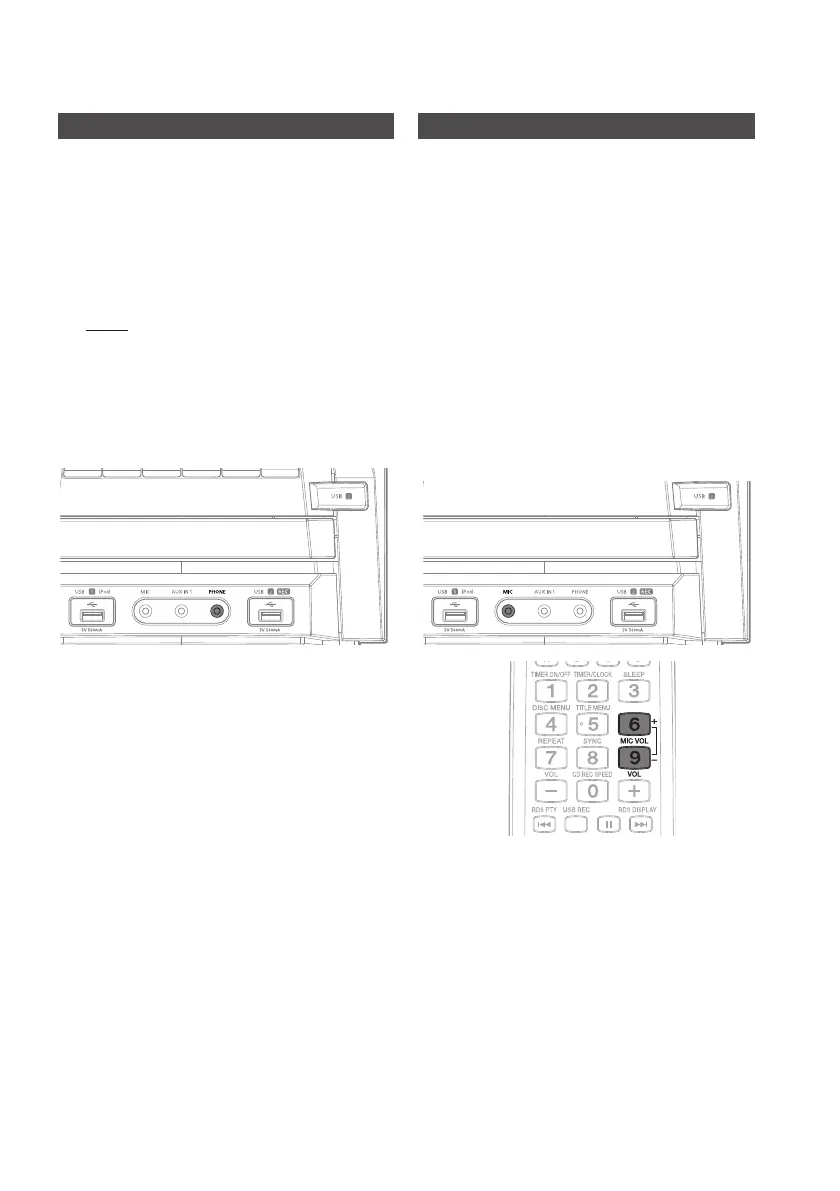
Connect the headphones to the 1. PHONE jack
on the main unit.
Result: The speakers are no longer used to output the
sound.
Prolonged use of headphones at a high volume may
`
damage your hearing.
If you use the headphones, GIGA SOUND will
`
automatically turn off. Even if you remove the
headphones, it will not turn on.
nnecting
Connecting the Microphone
You can also connect a microphone to sing along
with your favorite CDs.
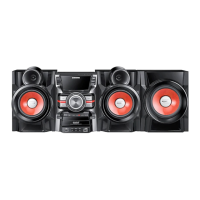
Plug a microphone with a 3.5ø MIC jack into the 1.
MIC terminal.
Press and hold the
`
MIC VOL +,- button on the
remote control to adjust the Microphone Volume.
NOTE ✎
If you use the Microphone, GIGA SOUND will `
automatically turn off. Even if you remove the
Microphone, it will not turn on.
If you hear strange noises (squealing or howling) while
`
using the microphone, turning the Volume Knob on
the main unit or the speaker volume is also effective.
This Microphone function is available only when using
`
the DVD/CD or USB function.


 To Next Page