3. Overview of the control panel
SAMSUNG ELECTRONICS CO., LTD 5
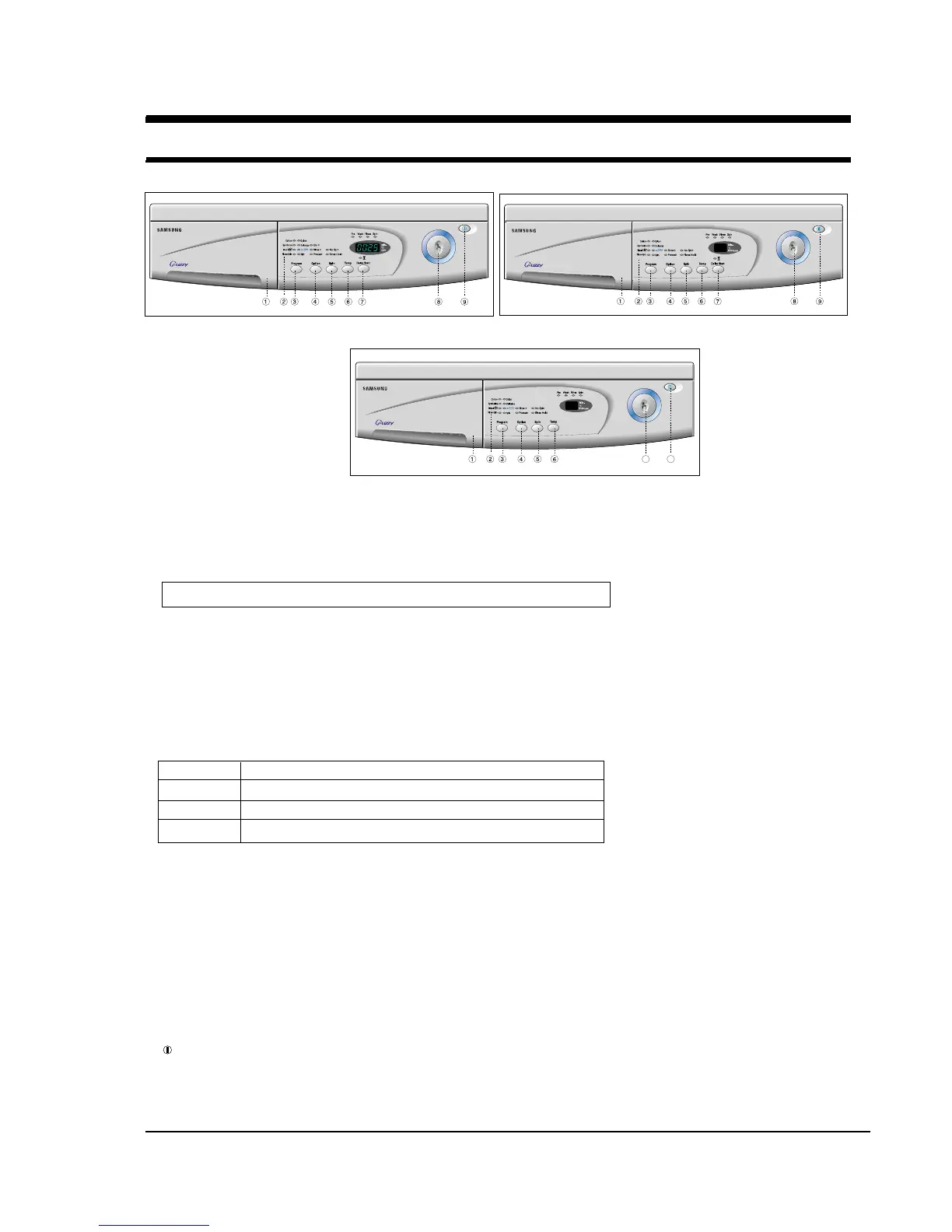
1. Detergent dispenser
2. Display panel
Displays the remaining wash cycle time and error messages.
3. Program button
Press the button to select one of the eight available wash programs.
4. Option Button
Press the button repeatedly to cycle through the available partial wash options
P1401/P1201 : Eco
+
➔Rinse
+
➔Prewash➔(Eco
+
+Rinse
+
) ➔(Rinse
+
+Prewash)➔Cancel➔Eco
+
P1001/P801 : Rinse
+
➔Prewash➔(Rinse
+
+Prewash)➔Cancel
Note : Prewash is available only with Cotton, Colour, Synthetic or Delicate programs.
5. Spin selection button
Press the button repeatedly to cycle through the available spin speed options.
When pressing this button during operation, you can see the selected spin
speed in the display panel.
6. Temperature selection button
Press the button repeatedly to cycle through the available water temperature options (cold water, 30 ˚C, 40 ˚C , 60 ˚C
and 95 ˚C).
When pressing this button during washing, you can see the selected temperature in the display panel.
7. Delay Start button
Press the button repeatedly to cycle through the available delayed start options
(from 1 hour to 24 hours in one hour increments).
8. Start/Pause button
Press to pause and restart programs.
9. (On/Off) button
Press once to turn the washing machine on, press again to turn the washing machine off. If the washing machine
power is left on for longer than 10 minutes without any buttons being touched, the power automatically turns off.
P1001
P801
P1401/P1201
P1401 no, rh, 400, 600, 800, 1000, 1200, 1400 rpm
P1201 no, rh, 400, 600, 800, 1000, 1200 rpm
P1001 no, rh, 400, 600, 800, 1000 rpm
P801 no, rh, 400, 600, 800 rpm
Cotton, Colour, Synthetic, Delicate, Wool, Quick, Rinse+Spin, Spin
no:no spin,
rh:rinse hold


 To Next Page