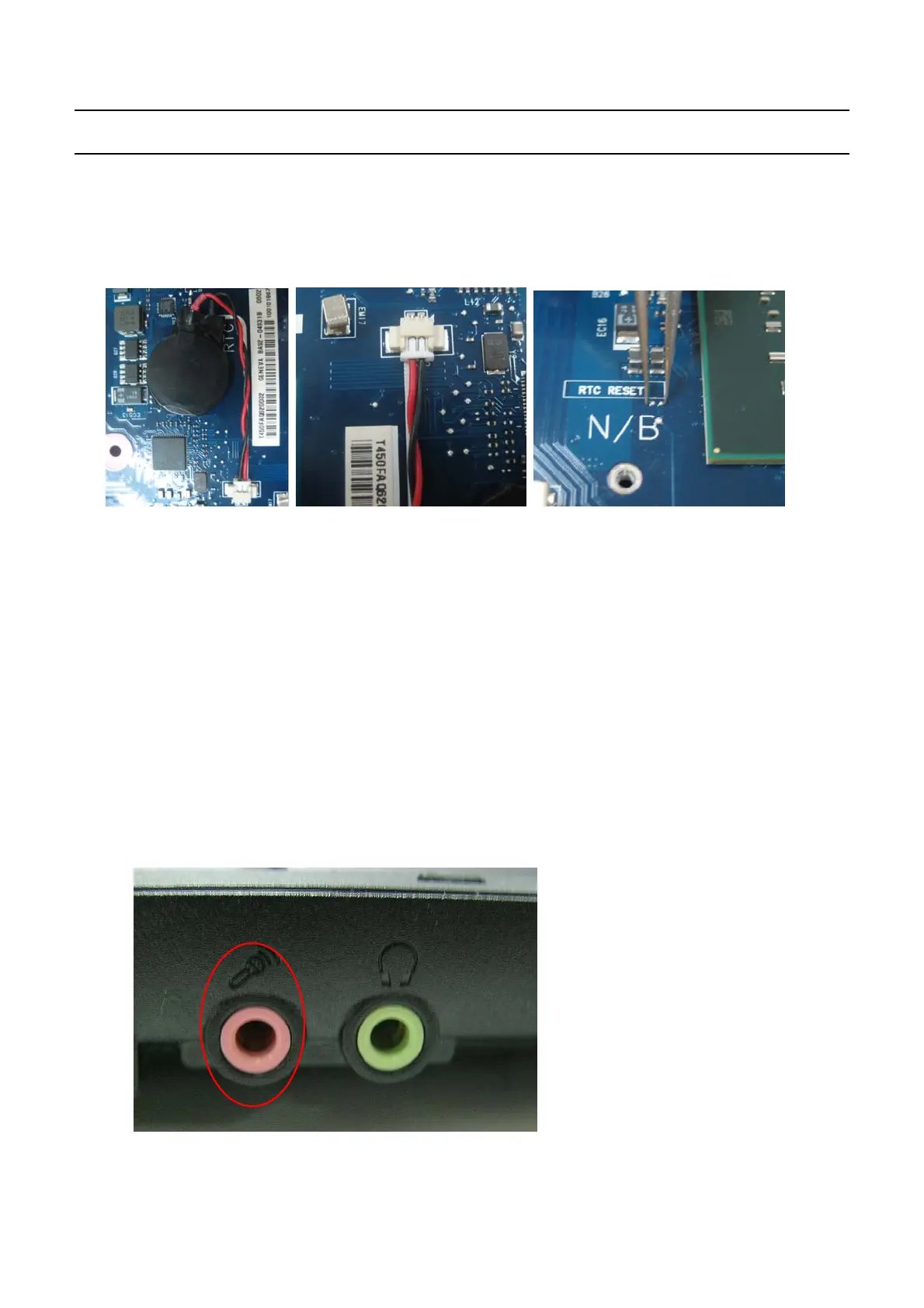
4-16
→
Reset the RTC Reset terminal next to the ICH9M.
Remove RTC cabel from RTC connector
Connect the two pad of the cap for
a
while
→
Replace the main board.
7.
The Express card is not inserted or the Eject button does not work
.
→
This may occur when the insulator within the Express card
s
lot is enwrapped
.
→
Replace the Express card
s
lot frame and check if it is out of order
.
8.
There is no sound from the
s
peaker.
(
Insert the figure of the audio jacks so that the reader can check via the figure.)
→
Check if the earphones or headphones are connected to the MIC jack of if there are any alien
substances in the jack
.
→
Check if the sound is muted after booting up Windows
.
→
Check the connection status of the speaker cable and check if the speaker is out of order
.
→
Check if there is
a
magnetic object near the speaker
.
-
This Document can not be used without Samsung's authorization
-
4.
Troubleshooting


 To Next Page