EasyManua.ls Logo

Samsung RS554NRUA Series - User Manual

Samsung RS554NRUA Series
27 pages
Print Icon
To Next Page IconTo Next Page
Loading...
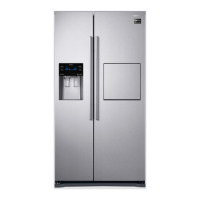
Refrigerator
user manual
RS554NRUA**
RS552NRUA**
imagine the possibilities
Thank you for purchasing a Samsung product.
To receive a more complete service,
please register your product at
www.samsung.com/register
Free Standing Appliance
English
DA68-02556M-3

Questions and Answers

  • B
    bentongeorgeAug 13, 2025
    What to do if food is freezing in my Samsung RS554NRUA Refrigerator?
    • R
      rebecca38Aug 13, 2025
      If the food in your Samsung Refrigerator is freezing, check the temperature setting on the display and adjust it to a warmer setting. Also, consider whether the room temperature is too low. Finally, make sure that food isn't placed too close to the air vent at the back of the refrigerator; if it is, move it away.
  • R
    Robert KaiserAug 17, 2025
    How to troubleshoot a Samsung Refrigerator that is not cooling?
    • M
      Mrs. Bethany Greene DVMAug 17, 2025
      If your Samsung Refrigerator isn't working or isn't chilling as much as it should, first ensure that the power plug is properly connected. Check the temperature control on the display panel and try setting it to a higher (colder) temperature. Also, make sure the refrigerator isn't in direct sunlight or near a heat source. Finally, ensure the back of the refrigerator has enough space for air to circulate.
  • A
    Amber JordanAug 20, 2025
    How to stop frost buildup in my Samsung RS554NRUA freezer?
    • C
      christophercalderonAug 20, 2025
      If you notice frost forming on the walls of the freezer in your Samsung Refrigerator, ensure that the air vent is not blocked, and remove any obstructions to allow for free air circulation. Make sure there is enough space between the stored foods to allow for efficient air circulation. Also, check that the freezer drawer is closed properly.
  • S
    Sandra HuynhAug 25, 2025
    How to get rid of a bad smell in my Samsung RS554NRUA Refrigerator?
    • M
      Mary CunninghamAug 25, 2025
      If your Samsung Refrigerator has a bad smell, start by checking for any spoiled food. Also, ensure that foods with strong odors, like fish, are tightly covered. It's also a good idea to periodically clean out your freezer and discard any food that is spoiled or suspicious.
  • F
    fgriffinAug 28, 2025
    Why is my Samsung Refrigerator making strange noises?
    • S
      Samantha ChandlerAug 28, 2025
      Unusual noises from your Samsung Refrigerator can often be resolved with a few simple checks. First, make sure the refrigerator is level and stable. Ensure that the back of the refrigerator isn't too close to the wall, which can prevent proper air circulation. Also, check behind and under the refrigerator to see if anything has fallen there. Note that a ticking sound is normal due to the accessories contracting or expanding. If you hear a “bleep” alarm, ensure the door of the refrigerator is closed properly.
  • L
    Lisa HolmesSep 1, 2025
    Why is there condensation on my Samsung RS554NRUA?
    • C
      Courtney GarnerSep 1, 2025
      If you notice heat and condensation on the front of your Samsung Refrigerator, be aware that some heat is normal because anti-condensators are installed to prevent condensation. However, condensation can also occur if the refrigerator door is left ajar for an extended period, so ensure the door is properly closed.
  • R
    Robin LoweSep 4, 2025
    Why do I hear water bubbling in my Samsung RS554NRUA?
    • M
      Matthew KellySep 4, 2025
      This bubbling sound is normal. It comes from the refrigerator coolant liquid circulating through the Samsung Refrigerator.
  • K
    Karen NormanSep 8, 2025
    What does it mean when my Samsung Refrigerator light flashes (India only)?
    • W
      William ShahSep 8, 2025
      This is normal. The controller is equipped with over-voltage protection. Once the voltage of power supply exceeds the threshold, the protection will be triggered off immediately, causing a short display of the board and a flash of the fridge light, getting everything back to normal .

Summary

Refrigerator Setup Guide

Installation Preparation

Steps to prepare for refrigerator installation and initial placement.

Best Location Selection

Guidance on choosing an optimal location for the refrigerator, considering sunlight and ventilation.

Door Removal and Installation

Instructions for safely removing refrigerator doors for easier transport and installation.

Refrigerator Leveling

Adjusting leveling legs to ensure the refrigerator is stable and doors align correctly.

Minor Door Alignment

Steps to align doors properly if they are not perfectly even after leveling.

Final Refrigerator Setup

Completing the refrigerator setup process to ensure it is fully operational.

Samsung Refrigerator Operation

Control Panel Guide

Explains the function of various buttons on the refrigerator's control panel.

Digital Display Usage

How to read and interpret the refrigerator's digital display for temperature and status.

Temperature Control Settings

Guide on setting and adjusting the freezer and refrigerator compartment temperatures.

Twist Ice Maker Operation

Instructions on how to use and fill the twist ice maker for ice production.

Food Storage Guidelines

Recommendations for storing food in freezer and fridge compartments for optimal freshness.

Freezer Accessory Removal

Steps for removing freezer shelves and drawers for cleaning or rearrangement.

Fridge Accessory Removal

Steps for removing fridge shelves and drawers for cleaning or rearrangement.

Refrigerator Cleaning Guide

Procedures for cleaning the interior, exterior, door seals, and home bar.

Door Operation and Sealing

Explanation of the door opening and closing mechanism for secure sealing.

Refrigerator Troubleshooting

Refrigerator Specifications

Ambient Temperature Limits

Specifies the operating temperature ranges for different climate classes of the refrigerator.

Overview

This document describes the Samsung Side-By-Side Refrigerator, a free-standing appliance designed for household use and similar applications such as staff kitchen areas, farmhouses, hotels, motels, bed and breakfast establishments, and catering services. It emphasizes safety, proper installation, and efficient operation to ensure a long lifespan and optimal performance.

Function Description

The Samsung Side-By-Side Refrigerator is equipped with various innovative storage and energy-efficient features. Its core function is to provide separate cooling for the refrigerator and freezer compartments, thanks to a Twin Cooling System with independent evaporators. This design ensures more efficient cooling and helps maintain optimal conditions for different types of food.

A key component of its energy efficiency is the Inverter compressor. This imported, high-effective compressor reduces power consumption, lowers operational noise, and operates at different frequencies to optimize freezing capacity and cooling speed.

The refrigerator offers precise temperature control for both compartments. Users can set the freezer temperature between -14°C and -23°C and the fridge temperature between 1°C and 7°C using the digital display. The appliance also features a Power Freeze function to rapidly freeze items, which is particularly useful for quickly freezing perishable goods or making large quantities of ice. Similarly, a Power Cool function is available to quickly cool fresh food in the fridge or to restore temperature after the door has been open for an extended period.

For periods of absence, the refrigerator includes a Vacation function. When activated, this function optimizes energy consumption by adjusting the fridge temperature. It is recommended to remove all food from the fridge and keep the door closed when this function is in use.

An optional Home bar feature provides convenient access to frequently used items without opening the main refrigerator door. This soft-touch bar opens and closes with a latch and damping system, adding a touch of modern convenience.

The appliance also incorporates a Child Lock button to prevent accidental changes to settings or unauthorized access, enhancing safety in households with children.

Usage Features

The refrigerator's design focuses on maximizing space and convenience. The interior includes various compartments tailored for different food types:

  • TWIST ICE MAKER: This feature allows users to easily make and dispense ice. Water is poured into the ice maker, and a simple turn of a button releases the ice into a storage compartment below. For optimal ice-making, it is recommended to activate the Power Freeze function and place the ice maker on the first layer shelf of the freezer.
  • GLASS SHELVES: Both the freezer and fridge compartments feature crack-resistant glass shelves for storing various foods and drinks. These shelves can be removed for thorough cleaning.
  • DOOR BINS: Located on the doors of both compartments, these bins are designed for small packages in the freezer and larger, bulkier items like milk gallons or bottles in the fridge.
  • DRAWERS: The freezer includes drawers for storing meats or dry foods, which should be securely wrapped. The fridge features a PHOTOSYNTHESIS FRESH-KEEPING DRAWER and a FRUIT & VEGETABLE DRAWER. The fresh-keeping drawer utilizes an LED lamp to periodically execute a fresh-keeping function, ideally used with fruits and vegetables stored in transparent plastic bags or their natural state. The fruit & vegetable drawer is specifically designed to control humidity levels to preserve freshness.
  • BEVERAGE CONTAINER (FOR THE MODEL WITH BAR): This container is integrated into models with the home bar, allowing for easy storage and access to beverages and fruits.
  • EGG TRAY: A dedicated tray for storing eggs.

When storing food, it is advised to wrap items properly in airtight containers to prevent odor penetration and maintain freshness. To maximize space, some freezer drawers (except the bottom one) can be removed without affecting thermal or mechanical characteristics. Users should also ensure that stored foods do not block the cool air outlet in the freezer to maintain efficient cooling.

Maintenance Features

Regular cleaning and maintenance are crucial for prolonging the life of the Samsung refrigerator and keeping it odor and germ-free.

  • Cleaning the Interior: The inside walls and accessories, including drawers and shelves, should be cleaned with a mild detergent and wiped dry with a soft cloth. All removable parts can be taken out for a more thorough cleaning.
  • Cleaning the Exterior: The digital and display panels should be wiped with a clean, soft cloth, preferably dampened with water sprayed onto the cloth rather than directly onto the surface. The doors, handles, and cabinet surfaces should be cleaned with a mild detergent and then wiped dry. Polishing the exterior once or twice a year is recommended to maintain its appearance.
  • Cleaning the Home Bar (optional): For models with a home bar, the door can be opened by lightly pressing its upper part. It should be cleaned with a wet cloth and then wiped dry with a clean, soft cloth.
  • Cleaning the Rubber Door Seals: Dirty door seals can prevent the doors from closing properly, leading to inefficient operation. They should be kept free of grit or grime by cleaning with a mild detergent and a damp cloth, then wiped dry.

Safety Precautions for Maintenance:

  • Never use Benzene, Thinner, or Clorox™ for cleaning, as these can damage surfaces and pose a fire risk.
  • Do not spray water directly onto the refrigerator while it is plugged in, to avoid electric shock.
  • Always disconnect the power before cleaning or performing any maintenance. If the refrigerator has been unplugged, wait at least ten minutes before plugging it back in.
  • Ensure the power plug pins are free of foreign matter or dust to prevent fire hazards.

The refrigerator is designed to be frost-free, eliminating the need for manual defrosting. The appliance handles defrosting automatically. If there is a power failure lasting more than 24 hours, it is recommended to remove all frozen food to prevent spoilage. For shorter power outages, minimize door openings.

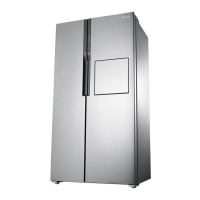
Samsung RS554NRUA Series Specifications

General IconGeneral
CategoryRefrigerator
TypeSide by Side
Cooling TechnologyNo Frost
Cooling SystemTwin Cooling Plus
Dimensions (H x W x D)178.8 x 91.2 x 72.6 cm
Width912 mm
Height1789 mm
Depth700 mm
Weight98 kg
ColorSilver
Ice MakerYes
Water DispenserYes
Defrost SystemFrost Free

Related product manuals