66
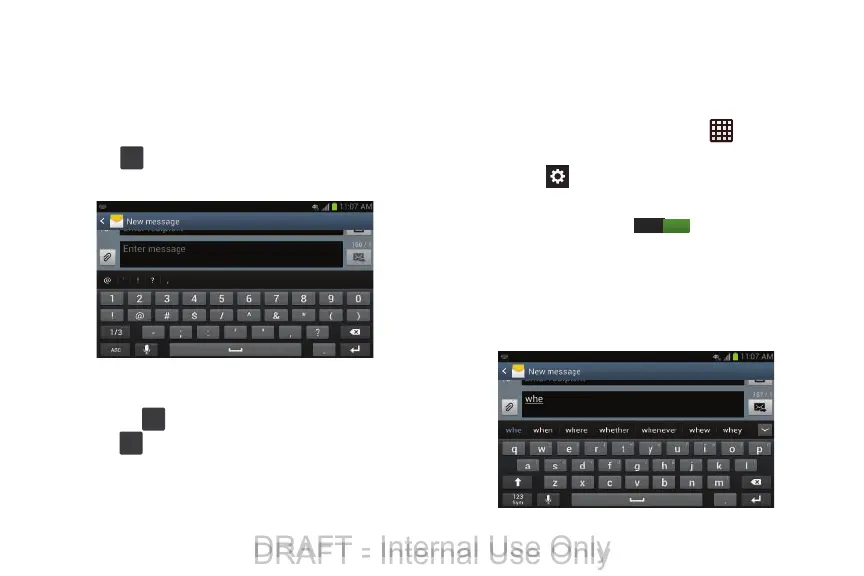
Using Symbol/Numeric Mode
Use Symbol/Numeric Mode to add numbers, symbols, or
emoticons.
1. Rotate your phone counterclockwise to a Landscape
orientation.
2. Tap
at the bottom of the screen. The following
screen displays:
3. Tap the desired number, symbol, or emoticon
characters.
4. Tap the
button to access additional symbols.
5. Tap to return to Abc mode.
Predictive Text
By using the Predictive Text option, you can have next-letter
prediction and regional error correction, which compensates
for pressing the wrong keys on the QWERTY keyboard.
1. To turn Predictive Text on or off, tap ➔
Settings
➔
More settings (System)
➔
Language and input
.
2. Tap the
icon next to
Samsung keyboard
.
3. Tap the ON/OFF slider, located to the right of the
Predictive text
field, to .
4. In the text portion of the message screen, begin typing
a word. A list of word options is displayed. Tap one of
the words to replace the word that has already been
typed or scroll the line of words to the left for more
word choices.
ON
DRAFT - Internal Use Only
DRAFT - Internal Use Only





 To Next Page