Alignment and adjustment
Samsung Electronics 5-29
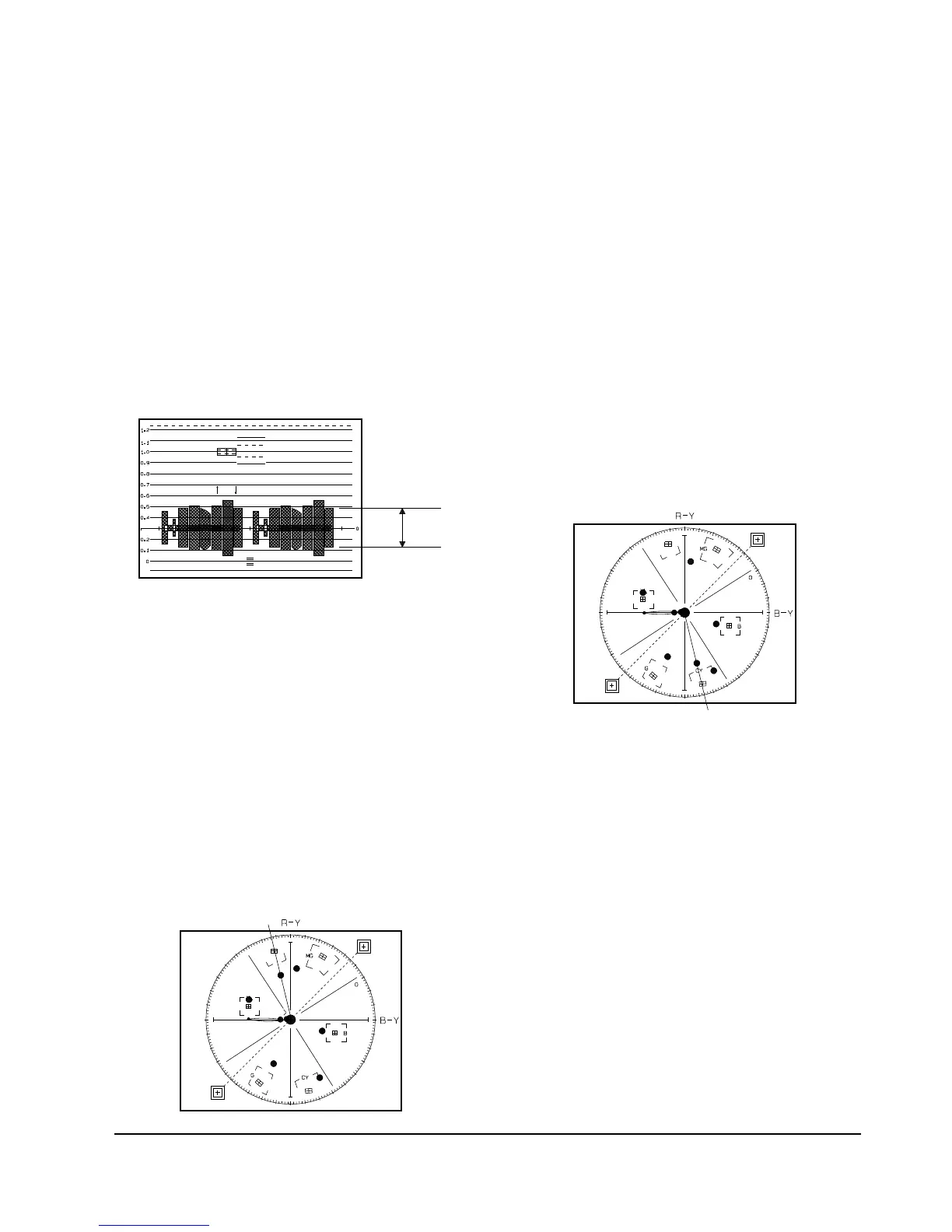
12. B-Y Negative Gain
1) Camera ÒE-EÓ, 3100¡K color bar chart.
2) Video(output) jack and register of EEPROM.
3) Connect video(output) jack to waveform monitor
input jack and monitor TV jack respectively.
4) Press the ÒMENU (MODE UP)/DATE
(MODE DOWN)Ó button so that the OSD state is
Ò37 CBGN XX XXÓ.
5) Aim the camera at a color bar chart illuminated at
1500 to 2000 lx.
6) Adjust the ÒDISPLAY(DATA UP)/C.RESET (DATA
DOWN)Ó button so that the yellow level is 50IRE.
7) Be sure to press the ÒTITLE (CONFIRM)Ó
button to memorize setting.
8) The OSD shows ÒOK!Ó.
13. R-Y Positive Hue
1) Camera ÒE-EÓ, 3100¡K color bar chart.
2) Video(output) jack and register of EEPROM.
3) Connect video(output) jack to vectorscope input
jack and monitor TV jack respectively.
4) Press the ÒMENU (MODE UP)/DATE
(MODE DOWN)Ó button so that the OSD state is
Ò39 CBHN XX XXÓ.
5) Aim the camera at a color bar chart illuminated at
1500 to 2000 lx.
6) Adjust the Ò DISPLAY (DATA UP)/C.RESET
(DATA DOWN)Ó button so that the red vector is 104.
7) Be sure to press the ÒTITLE (CONFIRM)Ó
button to memorize setting.
8) The OSD shows ÒOK!Ó.
14. R-Y Negative Hue
1) Camera ÒE-EÓ, 3100¡K color bar chart.
2) Video(output) jack and register of EEPROM.
3) Connect video(output) jack to vectorscope input
jack and monitor TV jack respectively.
4) Press the ÒMENU (MODE UP)/DATE
(MODE DOWN)Ó button so that the OSD state is
Ò38 CHGR XX XXÓ.
5) Aim the camera at a color bar chart illuminated at
1500 to 2000 lx.
6) Adjust the Ò DISPLAY(DATA UP)/ C.RESET
(DATA DOWN)Ó button so that the cyan vector
is 284.
7) Be sure to press the ÒTITLE (CONFIRM)Ó
button to memorize setting.
8) The OSD shows ÒOK!Ó.



 To Next Page