EasyManua.ls Logo

Samsung SDS SHS-3320 - User Manual

Samsung SDS SHS-3320
36 pages
Print Icon
To Next Page IconTo Next Page
Loading...
Please review all included documentation and use the product as intended. Safety precautions must be
followed to avoid personal injury or property damage.
Samsung SDS Digital Door Lock
User Guide
SHS-3320/3321
Question and Answer IconNeed help?

Do you have a question about the Samsung SDS SHS-3320 and is the answer not in the manual?

Overview

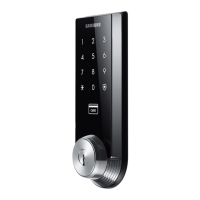
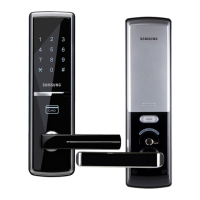
The Samsung SDS Digital Door Lock SHS-3320/3321 is an advanced security device designed for residential use, featuring a touch-sensitive number display pad and optional 13.56MHz Card reader. It supports up to 70 users, who can gain access using unique PIN codes or ISO14443A type Access Cards. The touchscreen incorporates a "Randomizer" function to prevent lockpicking by obscuring fingerprint traces. Additional features like Automatic Locking, Sound Setting, and Out-of-Home Security enhance peace of mind. The lock can also be integrated with Samsung video intercom systems (e.g., SHT-3006) for remote unlocking.

Function Description:

The lock offers multiple ways to open the door:

  • PIN Code Entry: Users touch the touchscreen, which illuminates. If the Random Security function is enabled, two illuminated numbers appear, which must be pressed first. Then, the user enters their PIN Code (4-12 digits) and presses the * button. A "Ding dong dang dong" sound indicates success, while "Ding dong ding dong" signifies failure.
  • Card Access: After touching the touchscreen, the user presents an Access Card to the Card reader. A successful scan results in "Ding dong dang dong," and failure in "Ding dong ding dong."
  • Double Authentication Mode: For enhanced security, this mode requires both a User PIN Code and an Access Card. The process involves touching the touchscreen, entering the PIN Code and pressing *, then presenting the Access Card to the reader. The Master PIN Code can bypass this mode. This mode is disabled by default and requires at least one User Card and PIN Code to be registered.
  • Mechanical Key (SHS-3320 only): The SHS-3320 model includes a keyhole for mechanical key access, providing an alternative entry method.
  • Video Intercom Integration: The lock can be connected to a Samsung video intercom system, allowing remote unlocking via the intercom's monitor by receiving a 1-second dry contact signal.

Important Technical Specifications:

  • Door Thickness: Supports doors from 1-3/8" to 2-5/32" (35 to 55mm).
  • Power Source: 4 AA Alkaline 1.5V Batteries (LR6) (6V).
  • Emergency Power Source: 9V Battery (6LF22) (not included).
  • Operation Method: Electronic Control Method (PIN Code entry or Card reading).
  • Weight: 1.8Kg (including both inside and Exterior Unit).
  • Exterior Unit Dimensions: 68.0 mm (W) x 180.0 mm (H) x 36.5 mm (D) or 2-11/16" inch (W) x 7-3/32" inch (H) x 1-7/16" inch (D).
  • Interior Unit Dimensions: 68.0 mm (W) x 180.0 mm (H) x 38.3 mm (D) or 2-11/16" inch (W) x 7-3/32" inch (H) x 1-1/2" inch (D).
  • User Capacity: Up to 70 users (PIN Codes, Access Cards, Key Fobs).
  • Master PIN Code: 4-12 digits, factory default '1234'.
  • User PIN Code: 4-12 digits.
  • Card Type: 13.56MHz (ISO14443A type).

Usage Features:

  • Touchscreen Display: Provides a convenient interface for PIN code entry and status indicators.
  • Random Security Function: Prevents fingerprint residue analysis by illuminating two random numbers before PIN entry, ensuring the entire touchscreen is touched. This function is enabled by default.
  • Automatic Locking (Auto Mode): The door automatically locks 2 seconds after closing. This function relies on the magnetic sensor and is the factory default.
  • Manual Locking: If Auto Mode is disabled, the door can be locked by touching the touchscreen or pressing the [OPEN/CLOSE] button on the Interior Unit.
  • Double-locking: Prevents unlocking from the outside. Activated by pressing the [OPEN/CLOSE] button for 5 seconds while the door is locked. Deactivated by pressing [OPEN/CLOSE] or turning the Thumbturn lever.
  • Out-of-Home Security Function: Prevents intrusions when no one is home. Activating this function and then pressing the [OPEN/CLOSE] button will trigger an alarm if an intrusion is detected.
  • Sound Setting: Adjustable volume for button inputs and lock operations (Levels 0-3). Level 0 mutes the sound, while Level 3 is maximum volume. Registration mode operates at Level 2 regardless of the sound setting.
  • Malfunction Prevention Function (Mischief Prevention Function): After more than 5 failed authentication attempts with unregistered PIN Codes/Cards, a warning sounds for 10 seconds, and the lock stops operating for 3 minutes. A 'beep' sounds every 10 seconds during this lockout period. This function is enabled by default.
  • Low Voltage Indicator: A "Fur Elise" melody and a flashing red [OPEN/CLOSE] button indicate low battery, prompting immediate replacement.
  • Magnetic Sensor: Detects the opening and closing of the door, crucial for automatic locking and intrusion detection.
  • Thumbturn Lever: Allows mechanical locking/unlocking from the inside, useful when batteries are completely discharged.
  • Registration Button: Located under the battery cover, used for changing Master PIN Code, registering User PIN Codes/Cards, and adjusting other lock settings. The press duration varies by function (brief press, 5 seconds, or 10 seconds).

Maintenance Features:

  • Battery Replacement: When the low-battery warning sounds ("Fur Elise" melody and flashing [OPEN/CLOSE] button), all 4 AA batteries should be replaced immediately. Do not mix old and new batteries.
  • Emergency Power Contact: If batteries are completely discharged, a 9V battery can be touched to the external power contacts on the Exterior Unit to temporarily power the lock for access.
  • Factory Reset: Deletes all registered information (Master and User data) and restores default settings. After a reset, the magnetic sensor must detect the magnet to re-set the hand type. This is done by pressing the [Registration] button for 10 seconds, then entering the current Master PIN Code and pressing *.
  • Restart Function: If the lock becomes unresponsive, pressing the [Restart] button (a small hole on the left of the external power contact) with a pin will reset the lock without deleting registered information.
  • Cleaning: Use a soft, dry cloth to clean the lock. Avoid water, alcohol, or other chemicals.
  • Regular Code Changes: Users are advised to change their PIN codes regularly to maintain security.
  • Moisture Protection: Minimize exposure to moisture, including wet hands and direct contact with liquids, to prevent damage.
  • Professional Repair: Do not attempt to repair the product yourself. Contact a service center for issues.
  • Warranty: The product comes with a 12-month warranty covering manufacturing defects. Improper installation, misuse, abuse, alteration, or damage due to acts of God will void the warranty. The warranty does not cover dismantling, reassembly, or reinstallation charges.

Samsung SDS SHS-3320 Specifications

General IconGeneral
BrandSamsung
ModelSDS SHS-3320
CategoryDoor locks
LanguageEnglish

Related product manuals