English-52
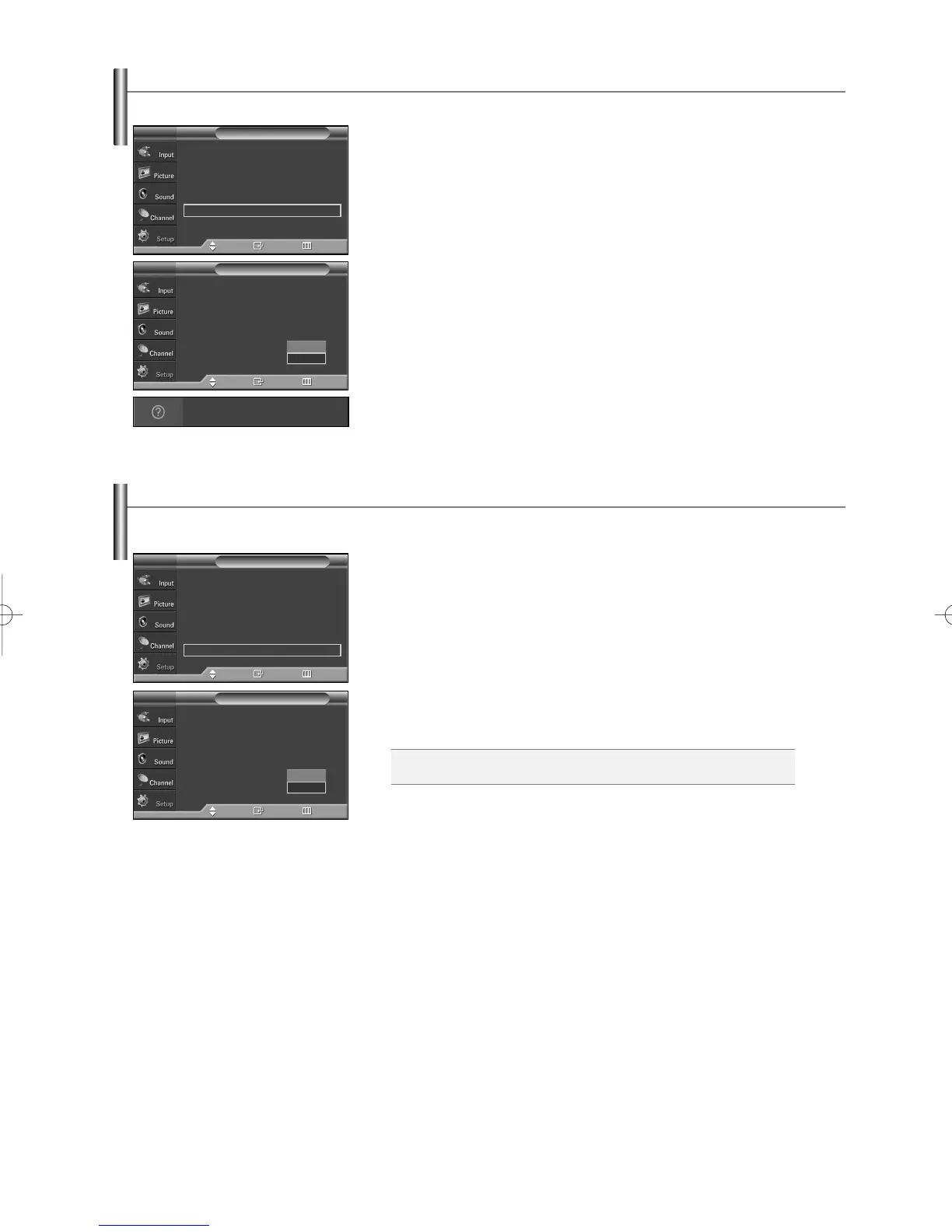
Setting the Function Help
Displays help on the menu functions.
1. Press the MENU button to display the menu.
Press the
……
or
††
button to select “Setup”, then press the ENTER button.
2. Press the
……
or
††
button to select “Function Help”, then press the ENTER
button.
3. Press the
……
or
††
button to select “Off” or “On”, then press the ENTER button.
Press the EXIT button to exit
➢
The Function Help default setting is On.
…
More
Menu Transparency : Medium
√
Energy Saving : Standard
√
Screen Burn Protection
√
PC
√
Function Help : On
√
Blue Eye : Off
√
Setup
TV
Move Enter Return
…
More
Menu Transparency : Medium
Energy Saving : Standard
Screen Burn Protection
PC
Function Help : Off
Blue Eye : Off
Setup
TV
Move Enter Return
Switches the Function Help on.
Off
On
Setting the Blue Eye
You can set the Blue Power LED on or off. If the TV’s power is tuned off when Blue Eye is set to off, the Blue LED goes off after
5 seconds. This will save power and reduce eye fatigue.
1. Press the MENU button to display the menu.
Press the
……
or
††
button to select “Setup”, then press the ENTER button.
2. Press the
……
or
††
button to select “Blue Eye”, then press the ENTER button.
3. Press the
……
or
††
button to select “Off” or “On”, then press the ENTER
button.
Press the EXIT button to exit
…
More
Menu Transparency : Medium
√
Energy Saving : Standard
√
Screen Burn Protection
√
PC
√
Function Help : On
√
Blue Eye : Off
√
Setup
TV
Move Enter Return
Off: LED(Blue) will not come on.
On: LED(Blue) will come on after you turn the TV off.
…
More
Menu Transparency : Medium
Energy Saving : Standard
Screen Burn Protection
PC
Function Help : Off
Blue Eye : Off
Setup
TV
Move Enter Return
Off
On
BN68-00991D-01Eng_0224 2/24/06 10:46 AM Page 52



 To Next Page