English-7
Œ
POWER IN
Connect the supplied power cord.
´
HDMI IN 2
Connect to the HDMI jack of a device with
HDMI output.
ˇ
HDMI 1/DVI IN
Connect to the HDMI jack of a device with HDMI output.
This input can also be used as a DVI connection with
separate analog audio inputs.
An optional HDMI/DVI cable will be necessary to make
this connection.
When using an optional HDMI/DVI adapter, the DVI
analog audio inputs on your TV allow you to receive left
and right audio from your DVI device. (Not compatible
with PC)
¨
DVI IN (AUDIO-L/R)
Connect to the DVI audio output jack of an
external device.
ˆ
OPTICAL DIGITAL AUDIO OUT
Connect to a Digital Audio component.
Ø
COAXIAL DIGITAL AUDIO OUT
Connect to a Digital Audio component.
∏
ANT 1 IN (CABLE)/ANT 2 IN (AIR)
75Ω Coaxial connector for Antenna/Cable
Network.
”
PC AUDIO IN
Connect to the audio output jack on your PC.
’
PC IN
Connect to the video output jack on your PC.
˝
SERVICE 1/SERVICE 2
These jacks are for service purposes only.
Ô
AUDIO-L/R (AV IN 1)
Audio inputs for external devices, such as
a camcorder or VCR.
VIDEO (AV IN 1)
Video input for external devices, such as
a camcorder or VCR.
Ò
S-VIDEO (AV IN 1)
Video input for external devices with an
S-Video output, such as a camcorder or VCR.
Ú
COMPONENT IN 1, 2
Video (Y/PB/PR) and audio (L-AUDIO-R)
component inputs.
Æ
AUDIO OUT
Audio outputs for external devices.
Œ
S-VIDEO IN 2
S-Video input for external devices with an S-Video output.
´
AV IN 2
Video and audio inputs for external devices.
ˇ
HEADPHONE
You can connect a set of headphones to your television if you wish to watch a television
program without disturbing other people in the room.
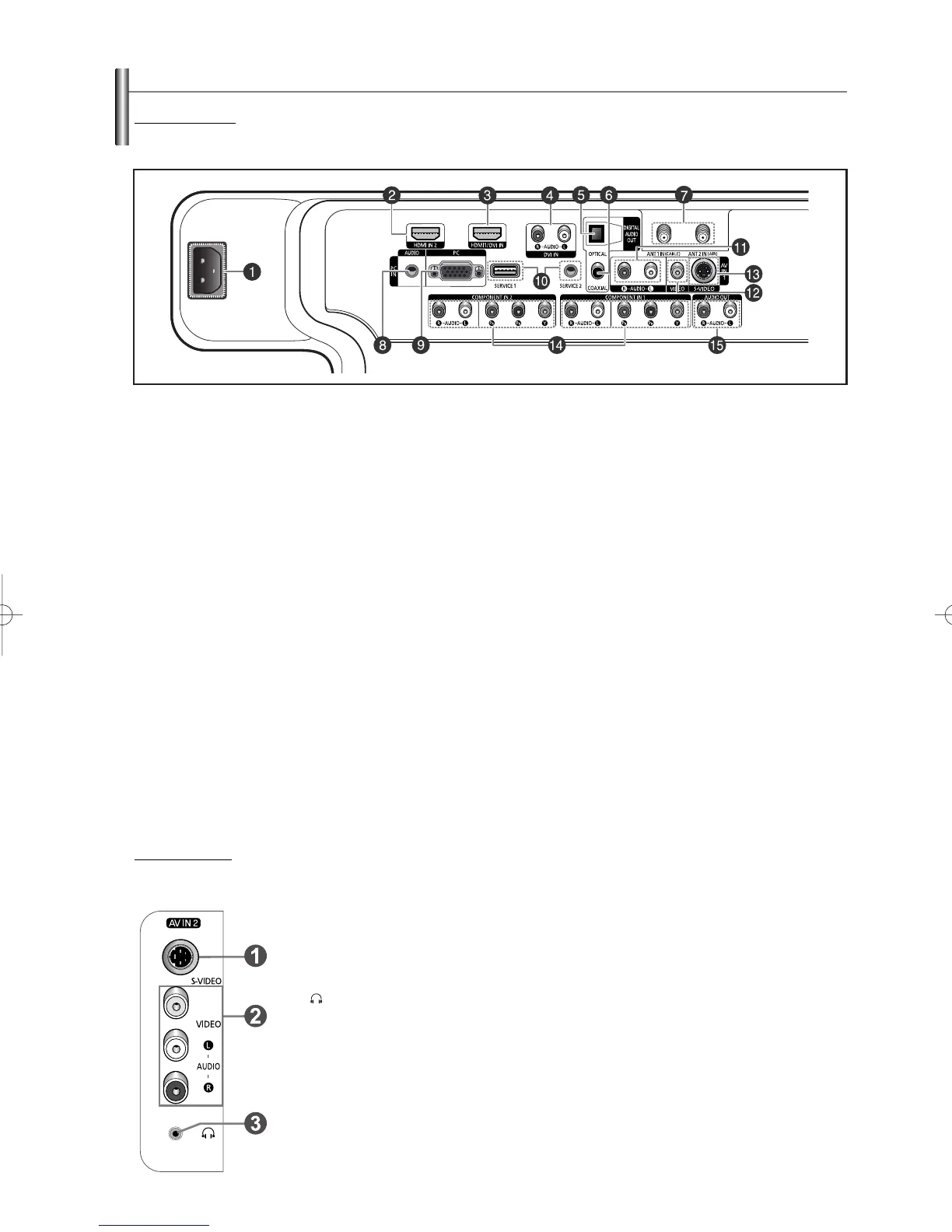
Rear Panel Jacks
Use the rear panel jacks to connect A/V components that will be connected continuously, such as VCR or DVD players.
For more information on connecting equipment, see pages 9-14. The product color and shape may vary depending on the model.
Side Panel Jacks
Use the left side panel jacks to connect a component that is used only occasionally, such as a camcorder or video game. (See page 12)
The product color and shape may vary depending on the model.
Viewing the Connection Panel
BN68-00991D-02Eng_0317 3/17/06 9:56 AM Page 7



 To Next Page