assembling the cleaner _19
02 ASSEMBLING THE CLEANER
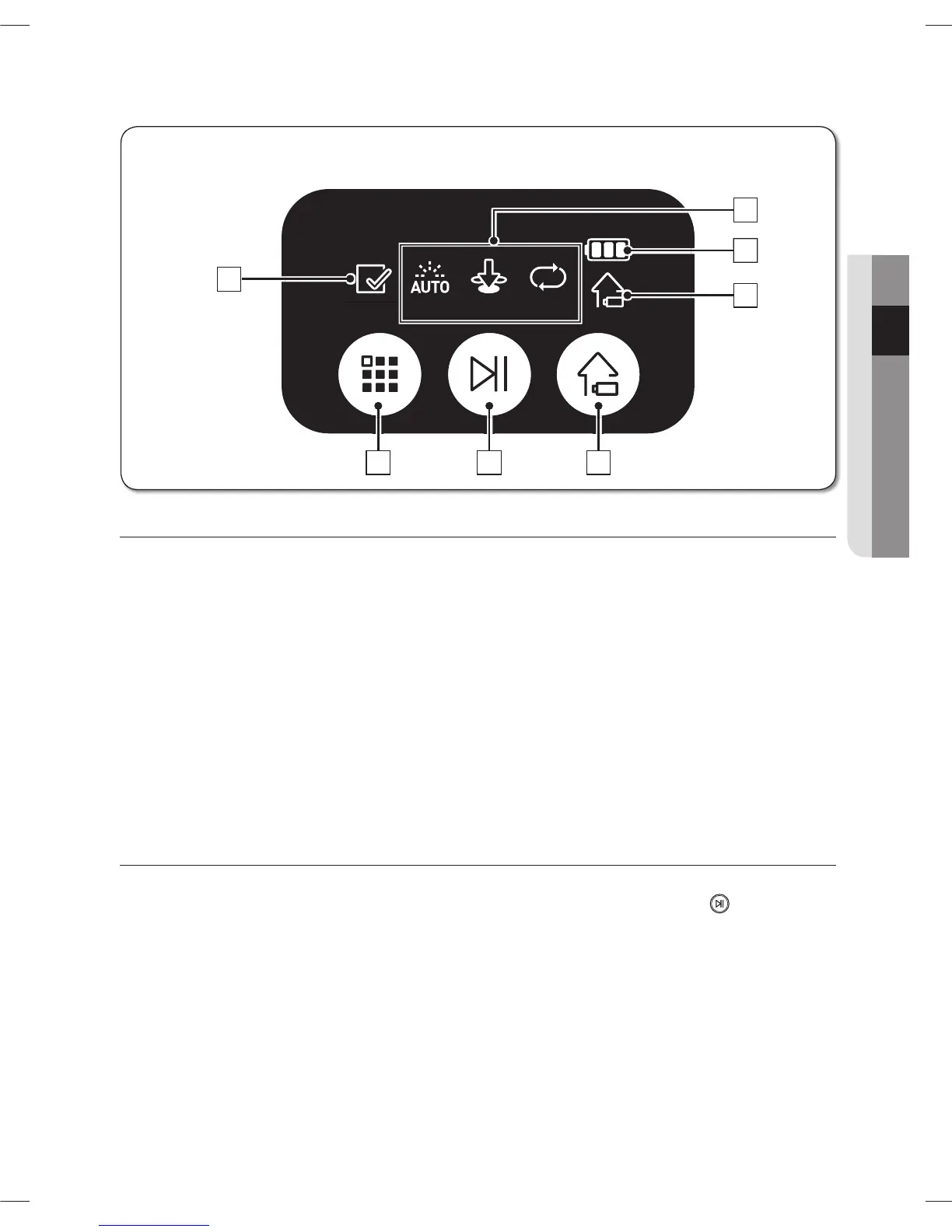
DISPLAY PART
Battery Level Indicator1.
Charging: Shows the charging progress in 3 steps. -
In Use: Shows the battery charge level. The battery charge level is reduced by each level from -
FULL while operating.
Recharging2.
This icon turns on when the Vacuum cleaning Robot returns to the charger station to charge its -
battery.
Cleaning Mode Display3.
Each time the cleaning mode button is pressed, the corresponding cleaning mode is displayed. -
Auto Mode: This icon turns on when Auto cleaning mode is selected.(A)
Spot Mode: This icon turns on when Spot cleaning mode is selected.(B)
Max Mode: This icon turns on when Max cleaning mode is selected.(C)
Check Code4.
The Check Code icon will turn on if an issue arises that needs your attention -
BUTTON PART
Cleaning Mode5.
Press to select a cleaning mode. After selecting a cleaning mode, press the ( -
) button to
start cleaning.
Start/Stop6.
Press to start/stop cleaning. -
Recharging7.
When this button is pressed, The cleaning robot will return to the charger station to charge its -
battery.
Display panel
■



 To Next Page