To Next Page
T
Terry WilliamsAug 30, 2025
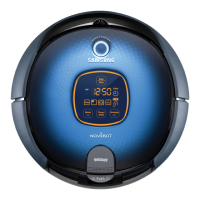
What to do if my Samsung SR8845 will not operate when the battery in the remote control is depleted?
- MMrs. Monica CainAug 30, 2025
Replace the batteries in the remote control. (AAA type)

What to do if my Samsung SR8845 will not operate when the battery in the remote control is depleted?
Replace the batteries in the remote control. (AAA type)
How to adjust the VIRTUAL GUARD sensor on Samsung Vacuum Cleaner?
If the distance detection sensor of the VIRTUAL GUARD is facing the charger, change the direction of the VIRTUAL GUARD or set the distance to an appropriate value.
What to do if the battery level is flashing only one level and ‘LO’ is displayed in the display panel of my Samsung SR8845 (stopped operating while cleaning)?
To resolve this, lift up the robotic vacuum cleaner, manually dock the robotic onto the charger to charge it.
What to do if my Samsung Vacuum Cleaner is stuck to the floor where there is a height difference?
Turn off the Power Switch and move the cleaning robotic vacuum to another place to clean.
How to remove object from Samsung Vacuum Cleaner left wheel?
If a foreign object is caught in the left driving wheel of your Samsung Vacuum Cleaner, turn off the power switch and remove the object.
What to do if there is a foreign substance on the obstacle sensor window of my Samsung SR8845?
If a foreign substance (dust, stain etc.) is on the Obstacle sensor window of your Samsung Vacuum Cleaner, turn off the Power Switch at the bottom and wipe the foreign substance from the front and rear sensor windows using a soft cloth.
What to do if I am using manganese drycell batteries in my Samsung SR8845 Vacuum Cleaner?
Replace the batteries with new alkaline batteries.
What to do if something is caught in the side brush of my Samsung Vacuum Cleaner?
If a foreign substance is caught on the edge-cleaning side rotating brush of your Samsung Vacuum Cleaner, turn off the Power Switch at the bottom and wipe the foreign substance from the edge-cleaning side rotating brush.
What to do if the filter is clogged in my Samsung Vacuum Cleaner?
If the Filter of your Samsung Vacuum Cleaner is clogged, clean the Filter well.
What to do if the battery level is flashing only one level and ‘LO’ is displayed on my Samsung SR8845 Vacuum Cleaner?
To resolve this, lift up the robotic vacuum cleaner, and manually dock it onto the charger to charge it.
Explains safety warnings, caution symbols, and other symbols used in the manual.
Covers general safety precautions and battery charger specific safety guidelines.
Warnings and precautions specific to the robotic vacuum cleaner operation.
Safety guidelines concerning the power cord, plugs, and electrical connections.
Important safety checks and considerations before operating the device.
Safety measures to follow while the robotic vacuum cleaner is in operation.
Steps for turning on, installing the charger, and charging the battery.
Instructions on how to charge the vacuum cleaner and check charge status.
How to start, stop, and resume cleaning operations using the unit or remote.
How to initiate recharging and troubleshoot if the cleaner doesn't return to the charger.
Step-by-step guide to empty and clean the dust bin and its filter.
Instructions on how to remove and clean the main power brush.
Common issues and their solutions before contacting customer support.
Troubleshooting steps when the cleaner cannot locate its charging station.
Explains common error codes and their corresponding solutions.
 General
| Charging time | 1.5 h |
|---|---|
| Battery technology | Nickel-Metal Hydride (NiMH) |
| Shape | Round |
| Product color | Gray |
| Noise level | 70 dB |
 Weight and Dimensions
| Weight | 4000 g |
|---|