Operating the cleaner _33
Operating the cleaner
03 OPERATING THE CLEANER
USING THE ROBOTIC VACUUM CLEANER
SCHEDULED CLEANING
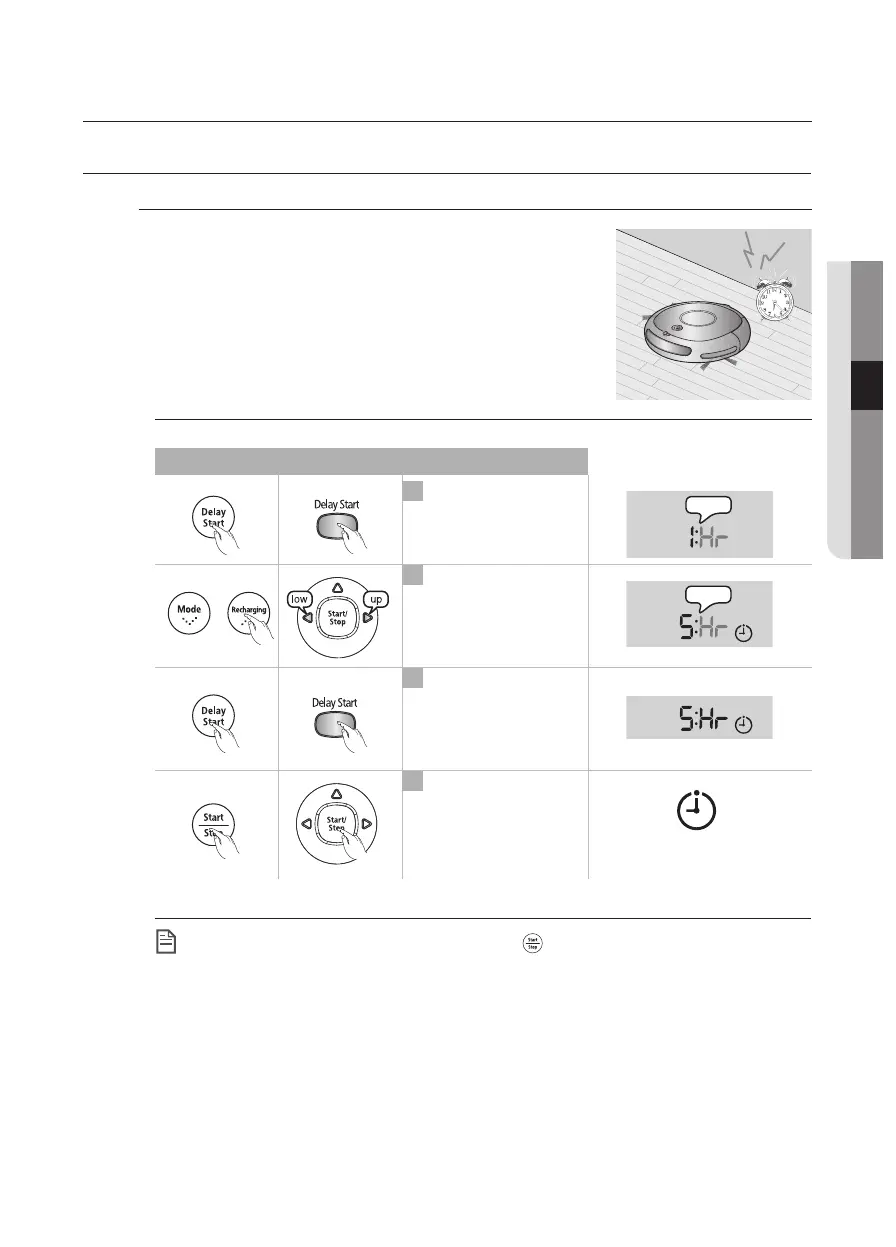
You can schedule robotic vacuum cleaner to start
cleaning from a particular time. (Time delay: Up to
23 hours)
■
Scheduled cleaning is only performed when robotic
vacuum cleaner is docked with the charger station.
The icon is turned off.
Whenever the button is
pressed, the time is
increased or decreased.
2
1
Enter the Scheduled
Cleaning mode.
Finish the setting.
3
Cancel the setting.
4
Main unit button
Remote control button Configuration Sequence
▶
(Example) To clean 5 hours
Later from now
Flash
Flash
NOTE
When setting is complete, and you press the ( ) button instead of the Delay Start
button, the scheduled cleaning time is canceled.
After completing the setting, if you manually move the robotic vacuum cleaner from
the charger station, the scheduled cleaning time is cancelled.
DJ68-00620V(0.0).indb 33DJ68-00620V(0.0).indb 33 2012.7.10 1:52:33 PM2012.7.10 1:52:33 PM



 To Next Page