40_ Maintain tools and fi lter
Maintain tools and fi lter
CLEANING THE ROBOTIC VACUUM CLEANER
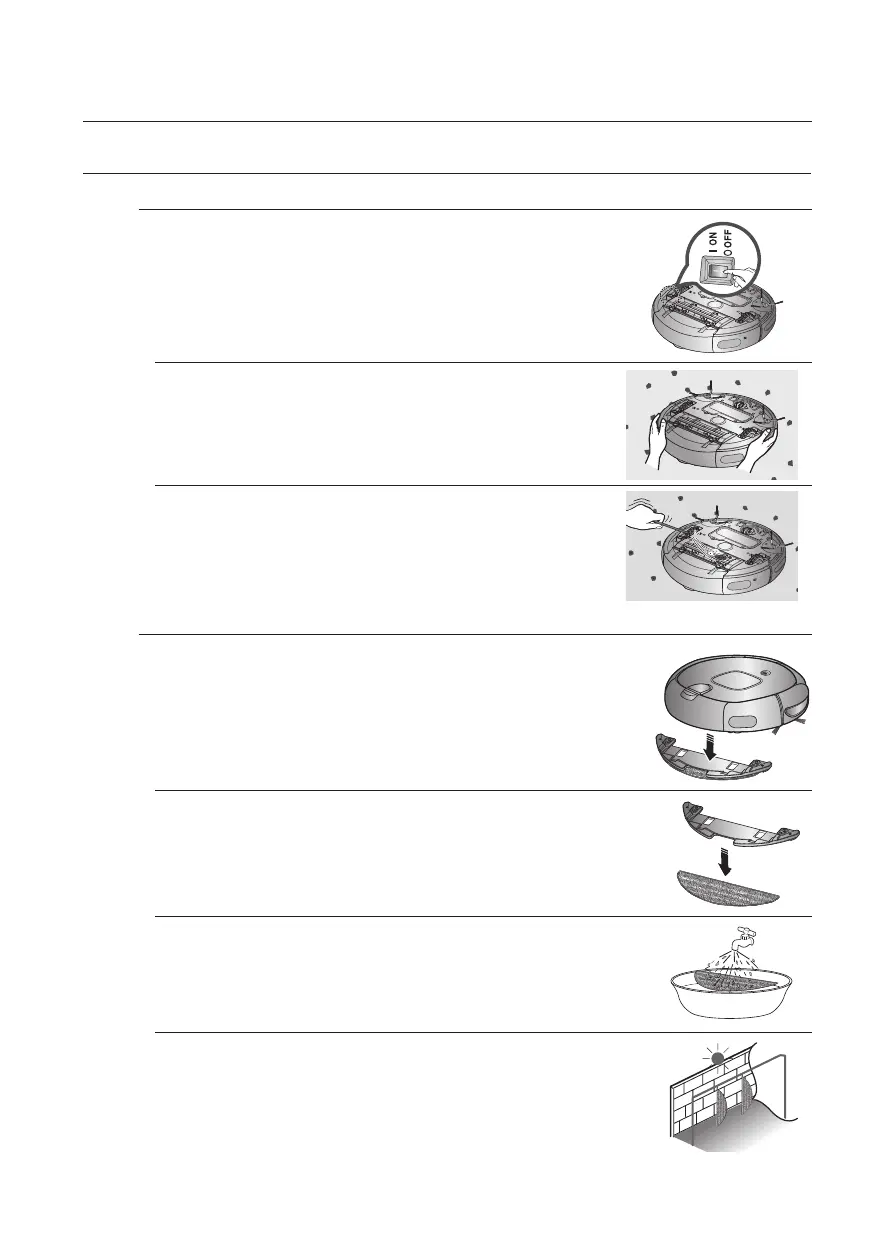
CLEANING THE DRIVING WHEEL
2. Check for foreign substances and remove them
using a stick or a pair of blunt nippers if necessary.
1. When cleaning the driving wheel, place a soft cloth
on the fl oor and fl ip the main unit, placing it down
carefully.
You must turn off the Power Switch at the bottom of the
main unit before cleaning the robotic.
■
If the robotic vacuum cleaner suddenly starts to zigzag, there
may be foreign substances stuck on the driving wheel.
CARING FOR THE MOP (OPTION)
2. Remove the mop from the mop plate.
3. Wash the mop with clean water.
4. Dry the mop completely in a well-ventilated location before
using it.
Since a contaminated mop may smell badly, keep the mop
clean.
1. Separate the mop plate from the bottom of the cleaning
robot.
DJ68-00620V(0.0).indb 40DJ68-00620V(0.0).indb 40 2012.7.10 1:52:35 PM2012.7.10 1:52:35 PM



 To Next Page