Shooting options
53
Using face detection
Select
3
when the face list appears.
Your favorite faces are indicated with a t on the face list.
You can register up to 6 favorite faces.t
The flash option will be set to t Off.
If you register the same face twice, you can delete one of the faces t
in the face list.
Viewing your favorite faces
In Shooting mode, select
1
f
.
Select
2
to view your favorite faces.
To change the ranking of your favorite faces, select t . (p. 68)
To cancel your favorite faces, select t
.
Registering faces as your favorites (My Star)
You can register your favorite faces to prioritize the focus and
exposure on those faces. This feature is available only when you
use a memory card.
In Shooting mode, select
1
f
.
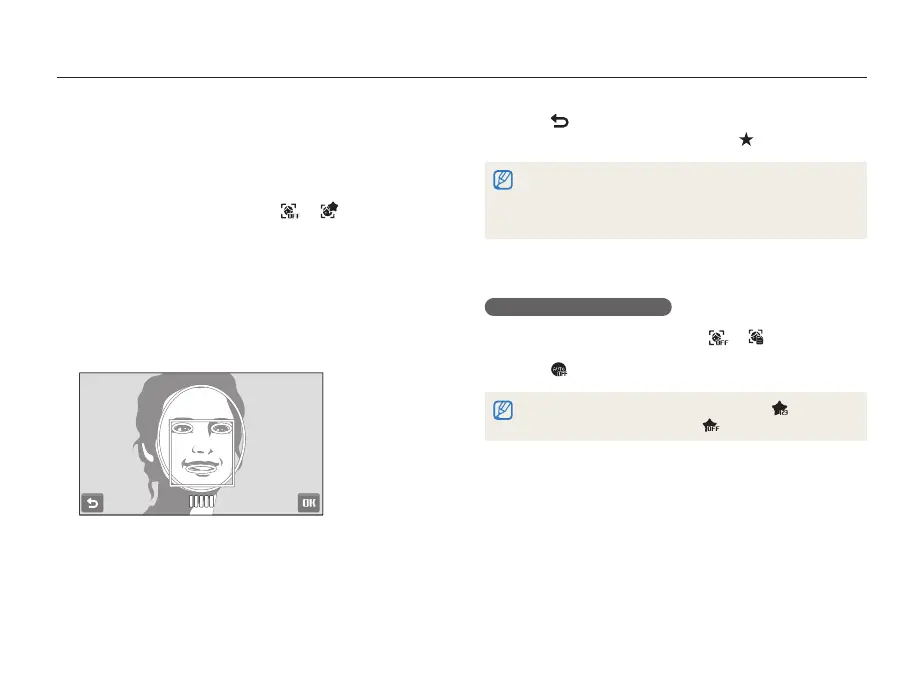
Align your subject’s face with the oval guideline and
2
press [Shutter] to register the face.
If the subject’s face is not aligned with the oval guideline, the t
white frame will not appear.
You will take 5 photos of the subject’s face: one each from the t
front, left, right, above, and below.
Take photos of one person at a time when registering faces.t



 To Next Page