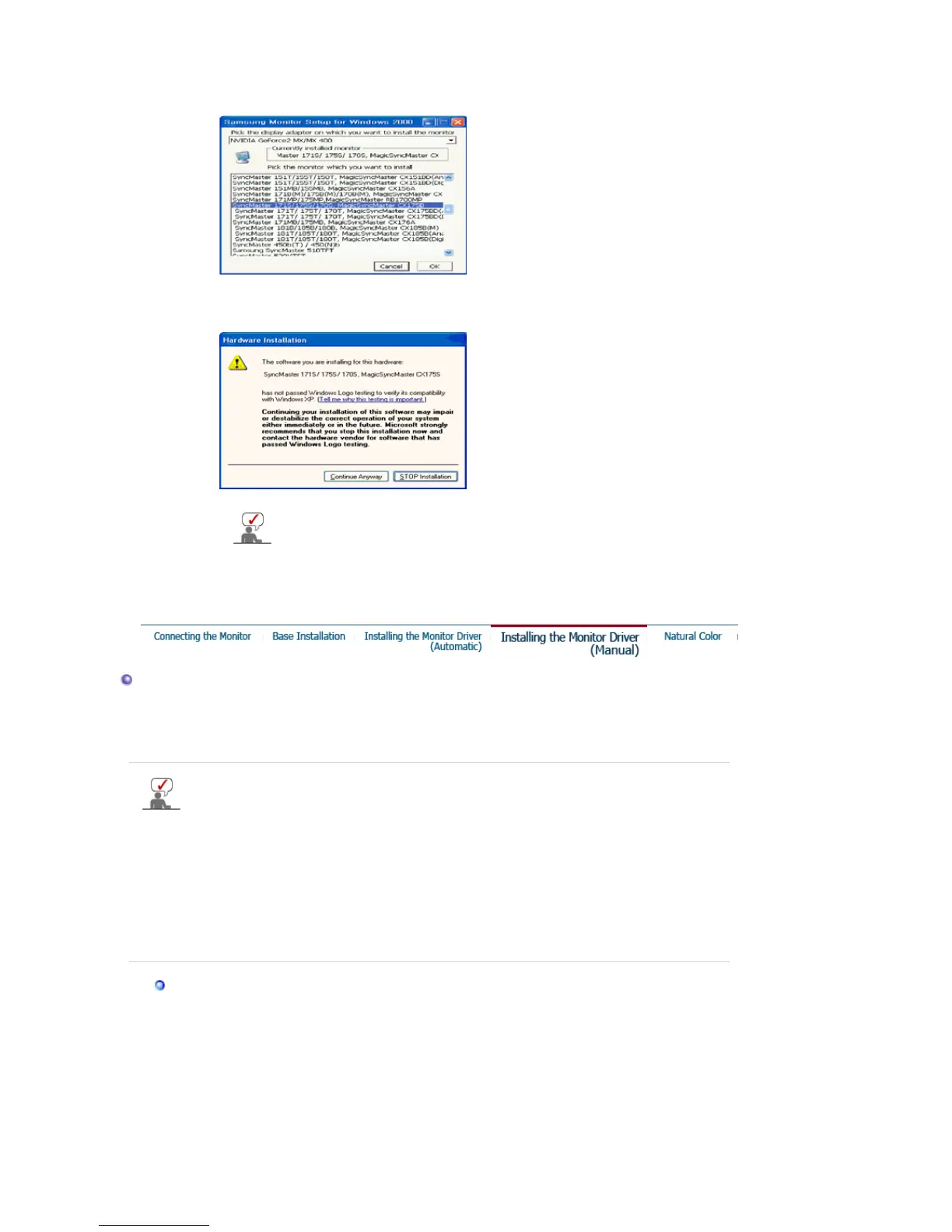
2. Click
"Windows XP/2000 Driver"
3. Choose your monitor model in the model list, then click the
"OK"
button.
4. If you can see following message window, then click the
"Continue Anyway"
button.
Then click
"OK"
button.
5. Monitor driver installation is completed.
This monitor driver is under certified MS logo and this installation doesn't
damage your system. The certified driver will be posted on Samsung
Monitor homepage.
http://www.samsung.com/.
Installing the Monitor Driver (Manual)
Windows XP | Windows 2000 | Windows Me | Windows NT | Linux
When prompted by the operating system for the monitor driver, insert the CD-ROM
included with this monitor. Driver installation is slightly different from one operating
system to another. Follow the directions appropriate for the operating system you
have.
Prepare a blank disk and download the driver program file at the Internet web site shown
here.
z
Internet web site : http://www.samsung.com/ (Worldwide)
http://www.samsung.com/monitor (U.S.A)
http://www.sec.co.kr/monitor (Korea)
http://www.samsungmonitor.com.cn/ (China)
Microsoft
®
Windows
®
XP Operating System
1. Insert CD into the CD-ROM driver.
2. Click "
Start
" —> "
Control Panel
" then click the "
Appearance and Themes
" icon.








 To Next Page