11
l
Use the Plus (+) or Minus (-) button
to control pinbalance of the display.
17. Vertical linearity
l
Use and hold both the vertical position
button and trapezoid button simulta-
neously for 4 to 5 seconds, or until the
indicator’s color changes from orange
to green.
l
Use the Plus ( + ) or Minus (-) button
to control vertical linearity of the dis-
play area.
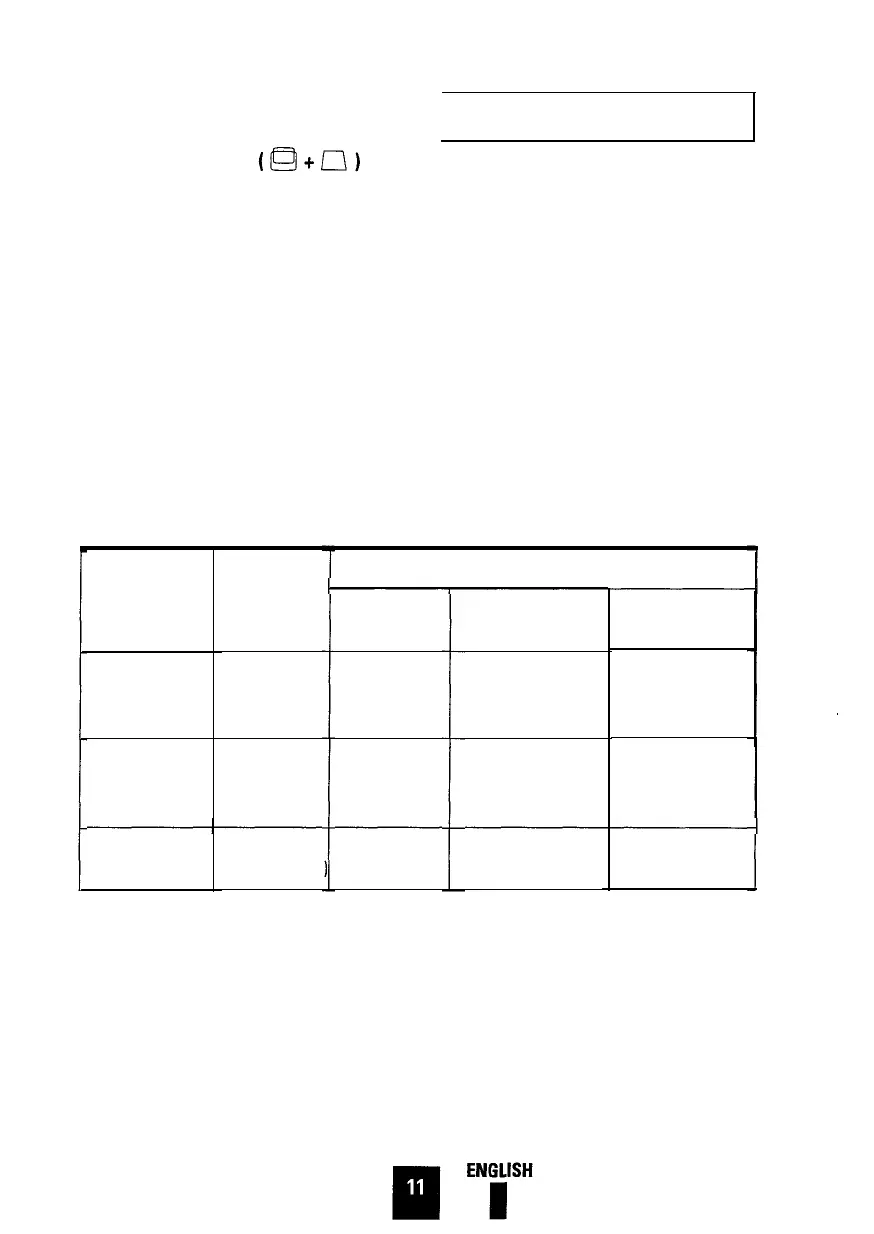
Power Management System
This monitor features a built-in power
management system–called
PowerSaver–which operates with your
computer’s video card. To take advantage
of the PowerSaver feature you must use a
VESA DPMS compliant video card.
The PowerSaver runs in four operational
states: On, Stand-by, Suspend and Off.
The modes of operation and time limits
are set through a software utility which
comes with your video card. See table
below for further details.
Table: Display Power Management Signaling ( DPMS ) Standard
State
Power-off mode/
Position A 2
Horizontal Sync.
Vertical Sync.
Video
Inactive
Inactive
Blanked
Power
Indicator
Power
Consumption
Power saving function mode EPA/NUTEK
Stand-by mode
Suspend mode /
Position A1
Normal
operation
Active
Inactive
Active
Active
Active
Blanked
Green
Orange
Active
Inactive
Blanked
Orange / Green
Blinking
85W ( max. )
68W ( max. )
Less than
67.5W ( nominal ) 40.5W ( nominal )
15W
Orange
Blinking
Less than
5W
Note:
The monitor automatically returns to the normal operation state when horizontal and vertical
sync returns. This occurs when you move your mouse or press a key on your keyboard. When you turn
the power off in Power-off mode, the LED indicator may continuosly blink on-off for 4 to 15 seconds.
This monitor is EPA Energy Star compliant and NUTEK compliant when used with a computer
equipped with VESA DPMS function. If your computer system cannot support a display power man-
agement function, you may purchase an optional DPMS software program to have power saving func-
tion. Please contact Samsung, or your dealer, for more information.
For Energy conservation, turn your monitor OFF when the monitor is not needed, or when leaving it
unattended for long periods.







 To Next Page