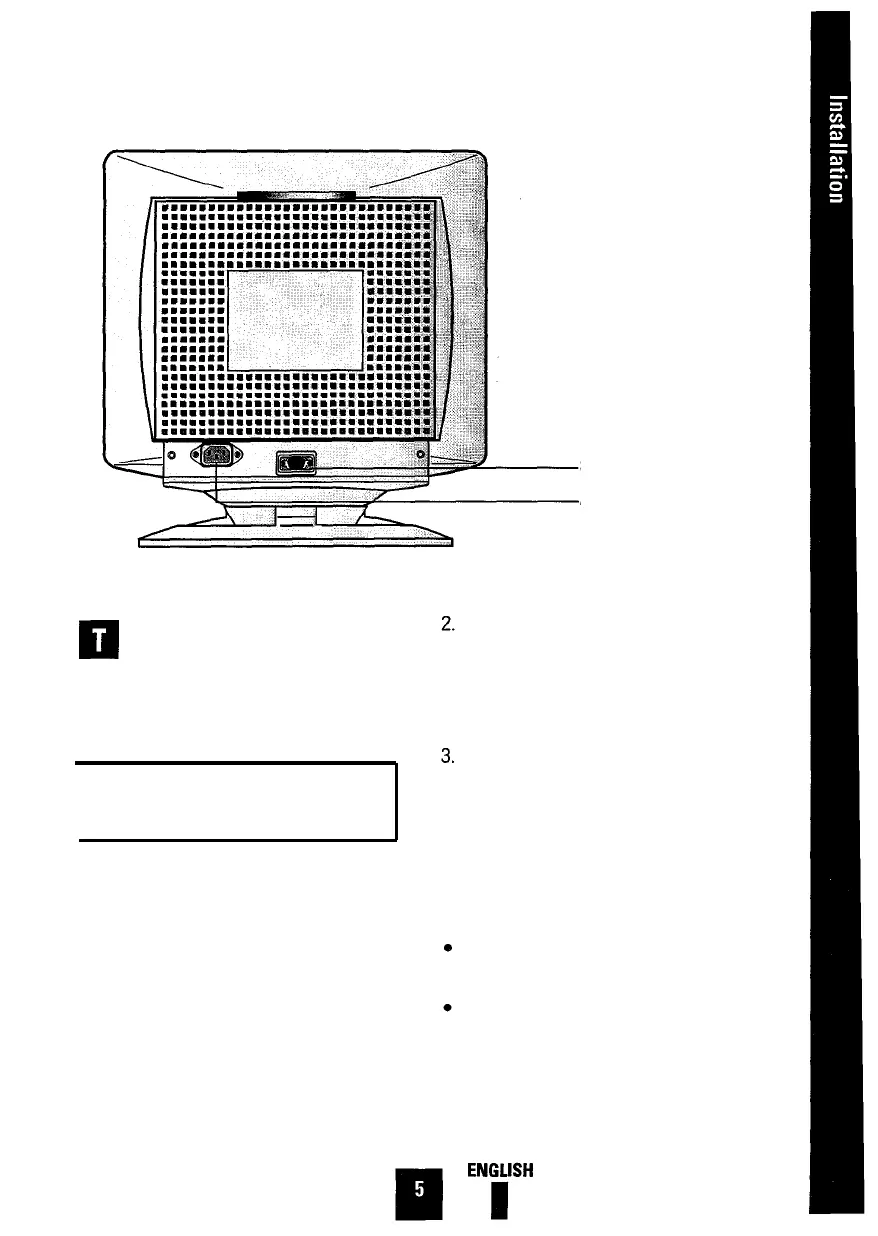
Signal Input
AC Cord Inlet
his section of the User’s Manual
explains how to connect the Color
Monitor to IBM or PC-compatible
computers, as well as Apple Macintosh
computers.
Connect one end of the signal cable
(provided with your monitor) to the D-
SUB connector on the rear of the mon-
itor. Tighten the screws on the signal
cable.
Connection to Your Computer—
IBM or PC-Compatible
Your Color Monitor complements a wide
range of IBM and PC-compatible systems.
To attach the monitor to this type of sys-
tem, follow these instructions:
Connect the other end of the signal
cable to the video connector on your
computer’s video controller. Tighten
the screws of the signal cable to
ensure proper connection.
Note: Your computer system has one of
two configurations:
1.
Turn off the power to the monitor and
computer.
The video controller is built into the
computer.
The video controller is in the form of a
display adapter ( also referred to as a
video card, graphics card, graphics
board, or graphics adapter ).







 To Next Page