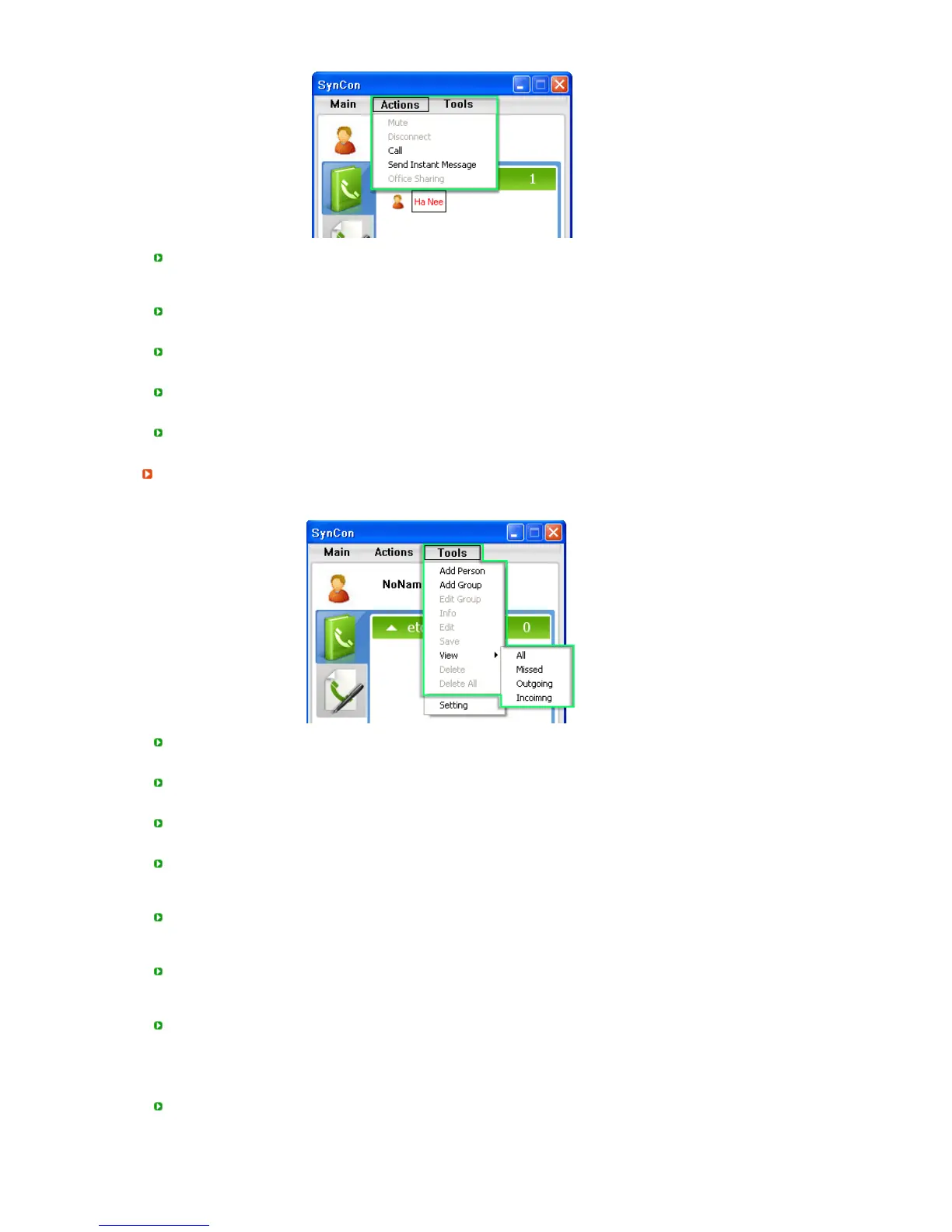
Mute
- Using this function, you can mute the audio data of a video call.
(You can suspend a video call depending on your requirements.)
Disconnect
- Disconnects an existing call.
Call
- Makes a call to the opposite party.
Send Instant Messa
e
- Sends a message to the opposite party.
Office Sharin
llows you to share office files with persons you are chatting to.
Tools
You can add, edit or delete a person or group and check the IP address of a registered person.
Add Person
-
dds a person to whom you wish to make a video call.
Add Group
-
dds a group of persons.
Edit Group
- Renames a group name.
Info
- If
Phonebook
is selected, the information for the user selected in the phonebook is displayed.
If
Call histor
is selected, the information for the user selected in the call history is displayed.
Edit
- Edits the information for the user selected in the phonebook.
(This is only enabled if the Phonebook is selected.)
Save
- Saves the information stored in the call history to the phonebook.
(This is only enabled if the Call history is selected.)
ll :Displays all calls.
- Missed :Displays missed calls.
- Outgoing :Displays outgoing calls.
- Incoimng :Displays incoming calls.
Delete
- If the
Phonebook
is selected, the selected phonebook entry is deleted.
If the
Call histor
is selected, the selected call history entry is deleted.








 To Next Page