EasyManua.ls Logo

Samsung SyncMaster 220TN - Page 49

Samsung SyncMaster 220TN
94 pages
Print Icon
To Next Page IconTo Next Page
To Previous Page IconTo Previous Page
Loading...
and select Call from the displayed menu.
3.Select the person to video call and select
Call
from the
Actions
menu in the
SYNCON
main screen.
If the opposite party does not accept the call or is not connected to SYNCON, you cannot hold
a video call.
Receivin
g
a Call
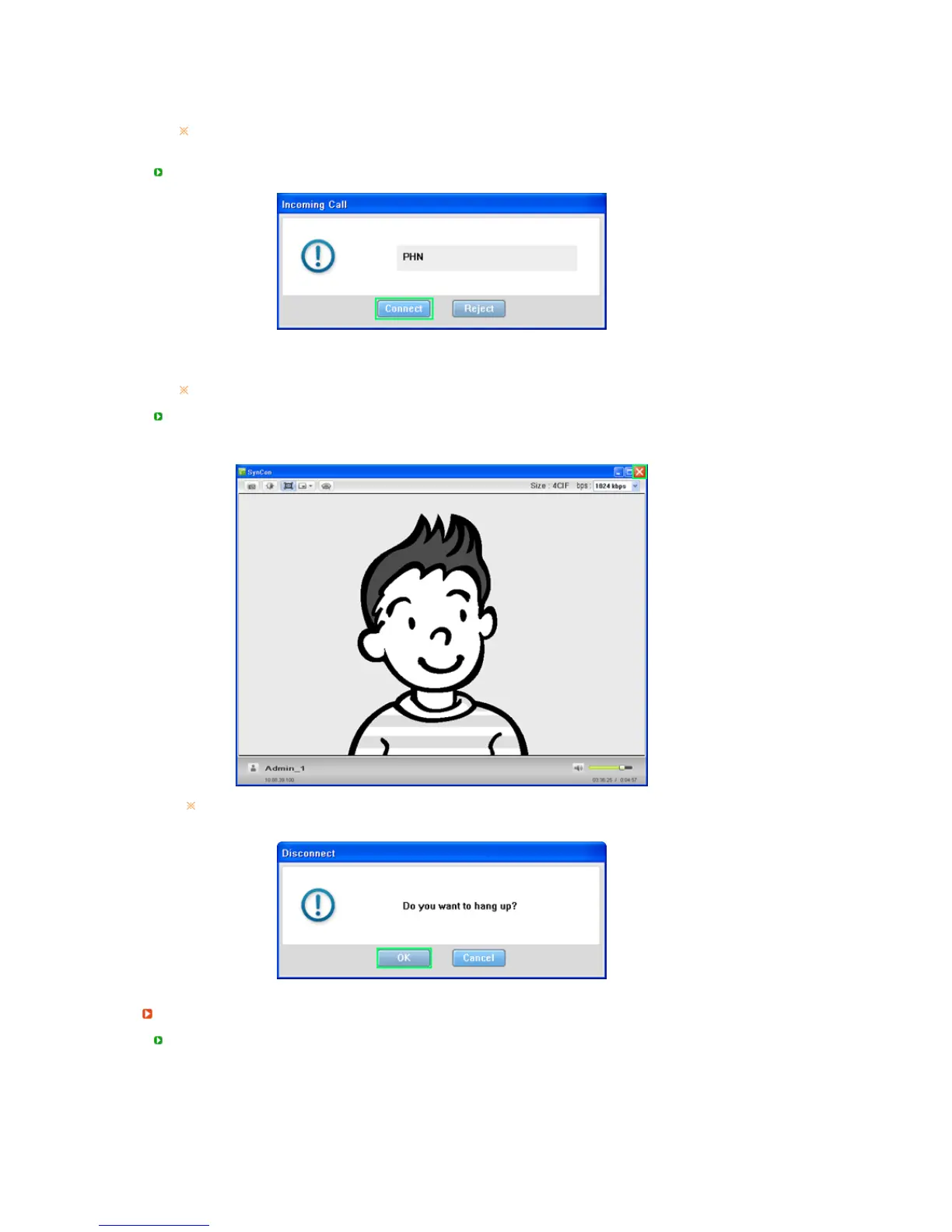
1. If the call rings while you are connected to SYNCON, click the Connect button. The video call
will be connected.
If you do not want to receive a call, click the Reject button.
Disconnectin
g
a Call
z
Disconnectin
g
a Call Usin
g
the Close Button
If you want to disconnect a video call, click the Close button. The Disconnect window is
displayed as shown in the figure below. Click OK.
Conference Call with Two or More Persons
Makin
g
a Call

Related product manuals