Using the product 3-4
3-4 Product Operating Buttons
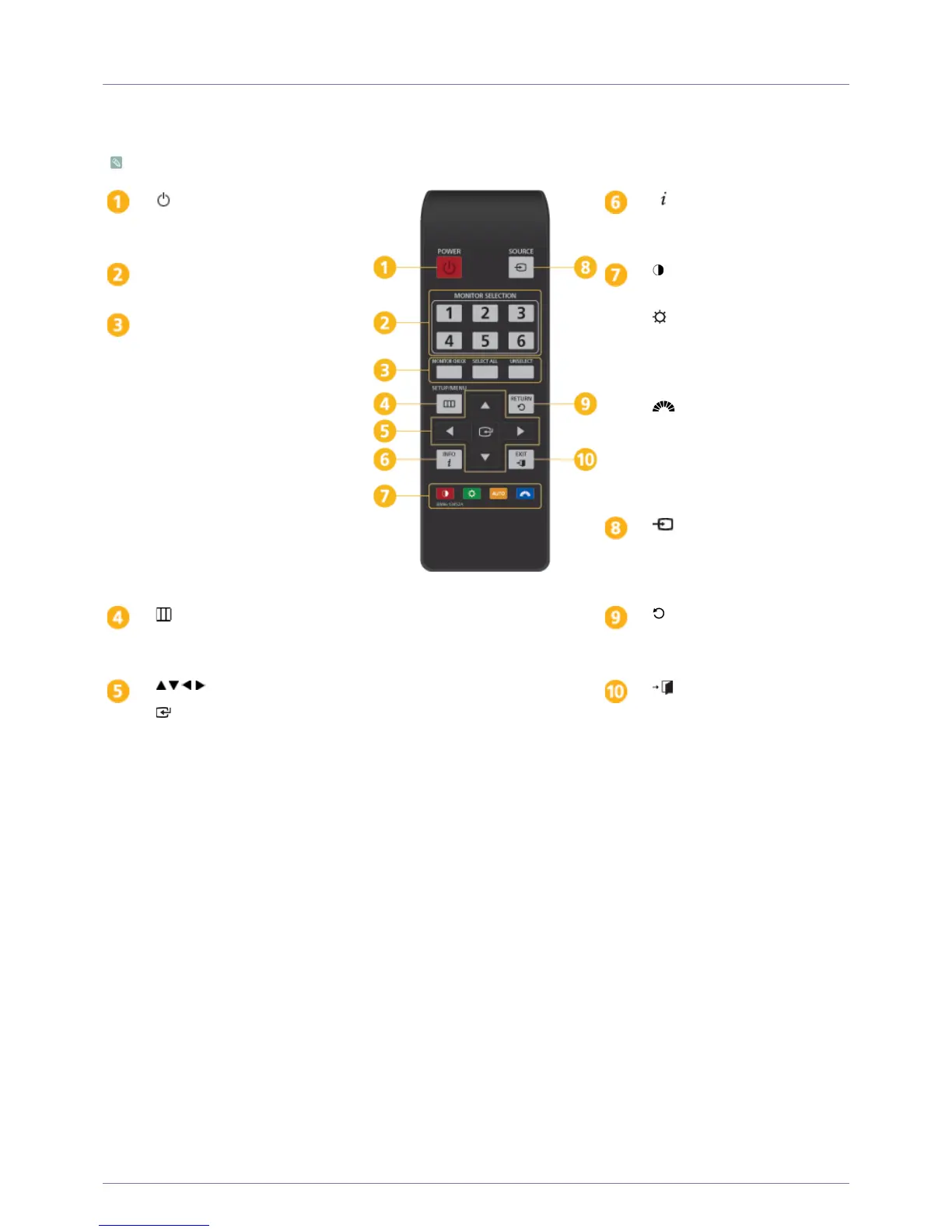
Multi Control Pad
This product can be controlled by using the multi control pad.
POWER
Turns the product On/Off.
INFO
Displays the current picture
information.
MONITOR SELECTION
Selects a monitor.
: Controls the contrast of the
screen.
: Use this button to control the
brightness of the screen.
AUTO
: Automatically adjusts the
picture in <Analog> mode.
: Provides preset picture
settings optimized for various user
environments such as editing a
document, surfing the Internet,
playing games, watching sports or
movies and so on.
MONITOR CHECK
: Displays the
monitor number.
SELECT ALL
: Selects all monitors.
UNSELECT
: Cancels selecting all
monitors.
SOURCE
Press the button to change the input
signal SOURCE. (Analog/Digital/
DP)
SETUP/MENU
Press this button to view the On
Screen Display (OSD).
RETURN
Returns to the previous menu.
Up-Down Left-Right buttons
Enter button
Activates the selected menu item.
EXIT
Exits from the menu screen.






 To Next Page