3-5 Using the product
3-5 Using the Screen Adjustment Menu (OSD: On Screen Display)
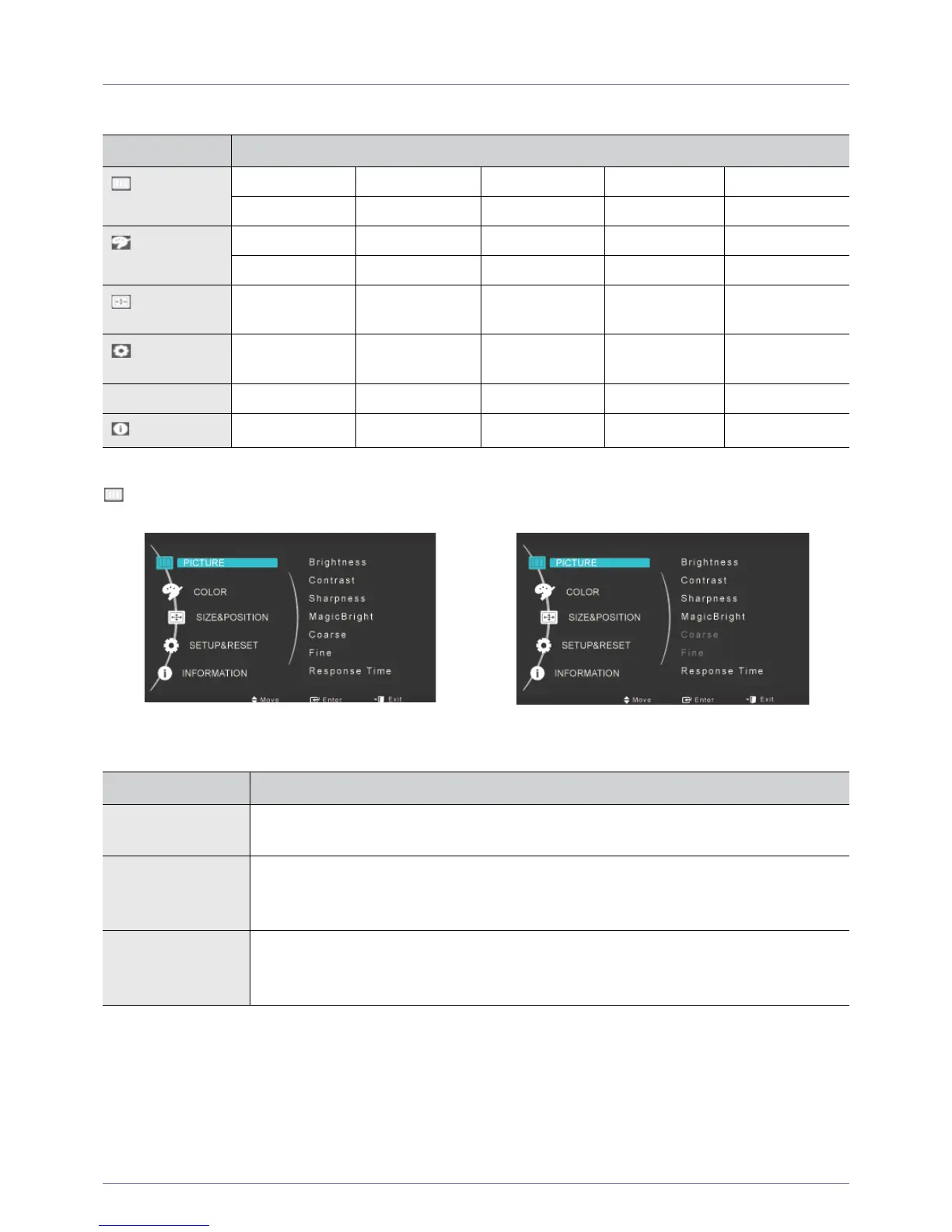
The Screen Adjustment Menu (OSD: On Screen Display) Structure
PICTURE
TOP MENUS SUB MENUS
PICTURE
Brightness Contrast Sharpness MagicBright Coarse
Fine Response Time
COLOR
MagicColor Red Green Blue Color Tone
Color Effect Gamma
SIZE &
POSITION
H-Position V-Position Image Size Menu H-Position Menu V-Position
SETUP&RESET
Reset Menu Transparency Language Off Timer On/Off Off Timer Setting
Auto Source PC/AV Mode Display Time
INFORMATION
<PC signals> <AV signals>
MENU DESCRIPTION
Brightness
Controls the screen brightness.
This menu is unavailable when <MagicBright> is set to <Dynamic Contrast> mode.
Contrast Controls the contrast of the pictures displayed on the screen
This menu is unavailable when <MagicBright> is set to <Dynamic Contrast> mode.
This menu is unavailable when <MagicColor> is set to <Full> mode or <Intelligent> mode.
Sharpness Controls the clarity of details of pictures displayed on the screen
This menu is unavailable when <MagicBright> is set to <Dynamic Contrast> mode.
This menu is unavailable when <MagicColor> is set to <Full> mode or <Intelligent> mode.






 To Next Page