EasyManua.ls Logo

Samsung VS20C95 Series - User Manual

Samsung VS20C95 Series
36 pages
Print Icon
To Next Page IconTo Next Page
Loading...
Vacuum cleaner
User manual
VS20C95**** Series
Before operating this unit, please read the instructions carefully.
For indoor use only
Untitled-7 1 2023-05-22  3:57:13

Questions and Answers

  • J
    Joshua FisherAug 13, 2025
    Why does my Samsung VS20C95 Vacuum Cleaner stop working?
    • M
      Madeline SolomonAug 13, 2025
      Your Samsung Vacuum Cleaner might not be working due to several reasons. First, check the battery level and charge it if needed. Ensure the vacuum cleaner is powered on by pressing the Power button. Also, inspect the Telescopic Pipe, dustbin, or brush for any blockages. Verify that the Washable Micro Filter is correctly inserted. If the vacuum hasn't been used for a while, charge the battery. If all else fails, the battery might be dead and needs replacement.
  • M
    melvin34Aug 17, 2025
    What to do if Samsung VS20C95 Vacuum Cleaner stops during cleaning?
    • S
      Sheila HowellAug 17, 2025
      Your Samsung Vacuum Cleaner may stop during cleaning because it has an overheating prevention device. This can happen under the following conditions: 1. The dustbin is full. 2. The brush is clogged. 3. The Extension Crevice Tool is used for long hours. After addressing the cause, you can turn the product on again.
  • S
    Stephen HarperAug 21, 2025
    Why does my Samsung VS20C95 Vacuum Cleaner suction suddenly decrease and vibrate?
    • E
      Edward AyalaAug 21, 2025
      A sudden decrease in suction force and a vibrating sound in your Samsung Vacuum Cleaner could be due to a few reasons. Check if the brush, dustbin, or Telescopic Pipe is clogged with foreign matter and remove any obstructions. Also, check if the dustbin is full and empty it if necessary. Lastly, inspect the filter for dirt and clean it if needed.
  • D
    Daniel JenkinsAug 25, 2025
    How to fix Samsung Vacuum Cleaner brush that is not spinning?
    • A
      Amy ChristensenAug 25, 2025
      If the spin brush (or spin disk) of an accessory on your Samsung Vacuum Cleaner isn't moving, try these steps. If the 'Check Brush' message appears, turn off the vacuum, check the brush for clogs, remove any foreign matter, and restart the vacuum. If that doesn't work, turn the vacuum off and on again. For the Slim LED Brush and Spray Spinning Sweeper, the motor's overheating prevention device may have activated; allow about 30 minutes for the motor to cool down.
  • D
    Derrick JacobsAug 28, 2025
    What to do if Samsung VS20C95 Vacuum Cleaner brush stops on carpet?
    • T
      Timothy VasquezAug 28, 2025
      If the brush on your Samsung Vacuum Cleaner stops on deep pile carpet or floor mat, it may be because the protective mode is operating to prevent motor damage caused by overload. Adjust the suction power according to the pile length and resistance of the carpet.
  • J
    Jeffrey ClayAug 31, 2025
    Why does my Samsung VS20C95 smell?
    • P
      patrick60Sep 1, 2025
      An odor from the air outlet or filter of your Samsung Vacuum Cleaner could be due to a few reasons. Make sure to frequently empty the dustbin and clean the filters. If the vacuum cleaner is new, a slight odor may be present for the first 3 months. Also, accumulated dirt in the dustbin or dust on the filter from long-term use can generate an odor. Replacement filters are available at your local Samsung service agent.
  • K
    kshepherdSep 4, 2025
    What to do if Samsung Spray Spinning Sweeper does not spray water?
    • B
      Brian FisherSep 4, 2025
      If your Samsung Spray Spinning Sweeper isn't spraying water, it could be due to air in the internal pump and tube, especially when using it for the first time. Detach the water tank, press the + button, and check for pump operation with a sound. Fill the water tank, attach it to the Spray Spinning Sweeper, and then press the + button repeatedly.
  • E
    Eric WadeSep 9, 2025
    How to stop static electricity from Samsung VS20C95?
    • G
      gary30Sep 9, 2025
      Static electricity when cleaning a thick and soft mat with your Samsung Vacuum Cleaner can be caused by the materials of the mat itself (like childcare center mats or noise prevention mats). Try moving the brush on a normal floor for a while before cleaning the mat again; this should help dissipate the static electricity.

Summary

Safety Information

Important Safety Symbols

Explains warning, caution, and note symbols used in the manual.

General Safety Guidelines

Provides general safety instructions and information on environmental commitments.

Vacuum Cleaner Safety Precautions

Safety precautions specific to operating the vacuum cleaner and its parts.

Charging Stand Safety

Safety precautions related to the proper use and handling of the charging stand.

Battery Safety Guidelines

Safety guidelines for handling, charging, and disposing of the product's battery.

Preparation

Product Accessories

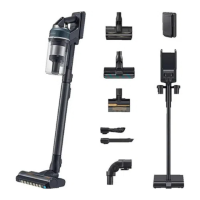
Lists and illustrates the various accessories included with the vacuum cleaner.

Parts Identification

Identifies and labels all the main parts of the vacuum cleaner.

Operation

Installing the Charging Stand

Step-by-step guide on how to assemble and set up the charging stand.

Using the Charging Stand

Instructions on how to correctly place the vacuum on the charging stand for charging.

Battery Charging and Storage

Instructions for charging the vacuum cleaner's battery and storing accessories.

Battery Operations

Steps for attaching, ejecting, and charging additional batteries for the vacuum.

Controls and Display Usage

Explains the function of the vacuum cleaner's buttons and display indicators.

Accessory Usage Guide

Instructions on how to attach and use different vacuum cleaner accessories.

Specialized Attachment Operation

Detailed instructions for using the Spray Spinning Sweeper and adjusting pipe length.

Maintenance

Vacuum Cleaner Cleaning

Instructions for cleaning the dustbin and washable micro filter.

Filter and Brush Maintenance

Steps for cleaning the fine dust filter and the Jet Dual Brush attachment.

Slim LED Brush Maintenance

Instructions for cleaning and maintaining the Slim LED Brush attachment.

Roller Wheel Cleaning

Guide on how to clean the roller wheels of the Slim LED Brush.

Rear Roller Wheel Cleaning

Instructions for cleaning the rear roller wheel of the brush.

Accessory Cleaning

Instructions for cleaning the Spray Spinning Sweeper, Pet Tool+, and pipe attachments.

Appendix

Installation Notes and Cautions

Important installation notes and safety cautions for the product.

Battery Usage Guidelines

Important notes and cautions regarding battery usage and performance.

Troubleshooting Common Issues

Common problems and their solutions for the vacuum cleaner.

Product Specifications

Technical specifications, dimensions, and cleaning times for the vacuum cleaner.

Samsung VS20C95 Series Specifications

General IconGeneral
ModelVS20C95 Series
Dust Collection TypeBagless
Power SourceBattery
Battery TypeLithium-Ion
TypeCordless Stick Vacuum

Related product manuals