18_ setting up your washing machine
setting up your washing
machine
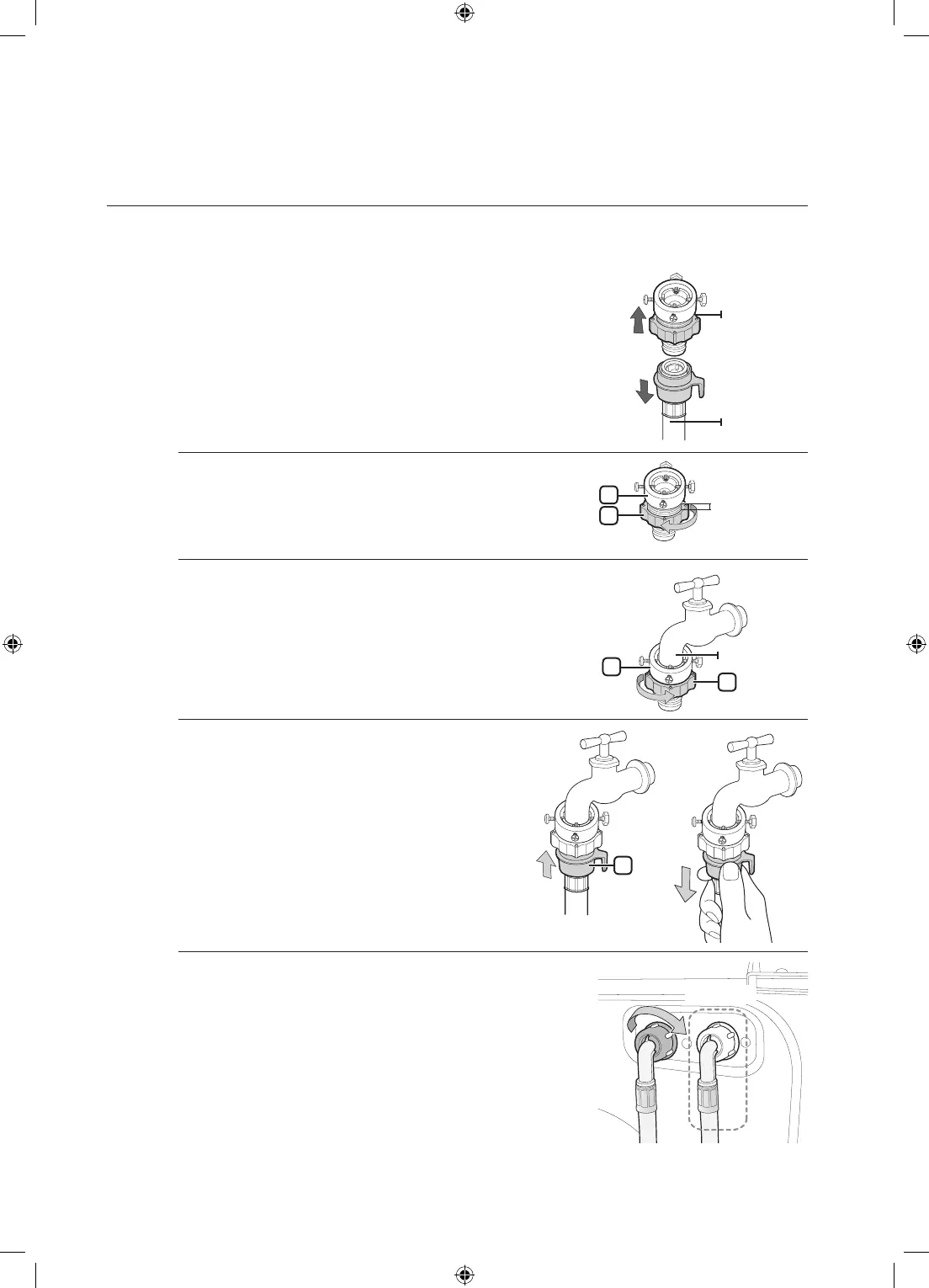
Connecting the water supply hose
1. Removetheadaptorfromthewatersupplyhose.
2. First, using a ‘+’ type screwdriver, loosen the four screws
ontheadaptor.Next,taketheadaptorandturnpart(2)
followingthearrowuntilthereisa5mmgap.
3. Connecttheadaptortothewatertapbytighteningthe
screws firmly while lifting the adaptor upwards.
Turnpart(2)followingthearrowandconnect(1)and(2).
4. Connectthewatersupplyhosetotheadaptor.
Whenyoureleasepart(3),thehoseautomatically
connects to the adaptor making a ‘click’ sound.
After you have connected the water supply
hose to the adaptor, ensure that it is connected
correctly by pulling the water supply hose
downwards.
5. Connecttheotherendofthewatersupplyhosetotheinlet
water valve at the rear of the washing machine. Screw the
hose clockwise all the way in.
Adaptor
Watersupply
hose
1
2
5mm
1
2
Watertap
Option
3
WD0804W8-02927U_EN(XEU)_removePF.indd 18 2011-7-9 11:58:50


 To Next Page