EasyManua.ls Logo

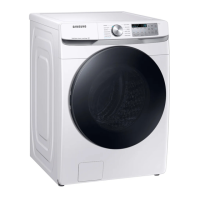
Samsung WF45B6300A Series - User Manual

Samsung WF45B6300A Series
128 pages
Print Icon
To Next Page IconTo Next Page
Loading...
Washer
User manual
WF45B6300A*
Untitled-1 1 2021-11-25  3:16:31

Table of Contents

Questions and Answers

  • L
    lindahunterAug 20, 2025
    What to do if my Samsung WF45B6300A does not drain and/or spin?
    • M
      morrisonjustinAug 20, 2025
      If your Samsung Washer isn't draining or spinning, ensure the drain hose isn't kinked or obstructed. Check the debris filter for clogs. Close the door and press Start/Pause. Also, make sure the drain hose is properly connected to the drain system and inserted 6 to 8 inches inside the drain pipe, and that the washer is level. A temporary power issue can also cause this, but it should resolve when power is restored.
  • A
    Ashley LeeAug 22, 2025
    Why my Samsung WF45B6300A does not start?
    • A
      Alejandro CrawfordAug 22, 2025
      If your Samsung Washer isn't starting, ensure it's plugged in, the door is properly closed, and the faucets are open. Press Start/Pause (Hold to Start) to begin the cycle. Verify that Child Lock is not activated. Also, check the fuse or reset the circuit breaker. The washer will make clicking noises and do a quick drain before filling.
  • A
    Aaron WebsterAug 25, 2025
    What to do if the door of my Samsung Washer does not open?
    • R
      rallenAug 25, 2025
      If your Samsung Washer door won't open, press Start/Pause (Hold to Start) to stop the washer. Allow a few moments for the door lock to disengage. Ensure all water has drained from the drum. If water remains, drain it manually. The door lock light should be off. Note that if the washer is paused after water is supplied, the door will open after one minute. If draining occurs followed by an information code, the door will open 3 minutes after the washer has stopped or the power is turned off. If you unplugged the power cord during operation, plug it back in, turn on the power, deactivate Child Lock if necessary, and then press and hold Start/Pause (Hold to Start) to stop the operation.
  • S
    Stephanie LinAug 26, 2025
    Why is my Samsung WF45B6300A leaking water?
    • J
      Joshua AllenAug 27, 2025
      If your Samsung Washer is leaking water, ensure the door is properly closed and all hose connections are tight. Make sure the end of the drain hose is correctly inserted and secured to the drain system. Avoid overloading the washer and use high efficiency (HE) detergent to prevent excessive suds.
  • W
    William LloydAug 28, 2025
    What to do if my Samsung WF45B6300A Washer does not start?
    • F
      Frank CowanAug 28, 2025
      If your Samsung Washer isn't starting, there are several things to check: * Ensure the washer is properly plugged in. * Verify that the door is completely closed. * Make sure the water faucets are fully open. * Press or tap the Start/Pause button (or Hold to Start) to initiate the wash cycle. * Confirm that Child Lock is not activated. * Check the fuse or reset the circuit breaker.
  • R
    Ricky ArellanoAug 29, 2025
    Why is my Samsung Washer vibrating excessively and making noise?
    • C
      Crystal SmithAug 29, 2025
      Excessive vibrations and noise in your Samsung Washer can stem from several causes: * Ensure the washer is installed on a level, solid, and non-slippery floor. * Verify that the shipping bolts have been removed. * Make sure the washer isn't touching any surrounding objects. * Ensure the laundry load is balanced. The motor's normal operation can also produce some noise. Additionally, items like overalls or metal-decorated clothing, as well as metal objects such as coins, can cause noise during the wash cycle. Remove these objects from the drum or filter case. When washing pillows and cushions, remove their fillings and wash only the covers.
  • C
    Catherine BondAug 31, 2025
    How to reduce vibration of my Samsung WF45B6300A Washer?
    • J
      Jessica OneillAug 31, 2025
      If your Samsung Washer is making excessive vibrations or noise, make sure it's installed on a level, solid floor. Adjust the leveling feet if needed. Ensure the shipping bolts have been removed and that the washer isn't touching anything else. Check that the laundry load is balanced. Remember that the motor can cause noise during normal operation, and metal objects or metal-decorated clothing can also create noise.
  • J
    Jody GoodSep 2, 2025
    Why Samsung WF45B6300A water supply is insufficient?
    • D
      Derrick TaylorSep 2, 2025
      If your Samsung Washer has insufficient water supply, fully open the faucet. Ensure the door is properly closed, and that the water supply hose isn't frozen, kinked, or clogged. Also, check that there is sufficient water pressure.
  • W
    williamsmarkSep 4, 2025
    How to reduce excessive suds in Samsung Washer?
    • J
      Jose SotoSep 4, 2025
      If your Samsung Washer is producing excessive suds, make sure you're using the recommended type and amount of detergent. Use high efficiency (HE) detergent to prevent oversudsing. Reduce the detergent amount for soft water, small loads, or lightly soiled loads, and avoid using Non-HE detergent.
  • M
    Madison BaileySep 6, 2025
    Why detergent remains in the detergent drawer of Samsung Washer after a cycle?
    • J
      Justin WilliamsSep 6, 2025
      If, after a cycle, detergent remains in the detergent drawer of your Samsung Washer, ensure the washer is running with sufficient water pressure. If using liquid detergent, add it to the liquid detergent container; remove the container if using powdered detergent. You may also need to clean the detergent drawer.

Summary

Safety Information

What You Need to Know About Safety Instructions

Provides essential information and guidance on understanding and following safety instructions for the appliance.

Important Safety Symbols

Explains the meaning of various icons and signs used throughout the user manual for safety awareness.

Important Safety Precautions

Details critical safety measures to reduce risks of fire, electric shock, or injury during appliance use.

Critical Installation Warnings

Highlights essential warnings and precautions related to the proper and safe installation of the washer.

Installation Cautions

Provides cautionary advice for installing the appliance to prevent potential hazards and damage.

Critical Usage Warnings

Emphasizes critical warnings that must be followed during the operation of the washer to ensure safety.

Usage Cautions

Offers cautionary advice for operating the washer safely and preventing common issues.

Critical Cleaning Warnings

Details crucial safety warnings that must be observed when cleaning the washing machine.

Regulatory Notice

FCC Notice

Provides Federal Communications Commission (FCC) compliance information for the device's radio frequency operations.

IC Notice

Details Industry Canada (IC) compliance statements and regulations for the appliance.

Open Source Announcement

Information regarding open-source software included in the product and how to obtain the source code.

Installation

Unpacking Your Washer

Instructions and safety advice for safely unpacking the new washing machine.

Whats Included

Lists all the components and accessories that should be included in the product package.

Installation Requirements

Specifies the necessary electrical supply, grounding, water supply, and drain requirements.

Flooring and Placement

Guidance on selecting appropriate flooring and considering water temperature for optimal installation.

Dimensions

Provides the physical dimensions of the washer for installation planning.

Clearance Requirements

Details the necessary space clearances around the appliance for stable operation and ventilation.

Installation Types

Covers different installation configurations like undercounter, pedestal, and side-by-side pairings.

Step-by-Step Installation

A comprehensive guide detailing the sequence of actions for installing the washer.

Before You Start

Initial Settings

Guides on initial setup procedures, including recommended calibration for accurate operation.

Laundry Guidelines

Provides instructions on sorting laundry, emptying pockets, and preparing items for washing.

Use HE Detergent Only

Emphasizes the requirement to use High Efficiency (HE) detergents for optimal cleaning and performance.

Detergent Drawer Guidelines

Explains the function of each compartment in the detergent drawer and how to use them correctly.

Using Bleach and Boosters

Instructions on how to properly use bleach and color-safe boosters for enhanced washing performance.

Operations

Control Panel

An overview of the washer's control panel, including buttons, display, and indicators.

Simple Steps to Start

A quick guide to starting a wash cycle with basic operational steps.

Cycle Overview

Describes the purpose and characteristics of each available wash cycle.

Cycle Chart

A reference chart to help select the best cycle and options for different laundry types.

Special Features

Explains special operational features like Delay End and Auto Temperature Control (ATC).

Advanced Functions

Details on using advanced functions such as Child Lock, Alarm Off, and Downloaded cycles.

SmartThings Connectivity

Instructions for connecting the washer to a smartphone via the SmartThings app.

Maintenance

Self-Clean+ Cycle

Procedure for running the self-cleaning cycle to keep the drum fresh and clean.

Smart Care

Enables self-diagnosis of the washer using a smartphone app to identify and resolve issues.

Emergency Drain

Instructions on how to drain water from the drum in case of a power failure.

Cleaning Procedures

Guidance on cleaning the washer's exterior, interior, mesh filters, pump filter, and detergent drawer.

Seasonal Care

Advice on recovery from freezing and care for the washer during extended periods of non-use.

Troubleshooting

Checkpoints

A guide to common problems and suggested actions to resolve them.

Information Codes

Explanation of error codes displayed on the screen and troubleshooting steps.

Specifications

Fabric Care Chart

Symbols and guidelines for proper garment care during washing and drying.

Wash Cycles and Settings

Details on available wash cycles, water temperatures, and heat settings.

Laundering Symbols and Warnings

Icons and explanations for laundry symbols and warnings related to washing and care.

Environmental and Compliance

Information on environmental considerations, disposal, and regulatory compliance.

Specification Sheet

Technical specifications including capacity, weight, power consumption, and dimensions.

Limited Warranty (U.S.A.)

Limited Warranty Coverage

Details the terms, conditions, and duration of the limited warranty for the Samsung washer.

Limitation of Remedies

Outlines the exclusive remedies available and limitations on liability under the warranty.

Samsung WF45B6300A Series Specifications

General IconGeneral
BrandSamsung
ModelWF45B6300A
TypeFront Load Washer
Capacity4.5 cu. ft.
Energy Star CertifiedYes
Spin Speed1300 RPM
Steam FunctionYes
Smart ConnectivityWi-Fi
Weight200 lbs
Vibration Reduction TechnologyYes
ColorBlack

Related product manuals