BASIC OPERATION
82005-PG-D SANDEL SN3500 EHSI PILOT’S GUIDE PAGE 3-1
CHAPTER 3 BASIC OPERATION
Overview
The SN3500 is configurable and controllable to provide the
information needed at any point in the flight. Configuring the
SN3500 refers to selecting the data for a given display. For
example, either the VOR or the GPS receiver can drive a bearing
pointer. Controlling the SN3500 refers to tailoring the display to suit
the immediate situation. For example, the pilot may decide to turn
off a bearing pointer completely during the enroute portion of the
flight and use it only during an approach.
Power-up Displays
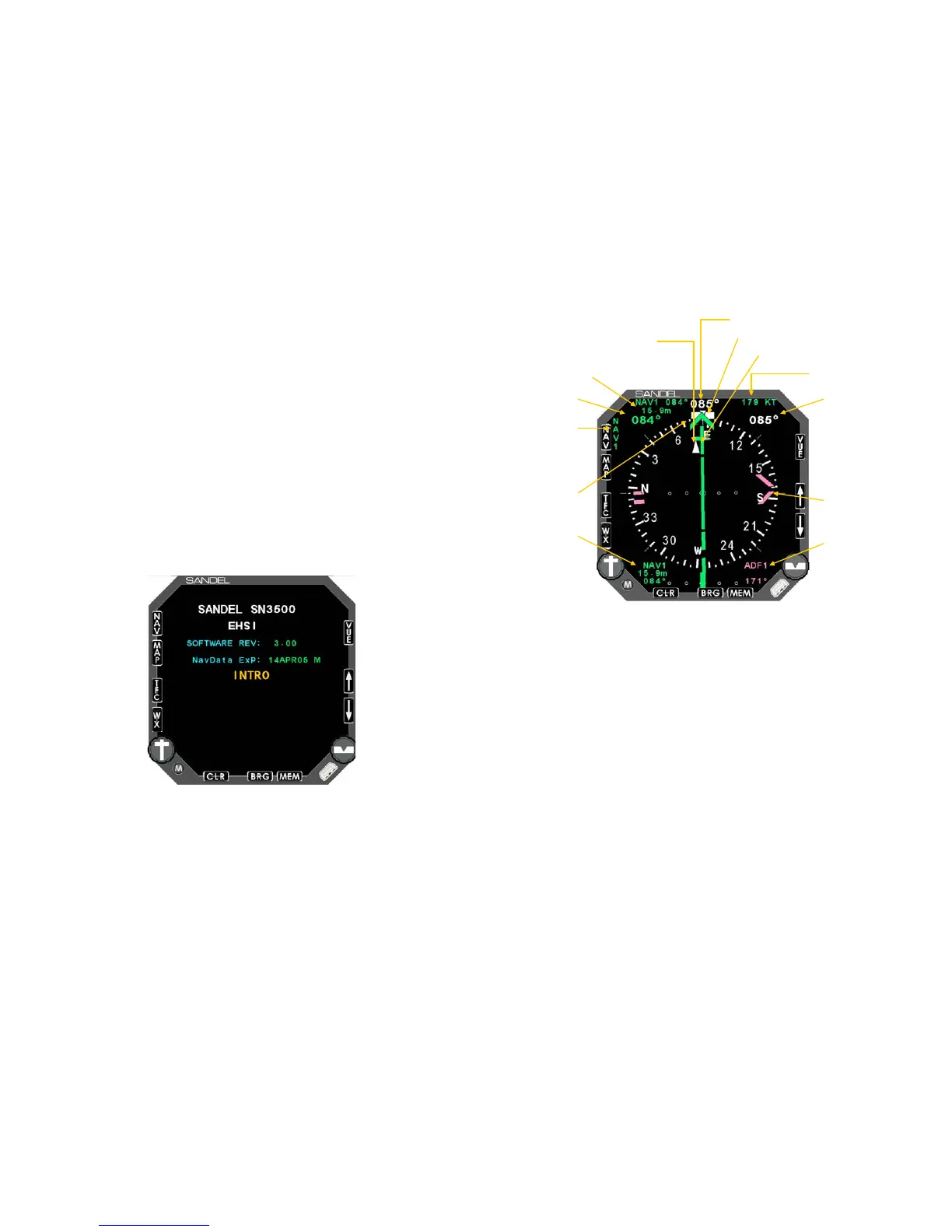
On initial power-up, a short introduction screen will be displayed
which includes the software and database versions.
Figure 3-1 Introduction screen
After a few seconds this display will be removed and the compass
card will be shown as below:
BASIC OPERATION
82005-PG-D SANDEL SN3500 EHSI PILOT’S GUIDE PAGE 3-2
Mag . heading
Course
pointer
Heading bug
DME
groundspeed
To /from
indicator
DME distance
Bearing
pointer 2
Bearing
pointer 2
source and
bearing
Bearing
pointer
1
Bearing
pointer
1
source and
bearing
Selected
course
Selected
heading
Current NAV
source
Figure 3-2 SN3500 display with compass card
Selecting the Data
Sensor data is data that comes from avionic sources within the
aircraft. This includes primary navigational instruments as well as
sensors. The SN3500 can display data from the following sources:
• Compass system (directional gyro and fluxgate)
• NAV1 and NAV2 receivers
• LNAV1 and LNAV2 receivers (GPS/FMS)
• DME1 and DME2
• ADF1 and ADF2
• Marker beacon receiver
• Weather detection (WX-500 Stormscope® and/or WSI)
• Traffic


 To Next Page