GB-11
Safety Warnings
Product Overview
Connections
Maintenance
Operation
Hints and Tips
and Specification
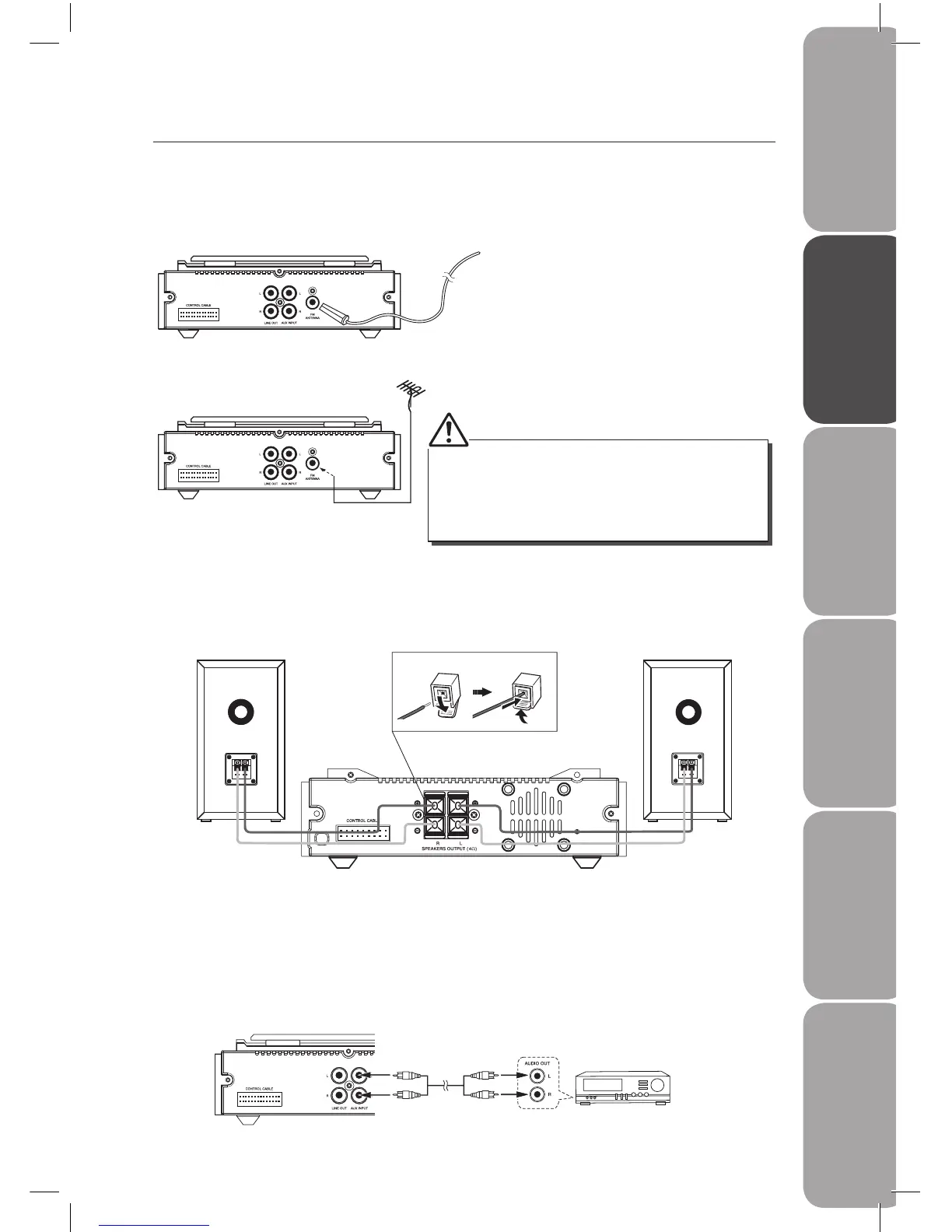
1. Connecting the FM Aerial
Connect the FM wire aerial provided to the FM Aerial socket as illustrated below.
Connections
3. Connecting Auxiliary Equipment
Connect the AUX INPUT sockets at the rear of the CD player to the line output sockets on
the auxiliary equipment using RCA stereo audio cables (not included) as illustrated below.
Auxiliary equipment
The CD Player
2. Speaker Connections
Connect the speaker cables at the back of the speakers to the speaker sockets (L/R) at the
rear side of the amplier.
1. FM Aerial
2. FM Aerial
Connect the FM wire aerial to the FM
aerial socket on the rear of the CD player.
If reception is poor, connect the unit to
an outdoor aerial.
• Before attaching a 75 ohm coaxial lead (the kind with
a round wire going to an outside aerial), disconnect
the supplied FM wire aerial.
• To avoid noise, keep antennas away from the system,
the control cable and the mains cable.
Right Speaker Box
Back View
Left Speaker Box
Back View
The Amplifer



 To Next Page