GB
3
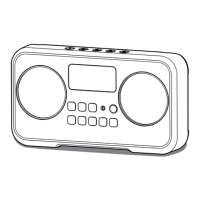
Controls
Opening the cover
Using the AC power adaptor to charge the unit
1
2
3
4
5
6
7
8
9
10
12
11
13
15
14
16
18
17
19
20
Volume up/down button
Bluetooth pair button/Preset button
Menu button/Info button
Tuning down button/Rewind button
Tuning up button/Fast-forward button
Select button/Play/Pause button
Source button
Telescopic Aerial
Bluetooth status indicator
LCD display
Battery charging indicator
Speaker
Headphone socket
Aux in socket
DC in
USB charging socket
Power button
Key lock
NFC detection tag
Socket for software upgrade
The cover is designed to protect the radio from
damage and can also serve as a stand for
the radio. Turn over the cover on the rear of
the radio and make sure the magnets on the
front cover and the rear cover hold together as
shown in the gure.
This unit operates on a built-in Li-on battery that can be recharged using the AC power
adaptor. The AC power required for this unit should be 12volts DC at 1.5A center pin
positive. Before operating the radio for the rst time please fully charge the battery.
Insert the adaptor plug into the DC socket on the left side of the radio. Then Plug the
adaptor into a standard mains socket outlet and the radio will begin charging the built
in battery. Please note that battery charging only occurs when the radio turns off.
Charging time is approx. 4.5 hours. The battery charging indicator on the front panel will
show steady green when the battery charging is in progress. When the battery charging
indicator turns off indicates the battery is fully charged. The indicator ashes in green
when the battery fails to charge.



 To Next Page
 Loading...