05
GB
F
E
NL
D
Recalling a preset station
1.
With your radio switched on, select required band by pressing Band button.
2.
Torecallapresetstation,pressthePagebuttontoselecttherequiredpresetpage(1-5)and
momentarilypresstherequiredPresetbutton(1-4),yourradiowilltunetothestationstoredin
the selected preset memory.
NOTE
Thedisplaywillash"---"ifnostationhasbeenstoredtothatpreset.
Stereo / Mono switching
The radio is designed to receive FM stereo broadcastings. For weak FM station, press Stereo /
Mono button
to switch Stereo to Mono. The Stereo icon will disappear on the display.
DBB (Dynamic Bass Boost)
Press the DBB button to activate the Dynamic Bass Boost function to have stronger bass sound,
the display will appear “DBB” symbol. Pressing the DBB button again will cancel the DBB
function.
NOTE
Sangean suggests activating the DBB when using earphones.
Software version / Setting tuning step
The software display cannot be altered and is just for your reference.
1.
Press and hold the Step button when your radio is in power off mode, the screen will show the
software version (e.g. Pxx).
2.
Continue pressing and holding the Step button and the radio will enter the AM tuning step
setting.
3.
The screen will show the AM tuning step (e.g. AM 9 or 10). Turn the jog wheel up / down to
choosebetween9kHzor10kHzandpressinthejogwheeltoconrmyourselection.
4.
After your completion of AM tuning step setting, the screen will show FM tuning step (e.g. FM
50,100or200).Turnthejogwheelup/downtochoose“50”,“100”or“200”kHz.Pressinthe
jogwheeltoconrmyoursetting.
NOTE
In Europe and other parts of the world the AM tuning step is 9kHz, in North America the AM
tuning step is 10kHz. FM tuning steps also vary from country to country. Change in the AM
tuning step setting will result in the removal of AM presets stored in the radio.
Key Lock Function
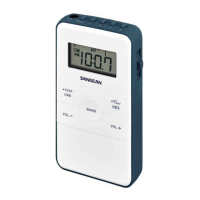
The key lock function is used to prevent unintentional operation of the radio. The Lock switch is
located on the left of the radio. When the Lock switch is set to the Lock position
, every button
will be disabled and a key lock icon will appear on the screen. To disable the key lock function,
slide the lock switch down to the unlock position. The lock icon will disappear from the display.


 To Next Page
 Loading...