9
Software version
The software display cannot be altered
and is just for your reference.
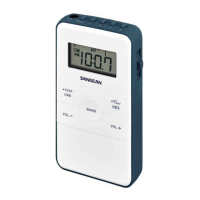
1. Press and hold DBB/● STEP button when
your radio is in power off mode, the screen
will show the software version (e.g. A03)
2. Continue pressing and holding the DBB/
● STEP and the radio will enter FM/AM
step setting.
FM / AM step setting
3. The screen will show FM tuning step
(i.e. FM1 50 or 100). Turn the Tuning jog
wheel to choose 50 KHZ or 100KHZ and
then press the Tuning jog wheel to conrm
your setting.
4. After your completion of FM tuning step,
the screen will show AM tuning step
(i.e. 9 or 10). Turn the Tuning jog wheel
to choose 9KHZ or 10 KHZ and press
the Tuning jog wheel to confirm your
selection.
Important: Reset of frequency range
and tuning step will erase all the preset
stations stored in your radio.



 To Next Page
 Loading...