- 27 -
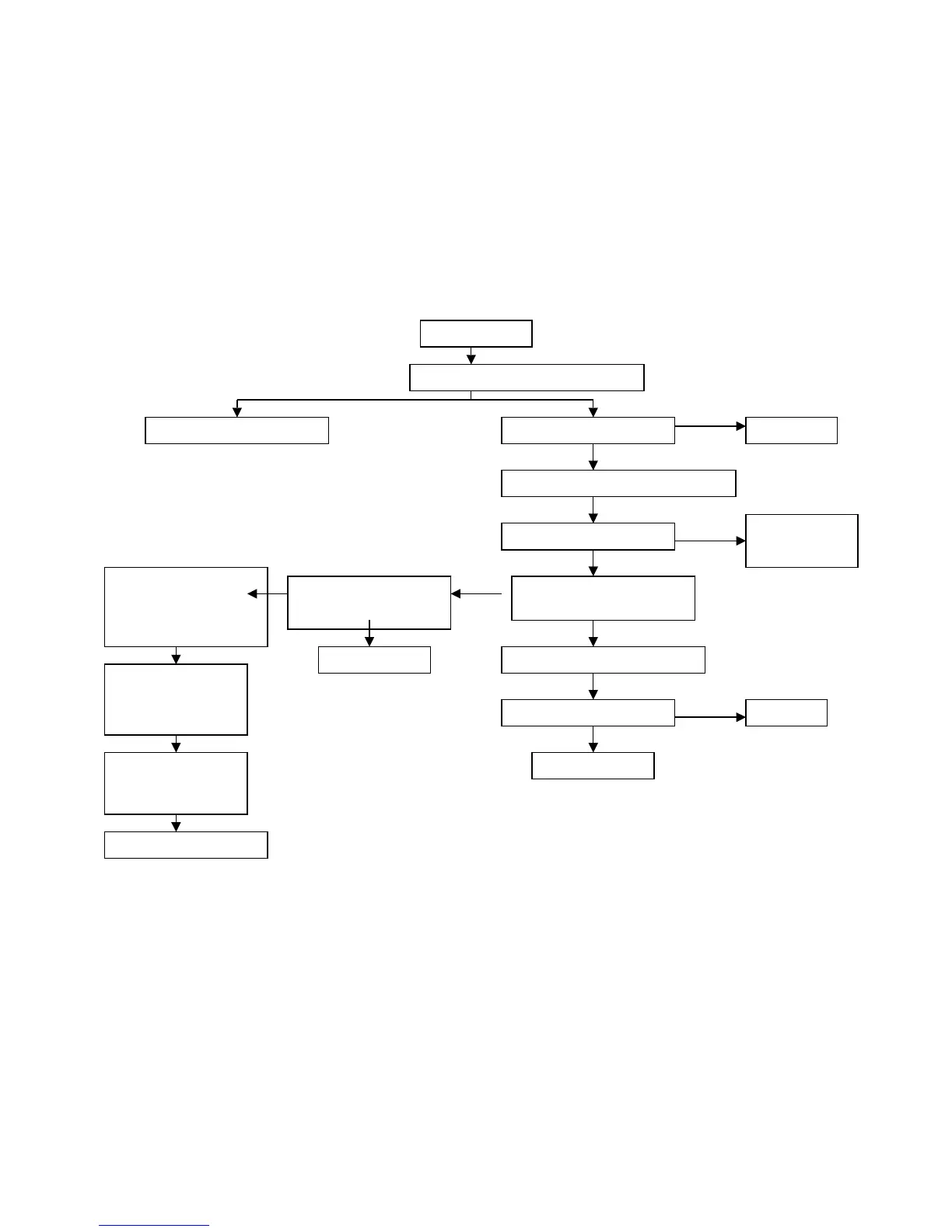
5. NO SOUND
Check if using the right audio in-put signal
Check the volume state, mute
Check the power supply U7(TDA7265)
Confirm U7(7265)Pin5<17V
Confirm U7 Pin7/Pin 11 audio
signal in-put
Confirm if there is output in earphone AV8
Check speaker
Confirm U6 (msp3415)
Pin26/ Pin27 audio signal
in-put
Replace AV8
Re-joint R48/R49
Confirm U1/U2(4052)
1. Right power supply
2. Right control
Open the outer audio in-put signal
Replace speaker
Confirm U6(msp3415)
Pin37/Pin38/Pin40/Pin41
audio signal in-put
Confirm U6(msp3415)
1. Power supply all right
2. Reposition all right
3. Crystal all right
No Sound
Volume up
Close U7(7265)
1. Mute
2. ST-BY
Check all audio input network


 To Next Page