- 5 -
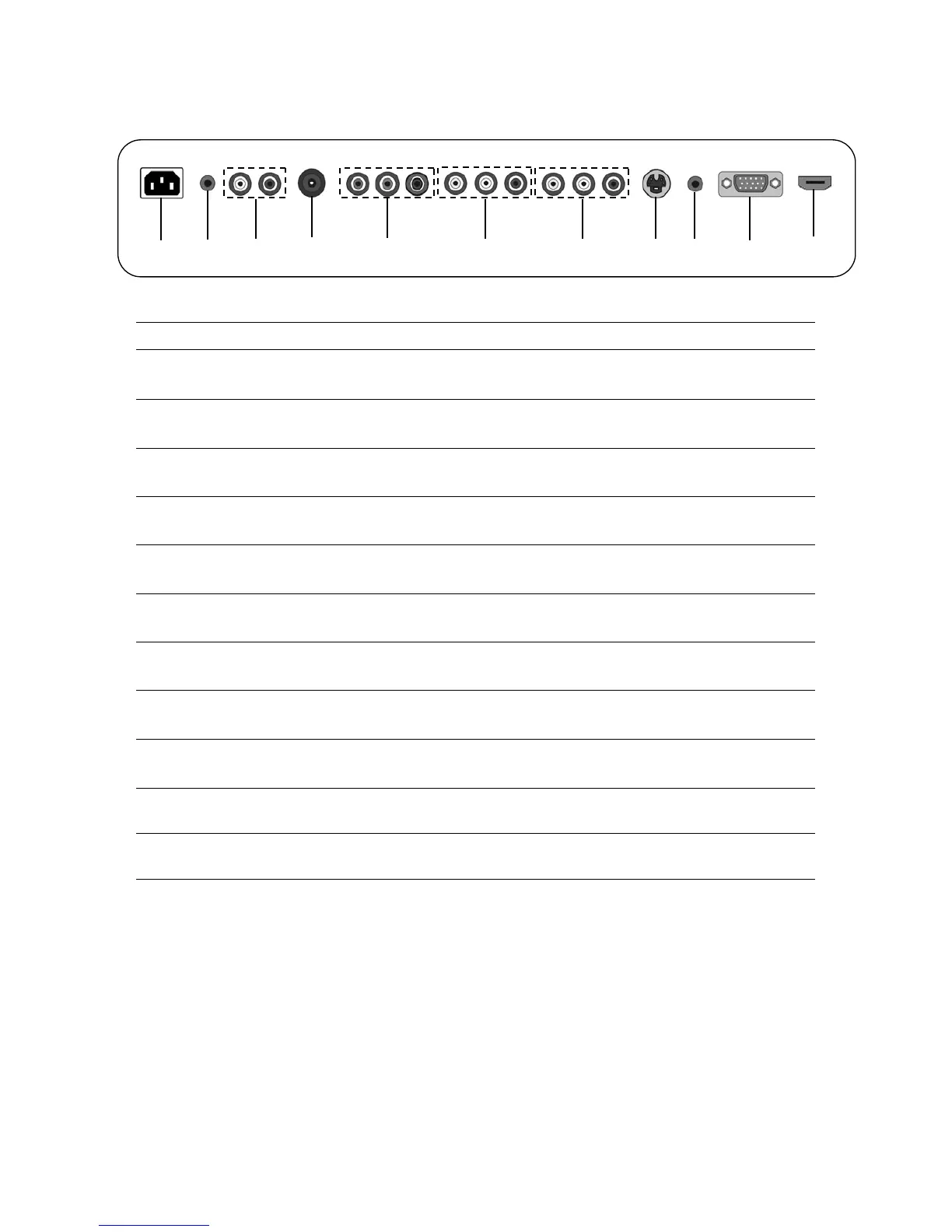
(2) Illustration of the interface panel
ITEM DESCRIPTION
1 AC IN
Connects the AC power cord. (100~240V AC, 50/60Hz)
2 Earphone Out
Earphone out interface.
3 YCbCr/YPbPr
Audio (L/R)
Audio in (L/R) jacks of your DVD player, HDTV, or video equipment.
4 RF(75Ω)
The RF input that connects to your VHF/UHF antenna or cable.
5 YCbCr/YPbPr
Component (Y, Cb/Pb, Cr/Pr) video jacks.
6 AV Out
Used to connect a video signal from a VTR or DVD
7 AV
Composite video input jacks.
8 S-Video
S-Video signal from an VCR or laserdisc player
9 PC Audio
Connects to the sound-output port of a personal computer
10 VGA
Used to connect a video signal from a personal computer
11 HDMI
Connects to a digital set-top box or other deceives with a HDMI interface.
⑽
⑼
⑴
⑶
⑹
⑸
⑷
⑵ ⑻ ⑺
⑾


 To Next Page