EasyManua.ls Logo

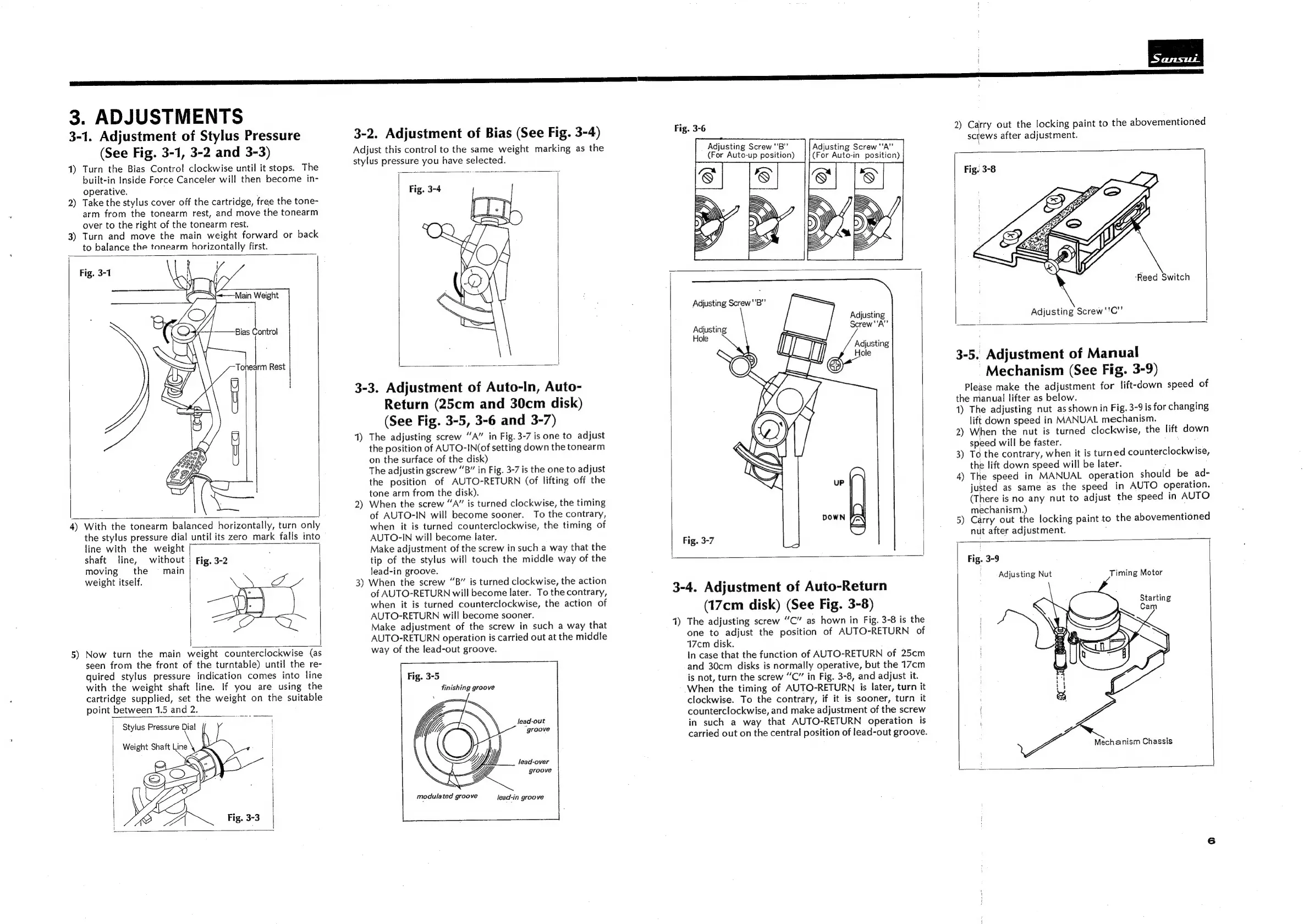
Sansui FR-4060 - 3. ADJUSTMENTS; 3-1. Adjustment of Stylus Pressure; 3-2. Adjustment of Bias; 3-3. Adjustment of Auto-In, Auto-Return (25 cm and 30 cm disk)

Sansui FR-4060
14 pages
Print Icon
To Next Page IconTo Next Page
To Previous Page IconTo Previous Page
Loading...
3.
ADJUSTMENTS
3-1.
Adjustment
of
Stylus
Pressure
(See
Fig.
3-1,
3-2
and
3-3)
1)
Turn
the
Bias
Contro!
clockwise
until
it
stops.
The
built-in
Inside
Force
Canceler
will
then
become
in-
operative.
;
Take
the
stylus
cover
off
the
cartridge,
free
the
tone-
arm
from
the
tonearm
rest,
and
move
the
tonearm
over
to
the
right
of
the
tonearm
rest.
3)
Turn
and
move
the
main
weight
forward
or
back
to
balance
the
tonearm
horizontally
first.
2
ww
Fig.
3-1
NO
me
4)
With
the
tonearm
balanced
horizontally,
turn
only
the
stylus
pressure
dial
until
its
zero
mark
falls
into
line
with
the
weight
shaft
line,
without
|
Fig.
3-2
moving
the
=
main
|
weight
itself.
5)
Now
turn
the
main
weight
counterclockwise
(as
seen
from
the
front
of
the
turntable)
until
the
re-
quired
stylus
pressure
indication
comes
into
line
with
the
weight
shaft
line.
If
you
are
using
the
cartridge
supplied,
set
the
weight
on
the
suitable
point
between
1.5
and
2.
Stylus
Pressure
Dial
3-2.
Adjustment
of
Bias
(See
Fig.
3-4)
Adjust
this
control
to
the
same
weight
marking
as
the
stylus
pressure
you
have
selected.
3-3.
Adjustment
of
Auto-In,
Auto-
Return
(25cm
and
30cm
disk)
(See
Fig.
3-5,
3-6
and
3-7)
1)
The
adjusting
screw
“A”
in
Fig.
3-7
is
one
to
adjust
the
position
of
AUTO-IN(of
setting
down
the
tonearm
on
the
surface
of
the
disk)
The
adjustin
gscrew
“B”
in
Fig.
3-7
is
the
one
to
adjust
the
position
of
AUTO-RETURN
(of
lifting
off
the
tone
arm
from
the
disk).
2)
When
the
screw
“A”
is
turned
clockwise,
the
timing
of
AUTO-IN
will
become
sooner.
To
the
contrary,
when
it
is
turned
counterclockwise,
the
timing
of
AUTO-IN
will
become
later.
Make
adjustment
of
the
screw
in
such
a
way
that
the
tip
of
the
stylus
will
touch
the
middle
way
of
the
lead-in
groove.
3)
When
the
screw
“B”
is
turned
clockwise,
the
action
of
AUTO-RETURN
will
become
later.
To
the
contrary,
when
it
is
turned
counterclockwise,
the
action
of
AUTO-RETURN
will
become
sooner.
Make
adjustment
of
the
screw
in
such
a
way
that
AUTO-RETURN
operation
is
carried
out
at
the
middle
way
of
the
lead-out
groove.
Fig.
3-5
finishing
groove
lead-out
groove
lead-over
groove
modulated
groove
lead-in
groove
Adjusting
Screw
"'B”’
(For
Auto-up
position)
Adjusting
Screw
“A”
(For
Auto-in
position)
Adjusting
Screw
'‘A”’
Hole
Fig.
3-7
3-4.
Adjustment
of
Auto-Return
(17cm
disk)
(See
Fig.
3-8)
1)
The
adjusting
screw
“C”
as
hown
in
Fig.
3-8
is
the
one
to
adjust
the
position
of
AUTO-RETURN
of
17cm
disk.
In
case
that
the
function
of
AUTO-RETURN
of
25cm
and
30cm
disks
is
normally
operative,
but
the
17cm
is
not,
turn
the
screw
“C”
in
Fig.
3-8,
and
adjust
it.
When
the
timing
of
AUTO-RETURN
is
later,
turn
it
clockwise.
To
the
contrary,
if
it
is
sooner,
turn
it
counterclockwise,
and
make
adjustment
of
the
screw
in
such
a
way
that
AUTO-RETURN
operation
is
carried
out
on
the
central
position
of
lead-out
groove.
2)
Carry
out
the
locking
paint
to
the
abovementioned
screws
after
adjustment.
Fig.
3-8
‘Reed
Switch
Adjusting
Screw
''C”’
3-5.
Adjustment
of
Manual
Mechanism
(See
Fig.
3-9)
Please
make
the
adjustment
for
lift-down
speed
of
the
manual
lifter
as
below.
1)
The
adjusting
nut
as
shown
in
Fig.
3-9
is
for
changing
lift
down
speed
in
MANUAL
mechanism.
2)
When
the
nut
is
turned
clockwise,
the
lift
down
speed
will
be
faster.
Ss
3)
To
the
contrary,
when
it
is
turned
counterclockwise,
the
lift
down
speed
will
be
later.
4)
The
speed
in
MANUAL
operation
should
be
ad-
justed
as
same
as
the
speed
in
AUTO
operation.
(There
is
no
any
nut
to
adjust
the
speed
in
AUTO
mechanism.)
5)
Carry
out
the
locking
paint
to
the
abovementioned
nut
after
adjustment.
Fig.
3-9
Adjusting
Nut
Timing
Motor
Mechanism
Chassis

Related product manuals