EasyManua.ls Logo

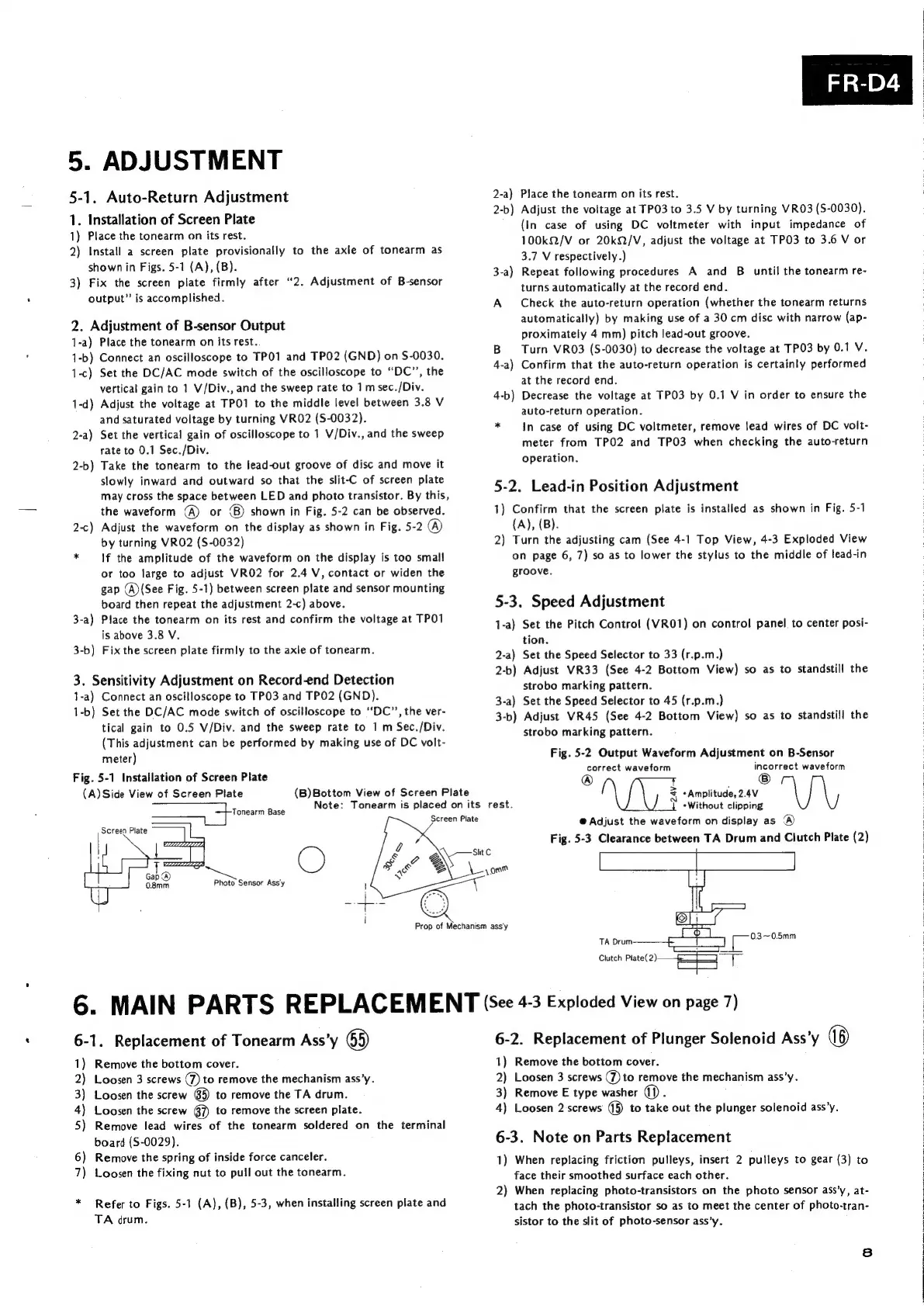
Sansui FR-D4 - Adjustment; Auto-Return Adjustment; Lead-in Position Adjustment; Speed Adjustment

Sansui FR-D4
11 pages
Print Icon
To Next Page IconTo Next Page
To Previous Page IconTo Previous Page
Loading...
5.
ADJUSTMENT
5-1.
Auto-Return
Adjustment
1.
Installation
of
Screen
Plate
1)
Place
the
tonearm
on
its
rest.
2)
Install
a
screen
plate
provisionally
to
the
axle
of
tonearm
as
shown
in
Figs.
5-1
(A),
(B).
3)
Fix
the
screen
plate
firmly
after
“2.
Adjustment
of
B-sensor
output”
is
accomplished.
2.
Adjustment
of
B-sensor
Output
1-a)
Place
the
tonearm
on
its
rest.
1-b)
Connect
an
oscilloscope
to
TP01
and
TPO2
(GND)
on
S-0030.
1-c)
Set
the
DC/AC
mode
switch
of
the
oscilloscope
to
“DC”,
the
vertical
gain
to
1
V/Div.,
and
the
sweep
rate
to
1
msec./Div.
1-d)
Adjust
the
voltage
at
TPO1
to
the
middle
level
between
3.8
V
and
saturated
voltage
by
turning
VRO2
(S-0032).
2-a)
Set
the
vertical
gain
of
oscilloscope
to
1
V/Div.,
and
the
sweep
rate
to
0.1
Sec./Div.
Take
the
tonearm
to
the
Jead-out
groove
of
disc
and
move
it
slowly
inward
and
outward
so
that
the
slit-C
of
screen
plate
may
cross
the
space
between
LED
and
photo
transistor.
By
this,
the
waveform
(A)
or
©)
shown
in
Fig.
5-2
can
be
observed.
2-c)
Adjust
the
waveform
on
the
display
as
shown
in
Fig.
5-2
@
by
turning
VRO2
(S-0032)
*
If
the
amplitude
of
the
waveform
on the
display
is
too
small
or
too
large
to
adjust
VRO2
for
2.4
V,
contact
or
widen
the
gap
(A)
(See
Fig.
5-1)
between
screen
plate
and
sensor
mounting
board
then
repeat
the
adjustment
2-c)
above.
3-a)
Place
the
tonearm
on
its
rest
and
confirm
the
voltage
at
TPO1
is
above
3.8
V.
3-b)
Fix
the
screen
plate
firmly
to
the
axle
of
tonearm.
2-b
=~
3.
Sensitivity
Adjustment
on
Record-end
Detection
1-a)
Connect
an
oscilloscope
to
TP03
and
TP02
(GND).
1-b)
Set
the
DC/AC
mode
switch
of
oscilloscope
to
‘‘DC”’,
the
ver-
tical
gain
to
0.5
V/Div.
and
the
sweep
rate
to
1
m
Sec./Div.
(This
adjustment
can
be
performed
by
making
use
of
DC
volt-
meter)
Fig.
5-1
Installation
of
Screen
Plate
(A)
Side
View
of
Screen
Plate
Tonearm
Base
Screen
Plate
Photo
Sensor
Ass'y
(B)Bottom
View
of
Screen
Plate
Note:
Tonearm
is
placed
on
its
rest.
2-a}
Place
the
tonearm
on
its
rest.
2-b)
Adjust
the
voltage
at
TP03
to
3.5
V
by
turning
VRO3
(S-0030).
(In
case
of
using
DC
voltmeter
with
input
impedance
of
100kQ/V
or
20k/V,
adjust
the
voltage
at
TPO3
to
3.6
V
or
3.7
V
respectively.)
3-a)
Repeat
following
procedures
A
and
B_
until
the
tonearm
re-
turns
automatically
at
the
record
end.
A
Check
the
auto-return
operation
(whether
the
tonearm
returns
automatically)
by
making
use
of
a
30
cm
disc
with
narrow
(ap-
proximately
4
mm)
pitch
lead-out
groove.
B
Turn
VRO3
(S-0030)
to
decrease
the
voltage
at
TPO3
by
0.1
V.
4-a)
Confirm
that
the
auto-return
operation
is
certainly
performed
at
the
record
end.
4-b)
Decrease
the
voltage
at
TPO3
by
0.1
V
in
order
to
ensure
the
auto-return
operation.
*
In
case
of
using
DC
voltmeter,
remove
lead
wires
of
DC
volt-
meter
from
TPO2
and
TPO3
when
checking
the
auto-return
operation.
5-2.
Lead-in
Position
Adjustment
1)
Confirm
that
the
screen
plate
is
installed
as
shown
in
Fig.
5-1
(A),
(B).
2)
Turn
the
adjusting
cam
(See
4-1
Top
View,
4-3
Exploded
View
on
page
6,
7)
so as
to
lower
the
stylus
to
the
middle
of
lead-in
groove.
5-3.
Speed
Adjustment
1-a)
Set
the
Pitch
Control
(VRO1)
on
control
panel
to
center
posi-
tion.
2-a)
Set
the
Speed
Selector
to
33
(r.p.m.)
2-b)
Adjust
VR33
(See
4-2
Bottom
View)
so
as
to
standstill
the
strobo
marking
pattern.
3-a)
Set the
Speed
Selector
to
45
(r.p.m.)
3-b)
Adjust
VR45
(See
4-2
Bottom
View)
so
as
to
standstill
the
strobo
marking
pattern.
Fig.
5-2
Output
Waveform
Adjustment
on
B-Sensor
correct
waveform
incorrect
waveform
®
i
.
=
*Amplitude,
2.4V
«Without
clipping
@
Adjust
the
waveform
on
display
as
Fig.
5-3
Clearance
between
TA
Drum
and
Clutch
Plate
(2)
6.
MAIN
PARTS
REPLACEMENT
(see
4-3
Exploded
View
on
page
7)
6-1.
Replacement
of
Tonearm
Ass’y
65)
1)
Remove
the
bottom
cover.
2)
Loosen
3
screws
(7)
to
remove
the
mechanism
ass’y.
3)
Loosen
the
screw
65)
to
remove
the
TA
drum.
4)
Loosen
the
screw
6D
to
remove
the
screen
plate.
5)
Remove
lead
wires
of
the
tonearm
soldered
on
the
terminal
board
(S-0029).
6)
Remove
the
spring
of
inside
force
canceler.
7)
Loosen
the
fixing
nut
to
pull
out
the
tonearm.
*
Refer
to
Figs.
5-1
(A),
(B),
5-3,
when
installing
screen
plate
and
TA
drum.
6-2.
Replacement
of
Plunger
Solenoid
Ass’y
1)
Remove
the
bottom
cover.
2)
Loosen
3
screws
(7)
to
remove
the
mechanism
ass’y.
3)
Remove
E
type
washer
(1)
4)
Loosen
2
screws
(5)
to
take
out
the
plunger
solenoid
ass’y.
6-3.
Note
on
Parts
Replacement
1)
When
replacing
friction
pulleys,
insert
2
pulleys
to
gear
(3)
to
face
their
smoothed
surface
each
other.
2)
When
replacing
photo-transistors
on
the
photo
sensor
ass’y,
at-
tach
the
photo-transistor
so
as
to
meet
the
center
of
photo-tran-
sistor
to
the
slit
of
photo-sensor
ass’y.
8
|
|
:
:

Related product manuals