EasyManua.ls Logo

Sansui G-9700 - Power Meter and Muting Features; AUDIO MUTING Switch; PEAK POWER LEVEL Meters; POWER METER RANGE Switch

Sansui G-9700
50 pages
Print Icon
To Next Page IconTo Next Page
To Previous Page IconTo Previous Page
Loading...
AUDIO
MUTING
OFF
ft
-20dB
=
20
0
0.02
0.05
O14
O25
05
125
25
5
25
100
200
(L
=
a
WATTS/822
[9
Sgn
ase
|
|
sam]
tS
|
|
|
a
0
0.02
0.05
0.1
025
05
1.25
25
5
25
100
200
POWER METER
RANGE
MODE
x1
PEAK
Oo
X1/10
HOLD
=
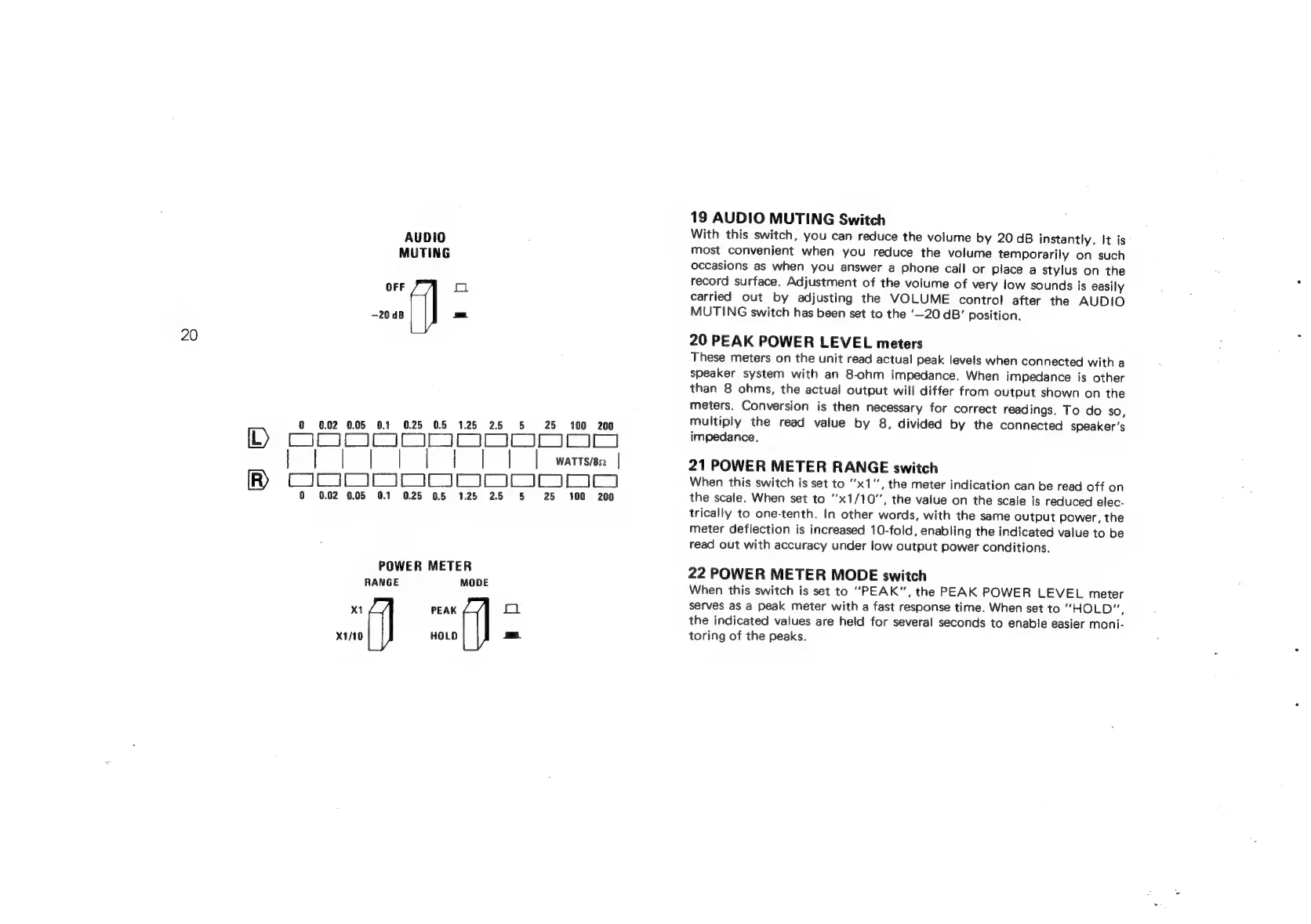
19
AUDIO
MUTING
Switch
With
this
switch,
you
can
reduce
the
volume
by
20
dB
instantly.
It
is
most
convenient
when
you
reduce
the
volume
temporarily
on
such
occasions
as
when
you
answer
a
phone
call
or
place
a
stylus
on
the
record
surface,
Adjustment
of
the
volume
of
very
low
sounds
is
easily
carried
out
by
adjusting
the
VOLUME
control
after
the
AUDIO
MUTING
switch
has
been
set
to
the
‘—20
dB’
position.
20
PEAK
POWER
LEVEL
meters
These
meters
on
the
unit
read
actual
peak
levels
when
connected
with
a
speaker
system
with
an
8-ohm
impedance.
When
impedance
is
other
than
8
ohms,
the
actual
output
will
differ
from
output
shown
on
the
meters.
Conversion
is
then
necessary
for
correct
readings.
To
do
so,
multiply
the
read
value
by
8,
divided
by
the
connected
speaker's
impedance.
21
POWER
METER
RANGE
switch
When
this
switch
is
set
to
’x1‘’,
the
meter
indication
can
be
read
off
on
the
scale.
When
set
to
''x1/10”,
the
value
on
the
scale
js
reduced
elec-
trically
to
one-tenth.
In
other
words,
with
the
same
output
power,
the
meter
deflection
is
increased
10-fold,
enabling
the
indicated
value
to
be
read
out
with
accuracy
under
low
output
power
conditions.
22
POWER METER
MODE
switch
When
this
switch
is
set
to
PEAK",
the
PEAK
POWER
LEVEL
meter
serves
as
a
peak
meter
with
a
fast
response
time.
When
set
to
“HOLD”,
the
indicated
values
are
held
for
several
seconds
to
enable
easier
moni-
toring
of
the
peaks.

Related product manuals