EasyManua.ls Logo

Sansui G-9700 - Using TAPE;AUX Inputs; Tape-to-Tape Copying; Protection Circuitry

Sansui G-9700
50 pages
Print Icon
To Next Page IconTo Next Page
To Previous Page IconTo Previous Page
Loading...
000000
©0009
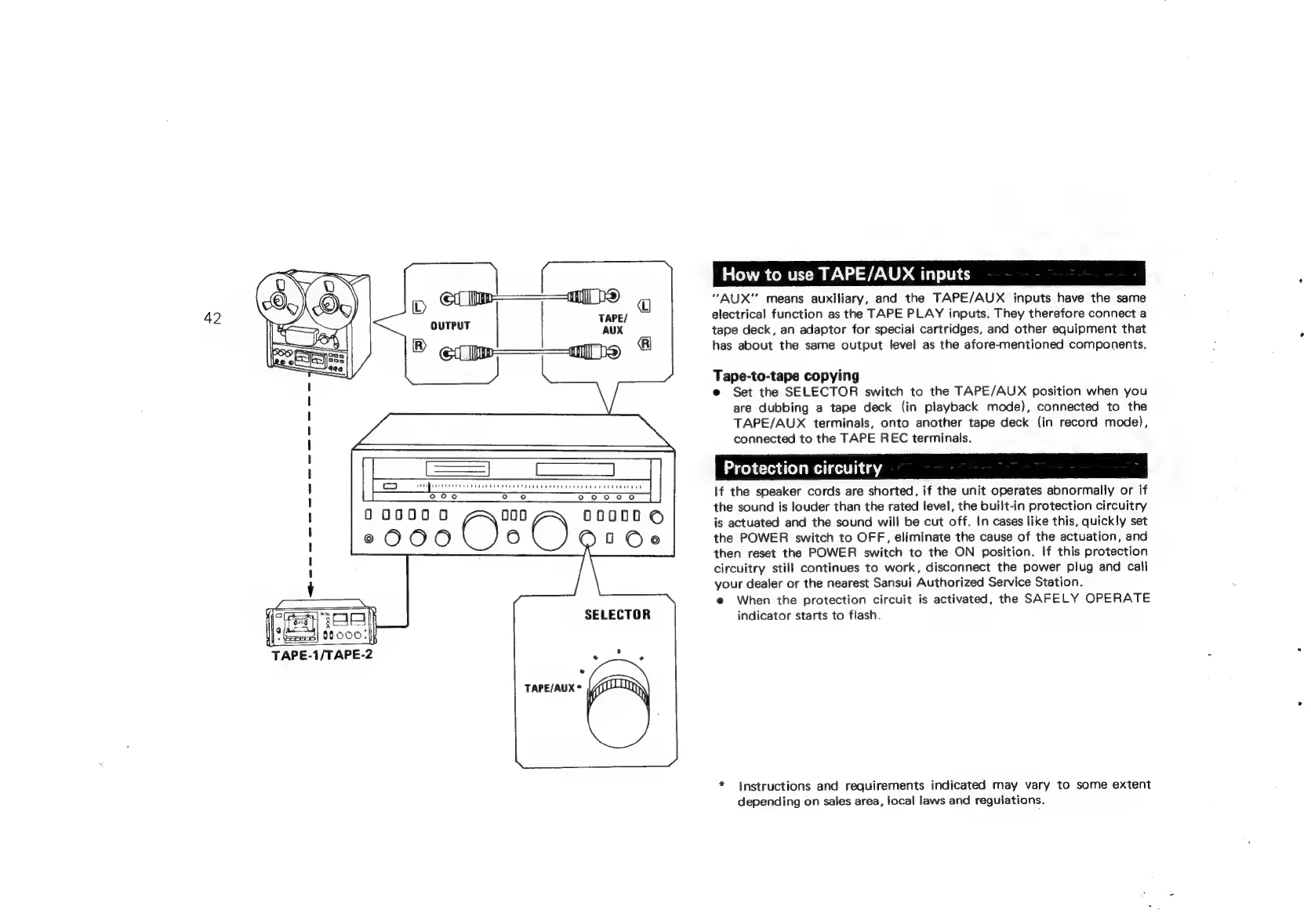
TAPE-1/TAPE-2
O
ooo
0
TAPE/AUX*
How
to
use
TAPE/AUX
inputs
“AUX"
means
auxiliary,
and
the
TAPE/AUX
inputs
have
the
same
electrical
function
as
the
TAPE
PLAY
inputs.
They
therefore
connect
a
tape
deck,
an
adaptor
for
special
cartridges,
and
other
equipment
that
has
about
the
same
output
level
as
the
afore-mentioned
components.
Tape-to-tape
copying
e
Set
the
SELECTOR
switch
to
the
TAPE/AUX
position
when
you
are
dubbing
a
tape
deck
(in
playback
mode),
connected
to
the
TAPE/AUX
terminals,
onto
another
tape
deck
(in
record
mode),
connected
to
the
TAPE
REC
terminals.
MaelicHeimHichiiiiag
If
the
speaker
cords
are
shorted,
if
the
unit
operates
abnormally
or
if
the
sound
is
louder
than
the
rated
level,
the
built-in
protection
circuitry
is
actuated
and
the
sound
will
be
cut
off.
In
cases
like
this,
quickly
set
the
POWER
switch
to
OFF,
eliminate
the
cause
of
the
actuation,
and
then
reset
the
POWER
switch
to
the
ON
position.
If
this
protection
circuitry
still
continues
to
work,
disconnect
the
power
plug
and
call
your
dealer
or
the
nearest
Sansui
Authorized
Service
Station.
e
When
the
protection
circuit
is
activated,
the
SAFELY
OPERATE
indicator
starts
to
flash.
*
Instructions
and
requirements
indicated
may
vary
to
some
extent
depending
on
sales
area,
local
laws
and
regulations.