EasyManua.ls Logo

Sansui P-M7 - Adjustment Procedures; Automatic Disc Size and Music Selection Adjustments; Tone Arm Height and Sensor Adjustments

Sansui P-M7
15 pages
Print Icon
To Next Page IconTo Next Page
To Previous Page IconTo Previous Page
Loading...
3.
ADJUSTMENTS
Note:
Before
adjustments
of
3-1
and
3-2,
remove
the
arm
rest
only.
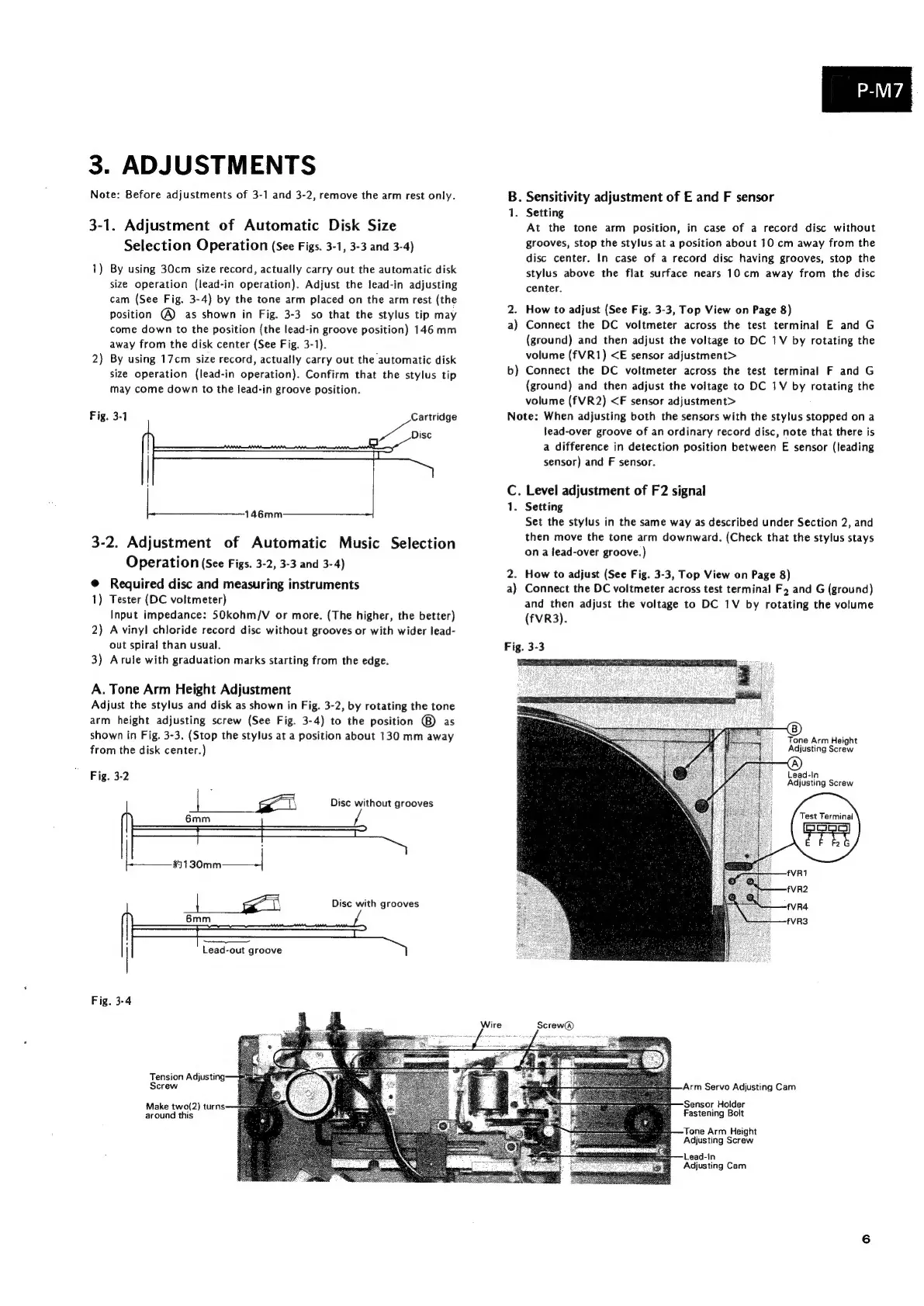
3-1.
Adjustment
of
Automatic
Disk
Size
Selection
Operation
(See
Figs.
3-1,
3-3
and
3-4)
1)
By
using
30cm
size
record,
actually
carry
out
the
automatic
disk
size
operation
(lead-in
operation).
Adjust
the
lead-in
adjusting
cam
(See
Fig.
3-4)
by
the
tone
arm
placed
on
the
arm
rest
(the
Position
@
as
shown
in
Fig.
3-3
so
that
the
stylus
tip
may
come
down
to
the
position
(the
lead-in
groove
position)
146
mm
away
from
the
disk
center
(See
Fig.
3-1).
By
using
17cm
size
record,
actually
carry
out
the
automatic
disk
size
operation
(lead-in
operation).
Confirm
that
the
stylus
tip
may
come
down
to
the
lead-in
groove
position.
i)
Fig.
3-1
Cartridge
wer
Disc
Pea
es
46mm
3-2.
Adjustment
of
Automatic
Music
Selection
Operation
(See
Figs.
3-2,
3-3
and
3-4)
@
Required
disc
and
measuring
instruments
1)
Tester
(DC
voltmeter)
Input
impedance:
50kohm/V
or
more.
(The
higher,
the
better)
2)
A
vinyl
chloride
record
disc
without
grooves
or
with
wider
lead-
out
spiral
than
usual.
3)
Arule
with
graduation
marks
starting
from
the
edge.
A.
Tone
Arm
Height
Adjustment
Adjust
the
stylus
and
disk
as
shown
in
Fig.
3-2,
by
rotating
the
tone
arm
height
adjusting
screw
(See
Fig.
3-4)
to
the
position
@)
as
shown
in
Fig.
3-3.
(Stop
the
stylus
at
a
position
about
130
mm
away
from
the
disk
center.)
Fig.
3-2
wi
Disc
without
grooves
Disc
with
grooves
!
eceereyeUuN
|
Lead-out
groove
Fig.
3-4
Tension
Adjusting
Screw
Make
two(2)
turns:
around
this
P-M7
B.
Sensitivity
adjustment
of
E
and
F
sensor
1.
Setting
At
the
tone
arm
position,
in
case
of
a
record
disc
without
grooves,
stop
the
stylus
at
a
position
about
10
cm
away
from
the
disc
center.
In
case
of
a
record
disc
having
grooves,
stop
the
stylus
above
the
flat
surface
nears
10
cm
away
from
the
disc
center.
2.
How
to
adjust
(See
Fig.
3-3,
Top
View
on
Page
8)
a)
Connect
the
DC
voltmeter
across
the
test
terminal
E
and
G
(ground)
and
then
adjust
the
voltage
to
DC
1V
by
rotating
the
volume
(fVR1)
<E
sensor
adjustment>
Connect
the
DC
voltmeter
across
the
test
terminal
F
and
G
(ground)
and
then
adjust
the
voltage
to
DC
1V
by
rotating
the
volume
(fVR2)
<F
sensor
adjustment>
Note:
When
adjusting
both
the
sensors
with
the
stylus
stopped
on
a
lead-over
groove
of
an
ordinary
record
disc,
note
that
there
is
a
difference
in
detection
position
between
E
sensor
(leading
sensor)
and
F
sensor.
b
C.
Level
adjustment
of
F2
signal
1.
Setting
Set
the
stylus
in
the
same
way
as
described
under
Section
2,
and
then
move
the
tone
arm
downward.
(Check
that
the
stylus
stays
ona
lead-over
groove.)
2.
How
to
adjust
(See
Fig.
3-3,
Top
View
on
Page
8)
a)
Connect
the
DC
voltmeter
across
test
terminal
Fz
and
G
(ground)
and
then
adjust
the
voltage
to
DC
1V
by
rotating
the
volume
(fVR3).
Fig.
3-3
Tone
Arm
Height
Adjusting
Screw
Lead-In
Adjusting
Screw
Test
Terminal
Arm
Servo
Adjusting
Cam
Sensor
Holder
Fastening
Bolt
‘Tone
Arm
Height
Adjusting
Screw
Lead-In
Adjusting
Cam

Related product manuals