EasyManua.ls Logo

Sansui P-M7 - E2 Signal Delay and Tone Arm Wire Tension; DD Motor Control Variable Resistors; Parts Lists and Diagrams; Front and Top View Parts Lists

Sansui P-M7
15 pages
Print Icon
To Next Page IconTo Next Page
To Previous Page IconTo Previous Page
Loading...
P-M7
D.
Delay
adjustment
of
E,
signal
1.
Setting
Use
the
record
disk
in
which
many
musics
(about
seven
music
tracks)
are
recorded,
and
select
three
music
tracks
having
lead-over
grooves,
respectively,
near
positions
70mm,
100mm,
and
130mm
away
from
the
disc
center.
2.
Adjustment
(See
Fig.
3-5,
Top
View
on
Page
8)
Perform
the
respective
lead-in
operations
for
three
selected
music
tracks,
and
adjust
the
operations
by
rotating
the
volume
(fVR4)
as
shown
in
Fig.
3-3
so
that
the
stylus
comes
down
on
or
a
little
before
the
lead-over
grooves
for the
three
music
tracks.
If
the
volume
(fVR4)
is
rotated
clockwise,
the
lift-down
position
of
the
stylus
is
shifted
inward.
Note:
In
the
lead-over
grooves
existing
on
a
70mm-or-less
from
the
center,
the
misplacing
of
the
arm
in
detection
position
occurs
inevitably.
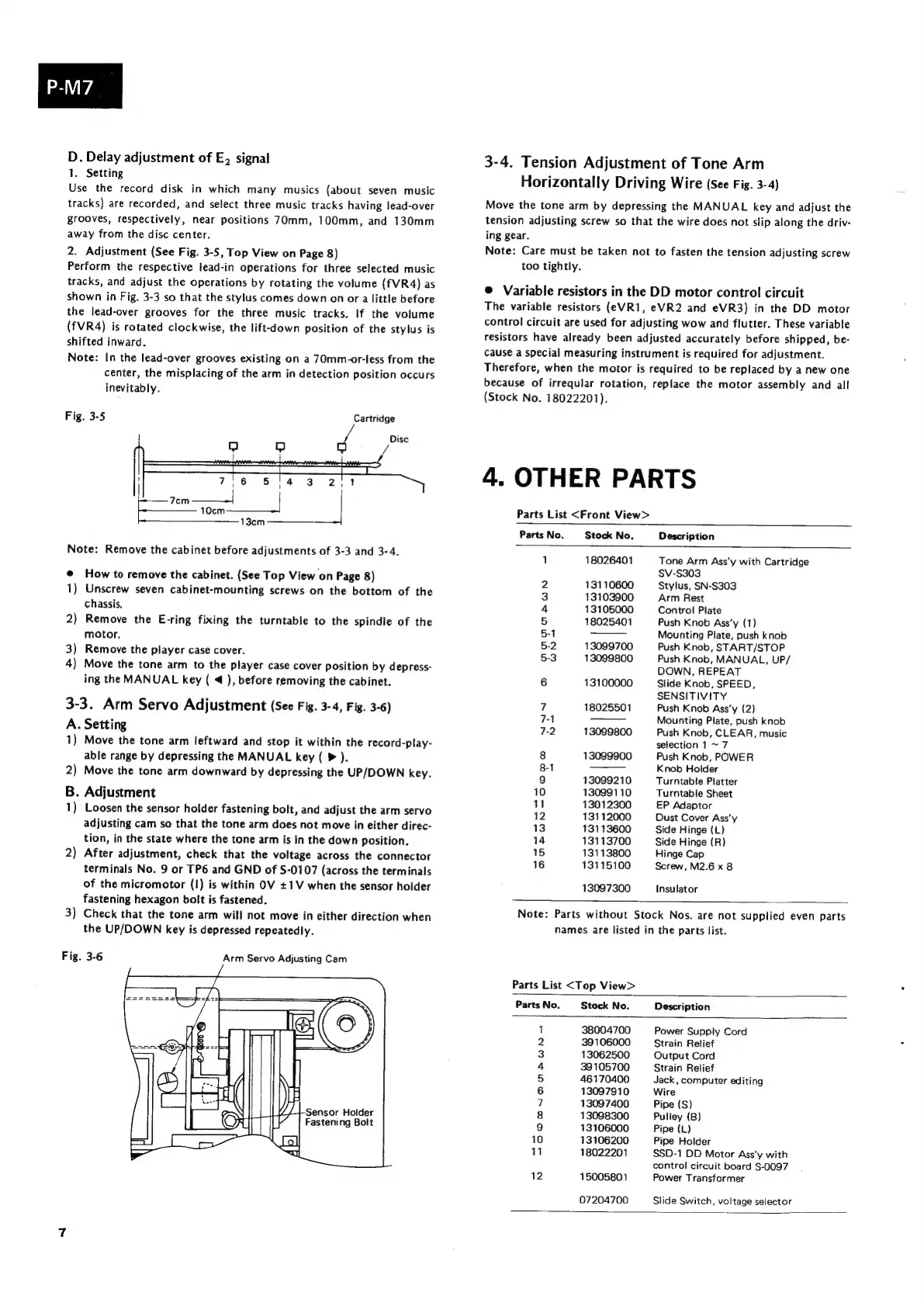
Fig.
3-5
Cartridge
Disc
5/4
3
2)
!
7,6
Jom
——--|
10cm
13cm
Note:
Remove
the
cabinet
before
adjustments
of
3-3
and
3-4.
How
to
remove
the
cabinet.
(See
Top
View
on
Page
8)
Unscrew
seven
cabinet-mounting
screws
on
the
bottom
of
the
chassis,
Remove
the
E-ring
fixing
the
turntable
to
the
spindle
of
the
motor.
3)
Remove
the
player
case
cover.
4)
Move
the
tone
arm
to
the
player
case
cover
Position
by
depress-
ing
the
MANUAL
key
(
4
),
before
removing
the
cabinet.
3-3.
Arm
Servo
Adjustment
(See
Fig.
3-4,
Fig.
3-6)
A.
Setting
1)
Move
the
tone
arm
leftward
and
stop
it
within
the
record-play-
able
range
by
depressing
the
MANUAL
key
(
>
).
2)
Move
the
tone
arm
downward
by
depressing
the
UP/DOWN
key.
B.
Adjustment
1)
Loosen
the
sensor
holder
fastening
bolt,
and
adjust
the
arm
servo
adjusting
cam
so
that
the
tone
arm
does
not
move
in
either
direc-
tion,
in
the
state
where
the
tone
arm
is
in
the
down
position.
-e@
2
2)
After
adjustment,
check
that
the
voltage
across
the
connector
terminals
No.
9
or
TP6
and
GND
of
S-0107
(across
the
terminals
of
the
micromotor
(I)
is
within
OV
+1V
when
the
sensor
holder
fastening
hexagon
bolt
is
fastened.
3)
Check
that
the
tone
arm
will
not
move
in
either
direction
when
the
UP/DOWN
key
is
depressed
repeatedly.
Fig.
3-6
Arm
Servo
Adjusting
Cam
Sensor
Holder
Fastening
Bolt
3-4.
Tension
Adjustment
of
Tone
Arm
Horizontally
Driving
Wire
(See
Fig.
3-4)
Move
the
tone
arm
by
depressing
the
MANUAL
key
and
adjust
the
tension
adjusting
screw
so
that
the
wire
does
not
slip
along
the
driv-
ing
gear.
Note:
Care
must
be
taken
not
to
fasten
the
tension
adjusting
screw
too
tightly.
®
Variable
resistors
in
the
DD
motor
control
circuit
The
variable
resistors
(eVR1,
eVR2
and
eVR3)
in
the
DD
motor
control
circuit
are
used
for
adjusting
wow
and
flutter.
These
variable
resistors
have
already
been
adjusted
accurately
before
shipped,
be-
cause
a
special
measuring
instrument
is
required
for
adjustment.
Therefore,
when
the
motor
is
required
to
be
replaced
by
a
new
one
because
of
irreqular
rotation,
replace
the
motor
assembly
and
all
(Stock
No.
18022201).
4.
OTHER
PARTS
Parts
List
<Front
View>
Parts
No.
Stock
No.
Description
=
18026401
Tone
Arm
Ass’y
with
Cartridge
SV-S303
2
13110600
Stylus,
SN-S303
3
13103900
Arm
Rest
4
13105000
Control
Plate
5
18025401
Push
Knob
Ass‘y
(1)
5-1
Mounting
Plate,
push
knob
5-2
13099700
Push
Knob,
START/STOP
5-3
13099800
Push
Knob,
MANUAL,
UP/
DOWN,
REPEAT
6
13100000
Slide
Knob,
SPEED,
SENSITIVITY
7
18025501
Push
Knob
Ass’y
(2)
7-1
Mounting
Plate,
push
knob
7-2
13089800
Push
Knob,
CLEAR,
music
selection
1
~
7
8
13099900
Push
Knob,
POWER
8-1
Knob
Holder
9
13099210
Turntable
Platter
10
13099110
Turntable
Sheet
41
13012300
EP
Adaptor
12
13112000
Dust
Cover
Ass’y
13
13113600
Side
Hinge
(L)
14
13113700
Side
Hinge
(R)
15
13113800
Hinge
Cap
16
13115100
Screw,
M2.6
x
8
13097300
Insulator
Note:
Parts
without
Stock
Nos.
are
not
supplied
even
parts
names
are
listed
in
the
parts
list.
Parts
List
<Top
View>
Parts
No.
Stock
No.
Description
1
38004700
Power
Supply
Cord
2
39106000
Strain
Relief
3
13062500
Output
Cord
4
39105700
Strain Relief
5
46170400
Jack,
computer
editing
6
13097910
Wire
7
13097400
Pipe
(S)
8
13088300
Pulley
(B)
9
13106000
Pipe
(L)
10
13106200
Pipe
Holder
11
18022201
SSD-1
DD
Motor
Ass‘y
with
control
circuit
board
S-0097
12
15005801
Power
Transformer
07204700
Slide
Switch,
voltage
selector

Related product manuals