EasyManua.ls Logo

Sansui QS-500 - Page 16

Sansui QS-500
25 pages
Print Icon
To Next Page IconTo Next Page
To Previous Page IconTo Previous Page
Loading...
ALIGNMENT
OUTPUT
ALIGNMENT
OF
REAR-CHANNEL
POWER
AMPLIFIER
CURRENT
ALIGNMENT
OF
REAR-GHANNEL
POWER
AMPLIFIER
STEP
CONNECT
“ADJUST
REMARKS
STEP
:
CONNECT
“ADJUST
|
1.
|
Turn
the
Rear
Volume
i
|
Remove
Foo;
and
Fooe
Control
fully
counterclock-
wise.
2.
|
Turn
VReoo
and
VRgoq.
fully
_
counterclockwise
Zz.
Set
an
oscillator
to
1kHz,
|
Use
oscillator
with
|
then
connect
it
to4CHAN-
|
output
capacity
great-
3.
|
Turn
on
Power/Rear
NEL
TAPE
MON
rear
|
er
than
200mV.
Set
|
Speakers
Switch.
|
|
left-channel
input
terminal.
|
all
three
Balance
Controls
in
center
4.
3.
|
Push
down
4
Channel
Tape
|
and
turn
up*
master
where
Fo;
was
(Refer
to
Monitor
Switch.
'
Volume
Control
to
|
Fig.
1.)
maximum.
|
4.
‘§
Connect
an
8-ohm
(or
16-
|
|
ohm)
resistor
(minimum
|
rating
of
50
watts)
to
SYS-
5.
|
Turn
VRgo2
slowly
clock-
.
TEM
A
rear
left-channel
wise
until
ammeter
shows
|
speaker
terminals.
15-20mA.
5.
|
Connect
an
oscilloscope
to
6.
|
Turn
off
power,
then
re-
_
the
same
speaker
terminal.
place
Foo.
6.
|
Set
Power/Rear
Speakers
Ts
Turn
on
power
again.
Switch
to
“SYSTEM
A’”’
|
|
position.
8.
Now,
connect
ammeter
(tester)
where
Foo.
was
7
Turn
Rear
Volume
Control
(Refer
to
Fig.
1.)
slowly
clockwise.
|
9.
|
Turn
VRgoq
slowly
clock-
8.
|
Adjust
VRgoi
so
that
both
|
wise
until
ammeter
shows
|
peaks
of
output,
wave
form
;
__/
15-20mA.
|
are
clipped
simultaneously.
|
|
|
10.
|
Turn
off
power,
then
re-
9.
For
rear
right-channel,
place
Foo.
|
repeat
above
procedure,
but
|
adjust
VRgo3
in
step
8.
STEP
|
CONNECT
“ADJUST
1.
Set
your
QS-500’s
three
Balance
Controls
at
re-
a
spective
center
positions.
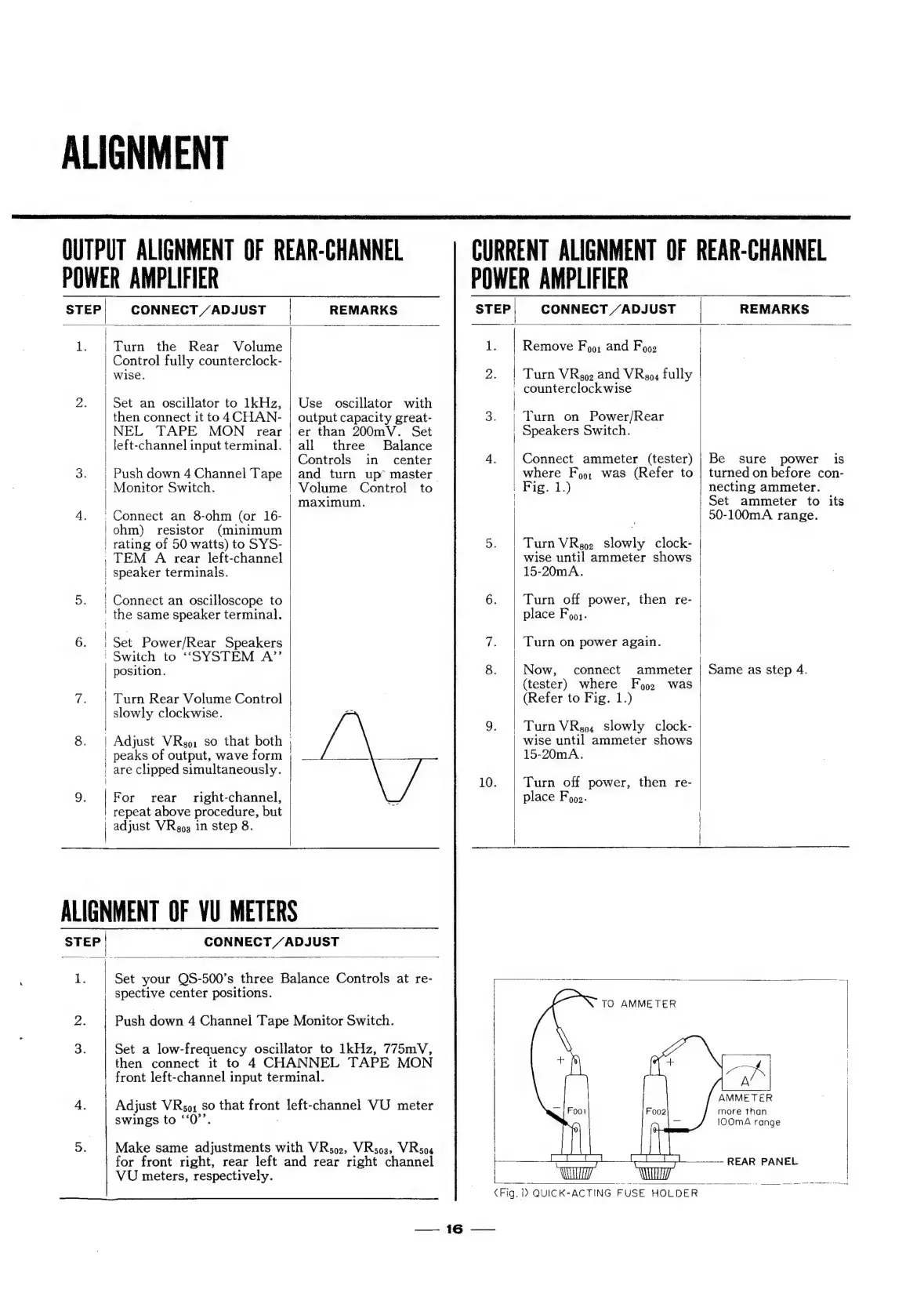
TO
AMMETER
2.
Push
down
4
Channel
Tape
Monitor
Switch.
3.
Set
a
low-frequency
oscillator
to
1kHz,
775mV,
then
connect
it
to
4
CHANNEL
TAPE
MON
front
left-channel
input
terminal.
4.
Adjust
VRso;
so
that
front
left-channel
VU
meter
swings
to
‘‘0’’.
.
5.
Make
same
adjustments
with
VRso2,
VRso3,
WRsoa
|
|
REMARKS
Connect
ammeter
(tester)
|
Be
sure
power
is
for
front
right,
rear
left
and
rear
right
channel
VU
meters,
respectively.
=.
{6
-———
Ba?
ghee,
¢Fig.
>
QUICK-ACTING
FUSE
HOLDER
turned
on
before
con-
|
necting
ammeter.
Set
ammeter
to
its
90-100mA
range.
Same
as
step
4.
AMMETER
more
than
1OOmA
range

Related product manuals