EasyManua.ls Logo

Sansui SE-7 - Tape Monitor

Sansui SE-7
22 pages
Print Icon
To Next Page IconTo Next Page
To Previous Page IconTo Previous Page
Loading...
r—TAPE
coPY—
iar
1>2
SOURCE
2>1
_
compensa
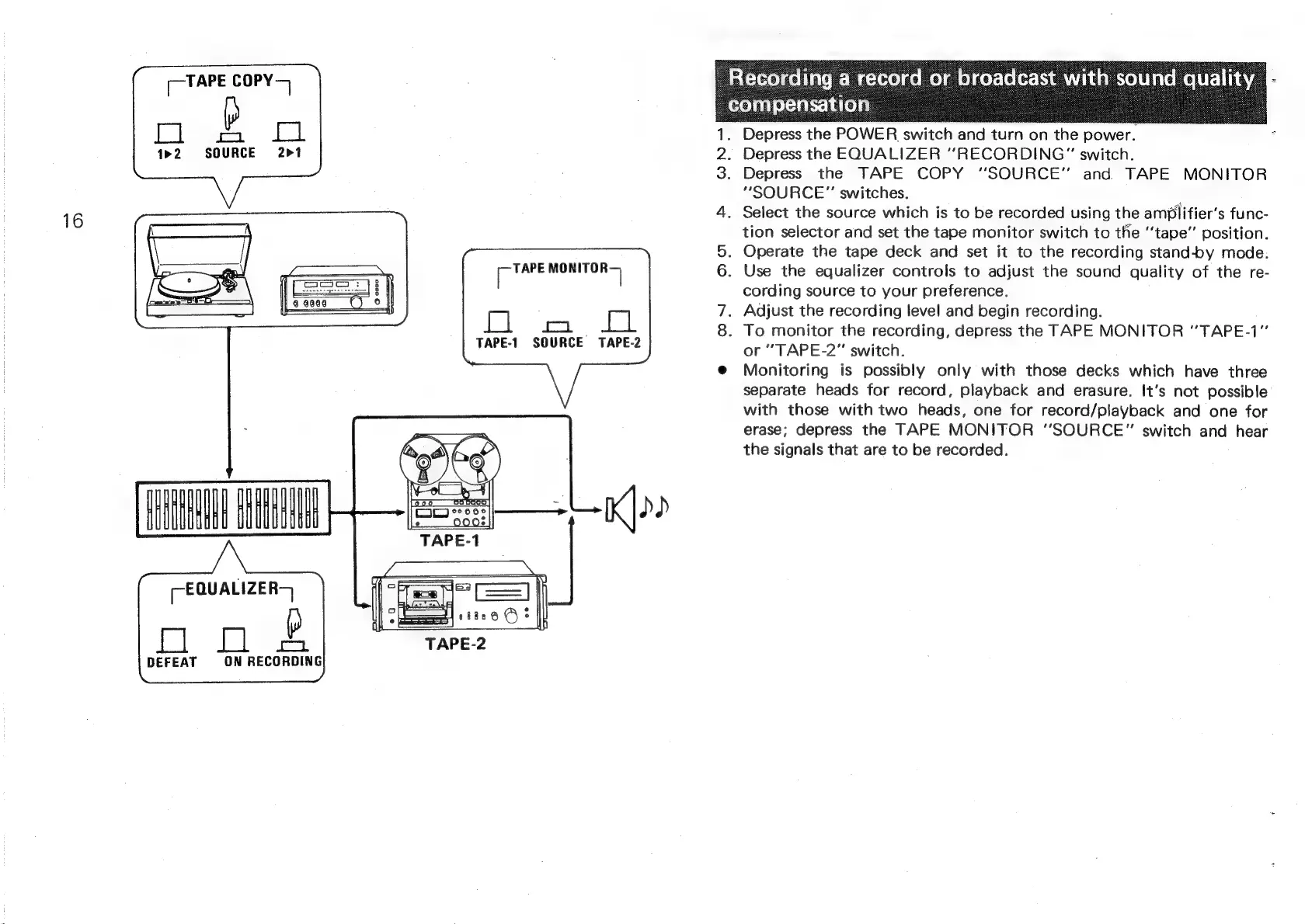
1.
Depress
the
POWER
switch
and
turn
on
the
power.
2.
Depress
the
EQUALIZER
“RECORDING”
switch.
3.
Depress
the
TAPE
COPY
“SOURCE”
and
TAPE
MONITOR
“SOURCE”
switches.
4.
Select
the
source
which
is
to
be
recorded
using
the
amplifier’s
func-
tion
selector
and
set
the
tape
monitor
switch
to
the
“‘tape’’
position.
5.
Operate
the
tape
deck
and
set
it
to
the
recording
stand-by
mode.
6.
Use
the
equalizer
controls
to
adjust
the
sound
quality
of
the
re-
cording
source
to
your
preference.
7.
Adjust
the
recording
level
and
begin
recording.
8.
To
monitor
the
recording,
depress
the
TAPE
MONITOR
“'TAPE-1”
or
“TAPE-2”
switch.
@
Monitoring
is
possibly
only
with
those
decks
which
have
three
separate
heads
for
record,
playback
and
erasure.
It’s
not
possible
with
those
with
two
heads,
one
for
record/playback
and
one
for
erase;
depress
the
TAPE
MONITOR
“SOURCE”
switch
and
hear
the
signals
that
are
to
be
recorded.
TAPE
MONITOR
[
|
Tel.
aeas
*
lel
TAPE-1
SOURCE
TAPE-2
K|>0
-EQUALIZER-
of
DEFEAT
ON
RECORDING