EasyManua.ls Logo

Sansui SE-7 - Page 18

Sansui SE-7
22 pages
Print Icon
To Next Page IconTo Next Page
To Previous Page IconTo Previous Page
Loading...
p
EQUALIZER
p
f=1
ON
RECORDING
p
TAPE
ag
foo
‘1>2
SOURCE
2>1
east
dire
ie
TAPE-1
SOURCE
TAPE-2
DEFEAT
18
EQUALIZER
[
|
—TAPE
copy
ee
TAPE
MONITOR
[
|
t]
DEFEAT
IT
TAPE-1
SOURCE
TAPE-2
1
1>2
SOURCE-
2>1
ON
RECORDING
EQUALIZER
["
|
£
DEFEAT
ON
RECORDING
SAO!
=
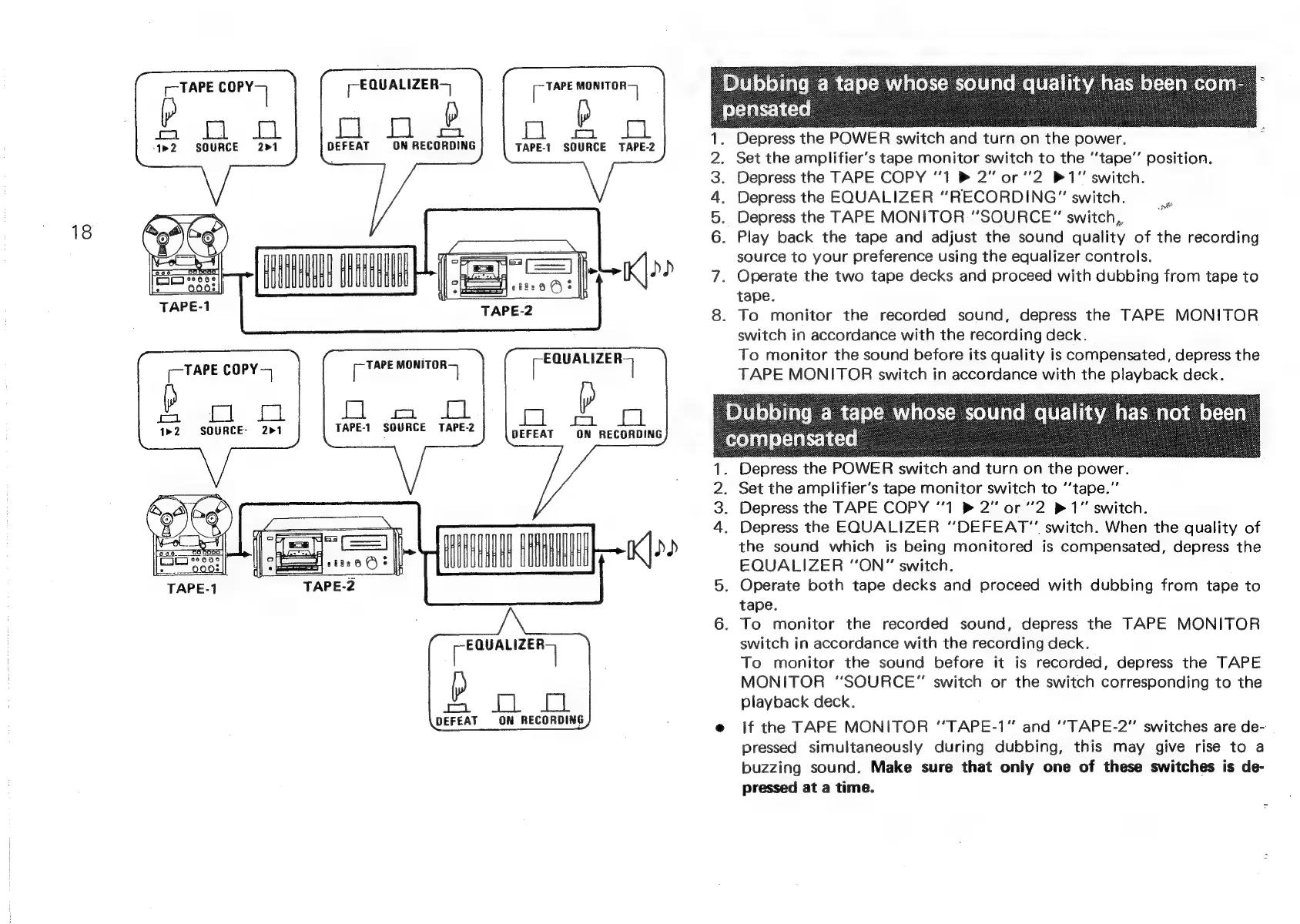
‘Depress
the
POWER
switch
and
turn
on
the
power.
PONS
Depress
the
POWER
switch
and
turn
on
the
power.
Set
the
amplifier’s
tape
monitor
switch
to
the
‘‘tape”’
position.
Depress
the
TAPE
COPY
“1
®
2”
or
"2
P11"
switch.
Depress
the
EQUALIZER
“RECORDING”
switch.
Depress
the
TAPE
MONITOR
“SOURCE”
switch,
pi?
.
Play
back
the
tape
and
adjust
the
sound
quality
of
the
recording
source
to
your
preference
using
the
equalizer
controls.
Operate
the
two
tape
decks
and
proceed
with
dubbing
from
tape
to
tape.
To
monitor
the
recorded
sound,
depress
the
TAPE
MONITOR
switch
in
accordance
with
the
recording
deck.
To
monitor
the
sound
before
its
quality
is
compensated,
depress
the
TAPE
MONITOR
switch
in
accordance
with
the
playback
deck.
Set
the
amplifier’s
tape
monitor
switch
to
‘‘tape.”
Depress
the
TAPE
COPY
‘1
2”
or
"2
1"
switch.
Depress
the
EQUALIZER
“DEFEAT”
switch.
When
the
quality
of
the
sound
which
is
being
monitored
is
compensated,
depress
the
EQUALIZER
“‘ON”
switch.
Operate
both
tape
decks
and
proceed
with
dubbing
from
tape
to
tape.
To
monitor
the
recorded
sound,
depress
the
TAPE
MONITOR
switch
in
accordance
with
the
recording
deck.
To
monitor
the
sound
before
it
is
recorded,
depress
the
TAPE
MONITOR
“SOURCE”
switch
or
the
switch
corresponding
to
the
playback
deck.
if
the
TAPE
MONITOR
“TAPE-1"
and
‘‘TAPE-2”
switches
are
de-
pressed
simultaneously
during
dubbing,
this
may
give
rise
to
a
buzzing
sound.
Make
sure
that
only
one
of
these
switches
is
de-
pressed
at
a
time.