EasyManua.ls Logo

Sansui SR-929 - Page 26

Sansui SR-929
36 pages
Print Icon
To Next Page IconTo Next Page
To Previous Page IconTo Previous Page
Loading...
24
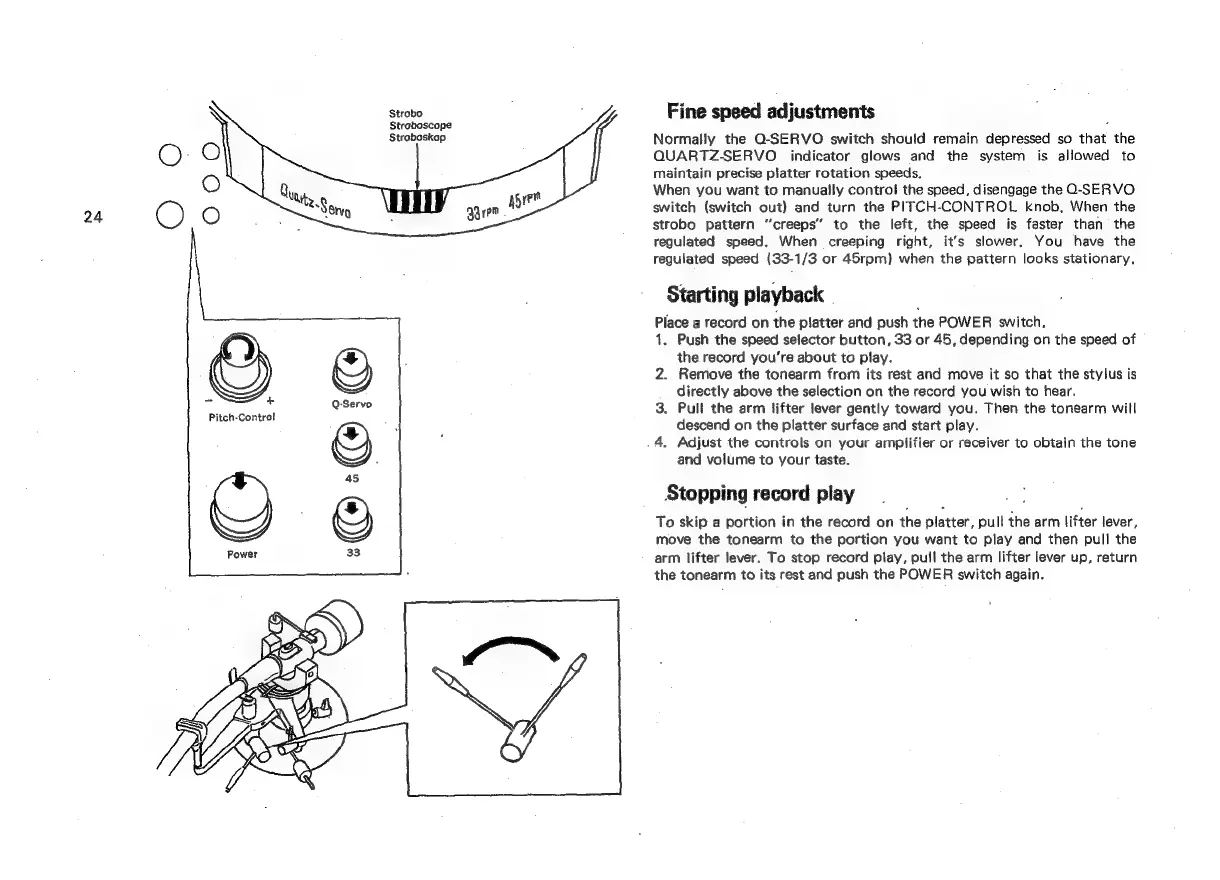
Pitch-Control
Strobo
Straboscope
Straboskop
Fine
speed
adjustments
Normally
the
O-SERVO
switch
should
remain
depressed
so
that
the
QUARTZ-SERVO
indicator
glows
and
the
system
is
allowed
to
maintain
precise
platter
rotation
speeds.
When
you
want
to
manually
control
the
speed,
disengage
the
O-SERVO
switch
(switch
out)
and
turn
the
PITCH-CONTROL
knob,
When
the
strobo
pattern
“creeps”
to
the
left,
the
speed
is
faster
than
the
regulated
speed.
When
creeping
right,
it’s
slower.
You
have
the
regulated
speed
(33-1/3
or
45rpm)
when
the
pattern
looks
stationary,
Starting
playback
Place
a
record
on
the
platter
and
push
the
POWER
switch.
1.
Push
the
speed
selector
button,
33
or
45,
depending
on
the
speed
of
the
record
you’re
about
to
play.
2.
Remove
the
tonearm
from
its
rest
and
move
it
so
that
the
stylus
is
directly
above
the
selection
on
the
record
you
wish
to
hear.
3.
Pull
the
arm
lifter
lever
gently
toward
you.
Then
the
tonearm
will
descend
on
the
platter
surface
and
start
play.
4.
Adjust
the
controls
on
your
amplifier
or
receiver
to
obtain
the
tone
and
volume
to
your
taste.
Stopping
record
play
To
skip
a
portion
in
the
record
on
the
platter,
pull
the
arm
|ifter
lever,
move
the
tonearm
to
the
portion
you
want
to
play
and
then
pull
the
arm
lifter
lever.
To
stop
record
play,
pull
the
arm
lifter
lever
up,
return
the
tonearm
to
its
rest
and
push
the
POWER
switch
again.

Related product manuals