6901-172002 <01>
6
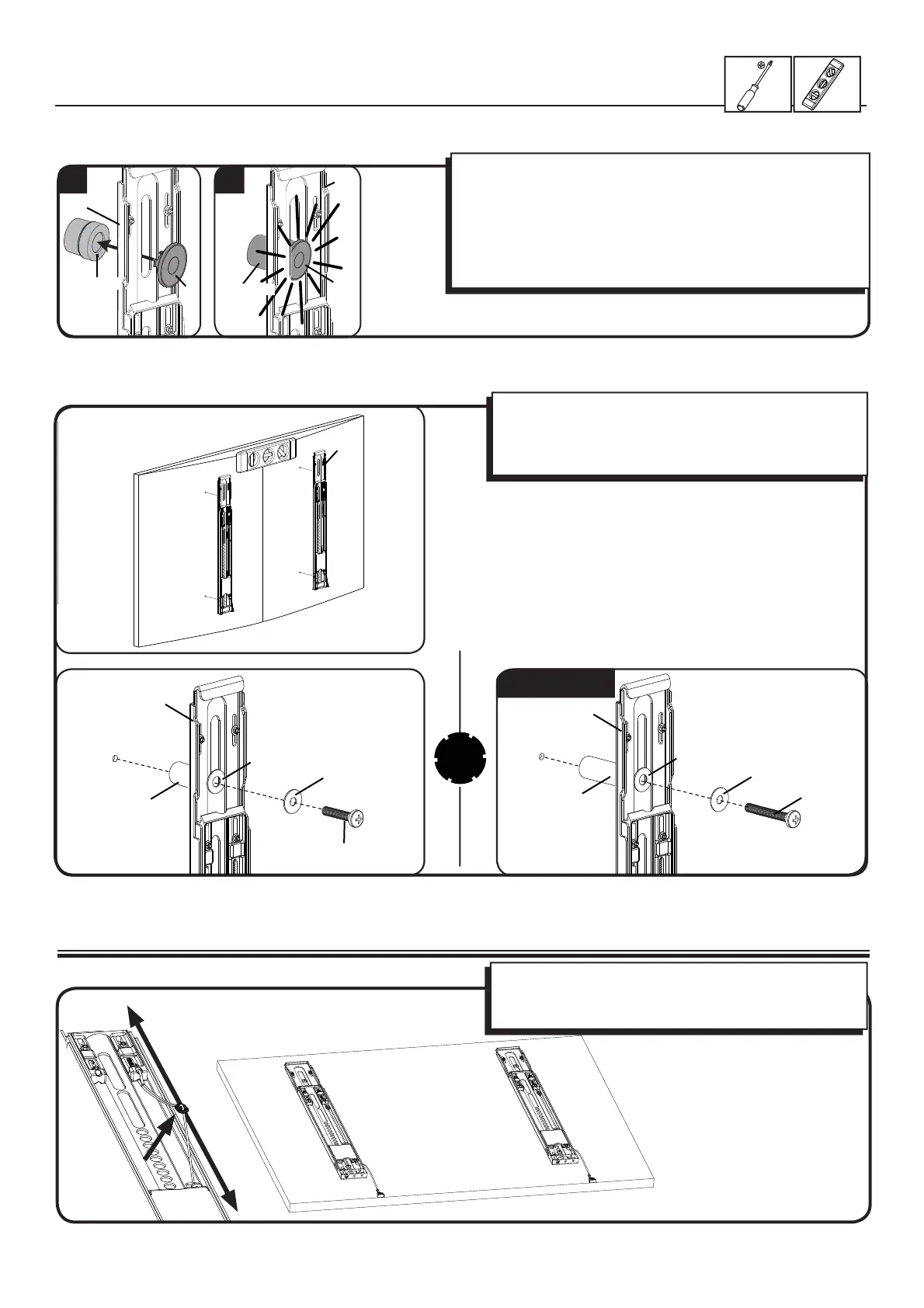
1-2 Attach brackets to a TV with an irregular back
2 Adjust Cord Length
To adjust cord length, gently pull the cord away from the
brackets.
For ease of access, cords should be level with bottom of TV.
M6/M8 ONLY!
Con rm that the brackets are level on the back of the TV.
Standard con gurations are shown. For special applications,
or if you are uncertain about your hardware selection, contact
Customer Service.
[02]
[21]
[21]
[22, 23]
[24]
[19, 20]
[20]
[08, 09, 11, 12, 14, 17]
[02]
[15, 18]
[22, 23, 24]
[21]
1 2
[02]
[02]
[21]
[22, 23, 24]
1. Push the shoulder washer [21] through the appropriate openings
of the brackets [02].
2. Snap shoulder washer [21] into the spacer you selected in step
1-1.
If your TV has a curved or obstructed back, or if you need more room
to accommodate cables, recesses, or protrusions, use either the
14mm, 24mm, or 38mm spacer [22, 23, or 24].
[02]


 To Next Page