18
TV Adjustments
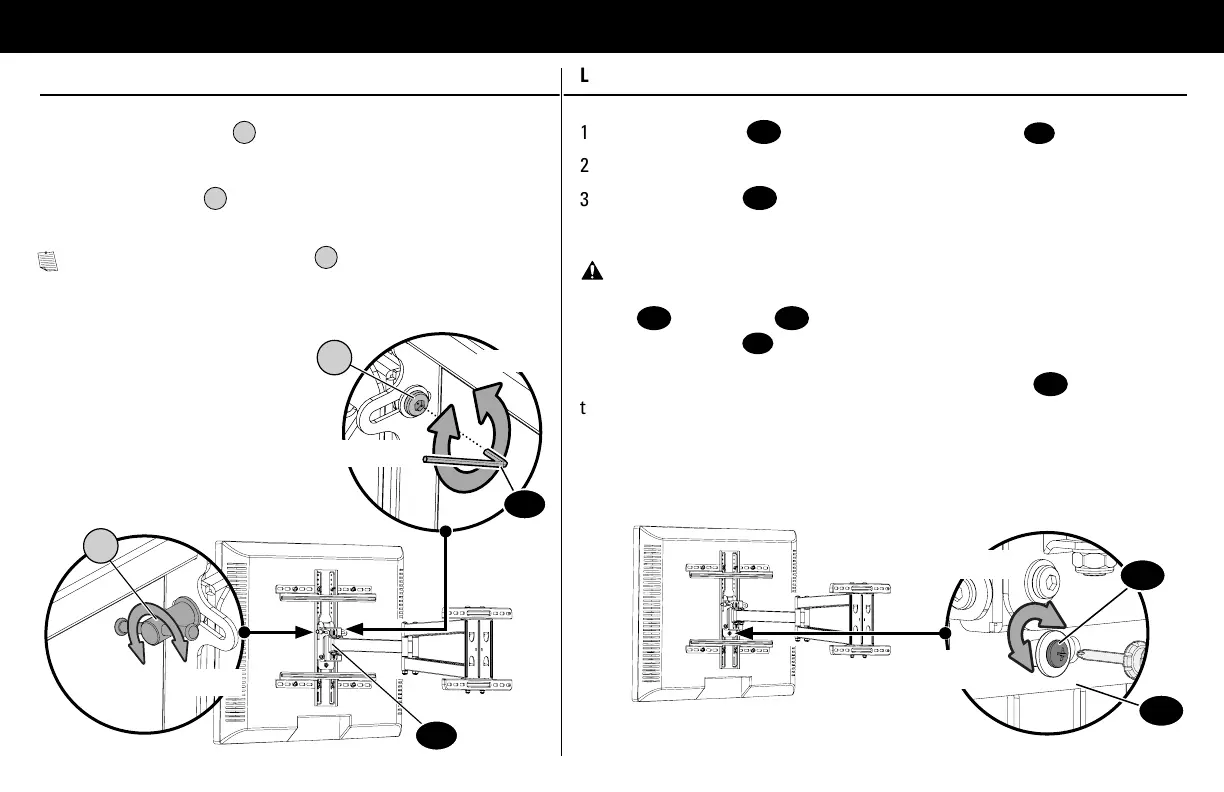
TILT LEVEL
1. Loosen the tilt lever
T
.
2. Adjust the TV tilt position.
3. Tighten tilt lever
T
to secure the TV in place
at your desired tilt angle.
NOTE: If needed, tighten screw
T2
for
additional tilt tensioning.
T2
T
Tighten
Tighten
Loosen
Loosen
1. Loosen the screw
12
on the rear of wall plate assembly
08
.
2. Level your TV.
3. Retighten screw
12
to secure in place.
Tighten
Loosen
14
08
08
12
CAUTION! Avoid potential personal injuries and property damage!
Screw
12
and washer
13
must be installed to secure your TV onto the
wall plate assembly
08
.
DO NOT use power tools for this step. Tighten the screw
12
only enough
to secure the TV.


 To Next Page