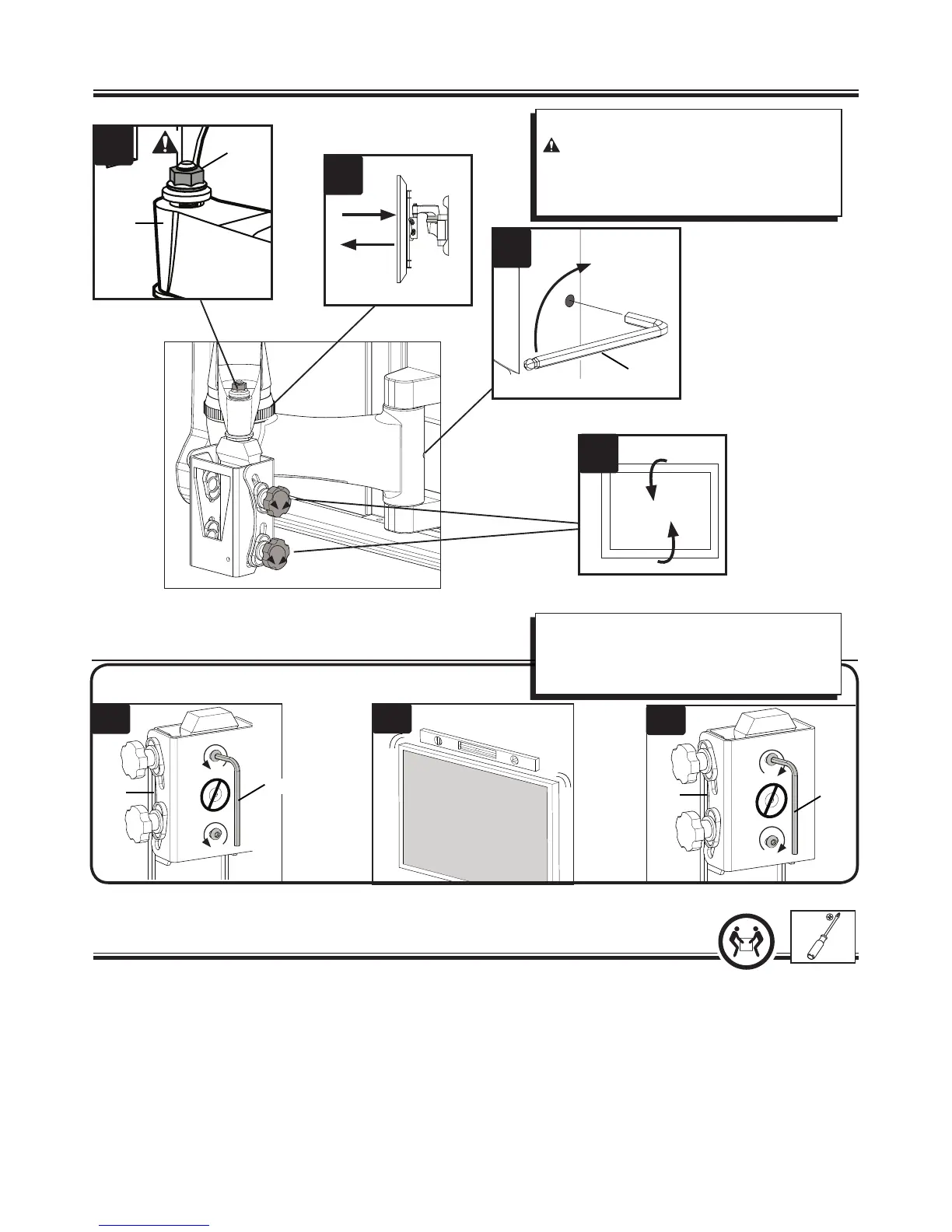
1. Adjust left / right swivel tension.
CAUTION: Never remove the tension nut (A).
Be sure threads are visible above the nut.
2. Adjust arm extend / retract tension.
3. Adjust up / down tilt tension.
1
3
2
2
B
A
C
6-1
(A)
Adjust level.
A. Loosen screws
B. Adjust level
C. Re-tighten screws
To remove the TV: (See illustrations in step 4.)
1. Unscrew the locking screw [13].
2. Push and hold the locking tab (L).
3. Carefully lift the TV from the arm [03], then release the locking tab (L).
TV will not hold the downward tilt position and floats upward:
1. Adjust tilt tension setting (see step 6).
2. If the problem persists, use a bracket installation option that uses longer spacers (see step 1-2).
TV will not hold the home position and floats downward:
1. Adjust tilt tension setting (see step 6).
2. If the problem persists, use a bracket installation option that uses shorter spacers (see step 1-2).


 To Next Page